


GWT OAuth and LinkedIn APIs
 When I worked at LinkedIn last year, I received a lot of inquiries from friends and developers about LinkedIn's APIs. After a while, I started sending the following canned response:
For API access to build LinkedIn features into your application, fill
out the following form:
http://www.linkedin.com/static?key=developers_apis
For requests to build an application, go to:
http://www.linkedin.com/static?key=developers_opensocial
I talked with the API team and they did say they look at every request that's sent via these forms. They don't respond to all of them b/c they know that many people would be angry if they told them "no", so they'd rather not have that headache.
Yesterday, I was pumped to see that they've finally decided to open up their API to Developers.
Starting today, developers worldwide can integrate LinkedIn into their business applications and Web sites. Developer.linkedin.com is now live and open for business.
First of all, congratulations to the API team on finally making this happen! I know it's no small feat. Secondly, it's great to see them using Jive SBS for their API documentation and developer community. My current client uses this to facilitate development and I love how it integrates a wiki, JIRA, FishEye, Crucible and Bamboo into one central jumping off point.
I've always been a fan of LinkedIn, ever since I joined way back in May 2003. However, I've longed for a way to access my data. LinkedIn Widgets are nice, but there's something to be said for the full power of an API. Last night, I sat down for a couple hours and enhanced my Implementing OAuth with GWT example to support LinkedIn's API.
I'm happy to report my experiment was a success and you can download GWT OAuth 1.2 or view it online. For now, I'm simply authenticating with OAuth and accessing the Profile API.
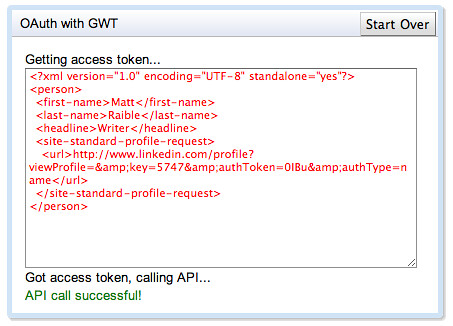
In the process, I learned a couple things:
- LinkedIn's OAuth implementation returns an oauth_verifier parameter after authenticating, whereas Google and Twitter do not. This parameter needs to be included when calling the Access token path.
- The Profile API example I implemented gets the current user's profile with http://api.linkedin.com/v1/people/~. This returns a "light" version of your profile. To get a more detailed version, you need to use Field Selectors. For example: http://api.linkedin.com/v1/people/~:(id,first-name,last-name,picture-url,headline,summary,positions,educations)
- LinkedIn's API only supports passing OAuth parameters in a header, rather than query parameters. To make this work, I modified my ProxyServlet to convert query parameters to an "Authorization" header at the end of the setProxyRequestHeaders() method.
// For LinkedIn's OAuth API, convert request parameters to an AuthorizationHeader
if (httpServletRequest.getRequestURL().toString().contains("linkedin-api")) {
    String[] parameters = httpServletRequest.getQueryString().split("&");
    StringBuilder sb = new StringBuilder("OAuth realm=\"http://api.linkedin.com/\",");
    for (int i = 0; i < parameters.length; i++) {
        sb.append(parameters[i]);
        if (i < parameters.length - 1) {
            sb.append(",");
        }
    }

    Header authorization = new Header("Authorization", sb.toString());
    httpMethodProxyRequest.setRequestHeader(authorization);
}
You might recall that my previous example had issues authenticating with Google, but worked well with Twitter. LinkedIn's authentication seems to work flawlessly. This leads me to believe that Twitter and LinkedIn have a much more mature OAuth implementation than Google.
Related OAuth News: Apache Roller 5 will be shipping with OAuth support. See Dave Johnson's What's New in Roller 5 presentation for more information.
Update December 6, 2009: I modified the gwt-oauth project to use GWT 1.7.1 and changed to the Maven GWT Plugin from Codehaus. Download GWT OAuth 1.3 or view it online.