
Pro JSP gets 10 Horseshoes!
Gregg Bolinger has reviewed Pro JSP and gives it 10 horseshoes! Very nice - thanks Gregg! The book from which AppFuse was born...
 The Angular Mini-Book is a
guide to getting started with Angular. You'll learn how to develop a bare-bones application, test it, and
deploy it. Then you'll move on to adding Bootstrap, Angular Material, continuous integration, and authentication.
The Angular Mini-Book is a
guide to getting started with Angular. You'll learn how to develop a bare-bones application, test it, and
deploy it. Then you'll move on to adding Bootstrap, Angular Material, continuous integration, and authentication.
Spring Boot is a popular framework for building REST APIs. You'll learn how to integrate Angular with Spring Boot and use security best practices like HTTPS and a content security policy.
For book updates, follow @angular_book on Twitter.
 The JHipster Mini-Book is a
guide to getting started with hip technologies today: Angular, Bootstrap, and Spring
Boot. All of these frameworks are wrapped up in an easy-to-use project called JHipster.
The JHipster Mini-Book is a
guide to getting started with hip technologies today: Angular, Bootstrap, and Spring
Boot. All of these frameworks are wrapped up in an easy-to-use project called JHipster.
This book shows you how to build an app with JHipster, and guides you through the plethora of tools, techniques and options you can use. Furthermore, it explains the UI and API building blocks so you understand the underpinnings of your great application.
For book updates, follow @jhipster-book on Twitter.
Gregg Bolinger has reviewed Pro JSP and gives it 10 horseshoes! Very nice - thanks Gregg! The book from which AppFuse was born...
This is a continuing series on what I'm doing to make AppFuse a better application in Winter/Spring 2004. Previous titles include: Changing the Directory Structure , Spring Integration and Remember Me refactorings.
- - - -
On my last project, we ported an existing JSP/Servlet/JDBC app to use JSP/Struts/iBATIS. In the process, I got to learn a lot about iBATIS and grew to love the framework (although I prefer to spell it iBatis). It was super easy to port the existing JDBC-based application because all of the SQL was already written (in PreparedStatements). Don't get me wrong, I think Hibernate is the better O/R Framework of the two, but iBATIS works great for existing databases. The best part is that iBATIS is just as easy to code as Hibernate is. For example, here's how to retrieve an object with Spring/Hibernate:
List users =
|
And with Spring/iBATIS, it requires a similar amount of Java code:
List users = getSqlMapTemplate().executeQueryForList("getUser", user);
|
The main difference between the two is that iBATIS uses SQL and Hibernate uses a mapping file. Here's the "getUser" mapped statement for iBATIS:
  <mapped-statement name="getUser" result-class="org.appfuse.model.User">
      SELECT * FROM app_user WHERE username=#username#;
  </mapped-statement>
Spring makes it super easy to configure your DAOs to use either Hibernate or iBATIS. For Hibernate DAOs, you
can simply extend HibernateDaoSupport and for iBATIS DAOs you can extend SqlMapDaoSupport.
Now to the point of this post: How I replaced Hibernate with iBATIS. The first thing I had to do was write the XML/SQL mapping files for iBATIS. This was actually the hardest part - once I got the SQL statements right, everything worked. One major difference between iBATIS and Hibernate was I had to manually fetch children and manually create primary keys. For primary key generation, I took a very simple approach: doing a max(id) on the table's id and then adding 1. I suppose I could also use the RandomGUID generator - but I prefer Longs for primary keys. Hibernate is pretty slick because it allows easy mapping to children and built-in generation of primary keys. The ability to generate the mapping file with XDoclet is also a huge plus.
As far as integrating iBATIS into AppFuse, I created an installer in contrib/ibatis. If you navigate to this directory (from the command line), you can execute any of the following targets with Ant. It might not be the most robust installer (it'll create duplicates if run twice), but it seems to work good enough.
                install: installs iBatis into AppFuse
              uninstall: uninstalls iBatis from AppFuse
    uninstall-hibernate: uninstalls Hibernate from AppFuse

                   help: Print this help text.
All of these targets simply parse lib.properties, build.xml and properties.xml to add/delete iBATIS stuff or delete Hibernate stuff. They also install/remove JARs and source .java and .sql files. If you're going to run this installer, I recommend running "ant install uninstall-hibernate". Of course, you can also simply "install" it and then change the dao.type in properties.xml. This will allow you to use both Hibernate and iBATIS DAOs side-by-side. To use both Hibernate and iBATIS in an application, you could create an applicationContext-hibatis.xml file in src/dao/org/appfuse/persistence and change the dao.type to be hibatis (like that nickname ;-). In this file, you'd have to then define your transactionManager and sqlMap/sessionFactory. I tested this and it works pretty slick. Click here to see my applicationContext-hibatis.xml file.
Some things I noticed in the process of developing this:
Hibernate is still the right decision for me, but it's cool that iBATIS is an option. Even cooler is the fact that you can mix and match Hibernate and iBATIS DAOs.
Download or read the (rather long) set of release notes. The good thing is that all tests pass with AppFuse - so that seems like a good release to me! You can also read a condensed version of the release notes.
Tonight's Denver JUG should be good. The basic concepts meeting is on Hibernate and the main show is on Jabber: XMPP and Jabber Streaming Objects library. Nice! It's snowing like the dickens right now so getting there might be tough. Good thing I live close to downtown! The meeting is actually located in the same building where Julie works.
Update: Tonight's meeting was pretty good, but kinda boring. I didn't learn anything new in the
Hibernate session - but I did see Chris do a lot of stuff via command line (vs. Ant). I do everything in Ant, so
I was again able to see the beauty of Ant and Hibernate's <schemaexport> task.
The Jabber talk was interesting but dry - probably because Peter and Matt didn't
have a presentation or agenda for the meeting. Rather, they just stood up and talked about Jabber and its
XMPP Protocol. From what
they said, Jabber's streaming XML protocol is being used for a lot of things besides Instant Messaging. It's biggest feature seems
to be presence - the ability to know when someone (or something) is online. For using Jabber in your
Java applications, you might want to look at Matt's JSO Project. While
I'm at it, I might as well mention my article describing how to setup a Jabber Server.
|
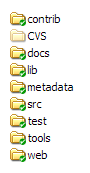
Now that I'm starting to add extensions to AppFuse, where should I put them in the source tree? I followed the Jakarta convention and put the ibatis install in the contrib folder, but I don't know if that's the best place for it. All the tools folder has in it is Erik Hatcher's StrutsGen tool - maybe that's a good place for all the extensions (ibatis, spring, webwork, tapestry)? Whaddya think? Where do you put extensions in your source tree? |
AppFuse is in an interesting state right now. In order for me to easily switch to using iBatis for the DAO layer, I left all the Hibernate stuff intact and just added iBatis classes and JARs. The next step is to extract the iBatis stuff into a separate CVS module and write a build.xml file to replace the Hibernate implementation with iBatis.
The one thing that will suck, in the iBatis version, is that the database can't be dynamically created from POJOs. However, if you're going to use the iBatis implementation, its likely that the database (or SQL) already exists. The reason I'm writing this post is because right now, in CVS, you can change the dao.type property to "ibatis" or "hibernate" when building and Voila! - that's the implementation you'll get. I see no reason why any project would ever want to have both implementations (maintenance would be a nightmare), so that's why I'm extracting the iBatis stuff in the next few days.
This is a continuing series on what I'm doing to make AppFuse a better application in Winter/Spring 2004. Previous titles include: Changing the Directory Structure and Spring Integration.
- - - -
AppFuse includes a Remember Me feature that works with Container-Managed Authentication. In version 1.3 it works by setting a few cookies: username, password and rememberMe. The last one being a simple flag that the user wants to be remembered. Then a LoginFilter checks for the rememberMe cookie, and if present, logs in the user using the other cookie values. The obvious issue with this is that the password being sent and stored on the user's browser.
This was easily solved in Tomcat 4 by placing the form-login-page and form-error-page under a "security" directory and then setting cookies on the /appfuse/security path. This way, since no other part of the app can access /appfuse/security, these cookies can never be retrieved in any part of the application. The problem is that this didn't work in Tomcat 5 since it forwards to the login page (rather than redirecting). Since forwarding is obviously a better solution (user's can't bookmark the login page), I needed a new way to implement the Remember Me feature.
To my knowledge, cookies can only be stolen if someone is able to login to your AppFuse app and insert JavaScript to send the "document.cookie" value to an external URL. So for AppFuse, it's likely that stealing cookies is not much of an issue. However, for applications like Roller, it is an issue - since other bloggers on the same server (i.e. JRoller) could put JavaScript on their blog to grab cookies from other users.
Just as I was about to give up searching for solutions, along came
Charle's persistent cookie strategy. Here's
how I implemented it in AppFuse. Hopefully it follows all the rules and is a good solution. Here's what I did make it happen.
- - - -
Step 1: Setting the cookie.
Scenario: A user logs in and selects the "Remember Me" checkbox.
What Happens: When a user clicks the Login button, they submit to a LoginServlet that redirects them to "j_security_check" to take
advantage of Container-Managed Authentication. This servlet is responsible for ensuring an SSL Login (if enabled), encrypting the
user's password (if enabled) and also sets a session variable to indicate the user wants to be remembered. After authenticating, the user
will hit the ActionFilter, where the following code sits:
// if user wants to be remembered, create a remember me cookie
|
In the above code snippet, the UserManager.createLoginCookie(username) method is responsible for creating a new cookie string and storing this information in the database.
public String createLoginCookie(String username) throws Exception {
|
The RandomGUID is a class I found on Java Exchange. Once the rememberMe cookie was set, I had to
configure LoginFilter.java (mapped to form-login-page and form-error-page) to look for this cookie. This brings us to Step 2.
- - - -
Step 2: Using the cookie to login the user.
Scenario: A User has already logged in successfully with "Remember Me" enabled.
What Happens: When the login page is served up to the user, the LoginFilter is invoked and it checks the validity of the "Remember Me" cookie.
Cookie c = RequestUtil.getCookie(request, Constants.LOGIN_COOKIE);
|
The UserManager.checkLoginCookie(value) method looks up a record based on the random GUID, and if it finds a match, it creates a new GUID and saves it in the database. If null is returned, it means the cookieId doesn't exist, and the login proceeds as it normally would. Below is the guts of the checkLoginCookie() method.
public String checkLoginCookie(String value) throws Exception {
|
You can see from this, that if the lookup succeeds - a new cookieId is saved and returned. If a not-null cookieId is returned, the remember me cookie is updated, the user is looked up and the Filter forwards an authentication request (with username/password) to the LoginServlet. The Filter also sets an attribute to let the application know that this user authenticated via cookies. This is important so that cookie-authenticated users cannot change passwords. When using cookie-authentication, the password field is hidden and a message warns the user that they must logout/login to change passwords.
Lastly, I had to come up with a solution to remove these login cookies.
- - - -
Step 3: Allow the user to clear their login cookies.
Scenario: A User has already logged in successfully with "Remember Me" enabled.
What Happens: For this, I implemented a simple solution. When a user logs out, all persistent login cookies are removed.
I don't know if it's best to divulge the details of AppFuse's cookie login strategy. However - it *is* open source - so folks can find figure it out if they really want to. By exposing it to the world, I hope to get the most robust solution possible.
Next up, how I replaced Hibernate with iBatis. Using Spring, it only took me a few hours! Pretty slick, eh? ;-)
 While leaving a comment on my ActionForms: Struts' bastard child post, Erik Hatcher sounds like a broken record:
> When are you going to just quit asking questions and try out Tapestry?
> You can build it from CVS HEAD easily or just grab a 3.0 binary (currently
> beta, but way stable). Drop in the WorkBench WAR file and see for yourself.
So I took 5 minutes and downloaded and deployed the WorkBench WAR. Check it out if you like. Looks pretty nice to me. The DatePicker is pretty cool, but it shows up in the wrong spot on Firefox - and it's annoying that I can't close it just by clicking on the screen somewhere (like most popup calendars). Also the Chart doesn't work on my Linux box (it worked fine on Windows).
However, if you're looking for something like the DisplayTag, Tapesty has that. The URLs it constructs for everything look a little ridiculous though. I wonder if a Filter with smarts could pretty those up?
Google Ads are a good thing - it looks like they'll be covering my hosting/bandwidth costs. Sweet!
I downloaded Mozilla Firefox (formerly known as Mozilla Firebird) for my Mac this morning and I'm definitely not impressed. I can't change the fonts and there's no scrollbar when I visit any sites. What a CF. As for Windows, I can't even download the installer. Too bad - this release had real potential.
