Matt RaibleMatt Raible is a writer with a passion for software. Connect with him on LinkedIn.

The Angular Mini-Book The Angular Mini-Book is a guide to getting started with Angular. You'll learn how to develop a bare-bones application, test it, and deploy it. Then you'll move on to adding Bootstrap, Angular Material, continuous integration, and authentication.

Spring Boot is a popular framework for building REST APIs. You'll learn how to integrate Angular with Spring Boot and use security best practices like HTTPS and a content security policy.

For book updates, follow @angular_book on Twitter.

The JHipster Mini-Book The JHipster Mini-Book is a guide to getting started with hip technologies today: Angular, Bootstrap, and Spring Boot. All of these frameworks are wrapped up in an easy-to-use project called JHipster.

This book shows you how to build an app with JHipster, and guides you through the plethora of tools, techniques and options you can use. Furthermore, it explains the UI and API building blocks so you understand the underpinnings of your great application.

For book updates, follow @jhipster-book on Twitter.

10+ YEARS


Over 10 years ago, I wrote my first blog post. Since then, I've authored books, had kids, traveled the world, found Trish and blogged about it all.

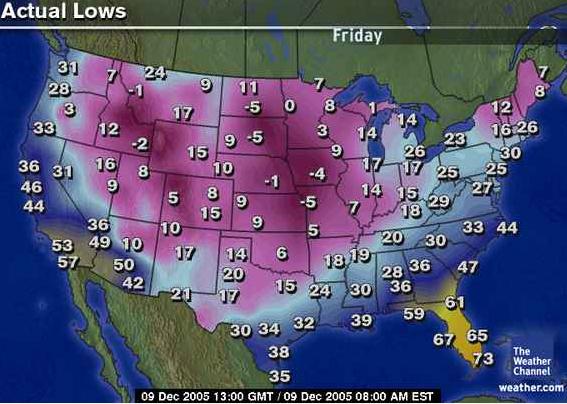
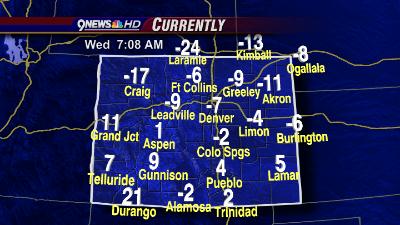
Brrrrrrrrr

Good thing I'm heading to Florida today.

Weather in Denver: 12/7/2005

For those of you stuck in Denver this week: enjoy the weather! ;-)

Update: To see my notes from this evening's session, see The Spring Experience: Rod Johnson's opening Keynote.

Posted in General at Dec 07 2005, 07:19:37 AM MST 7 Comments

New AppFuse Documentation: Axis, Handling Complex POJOs and Korean Translation

A few AppFuse enthusiasts have been hard at work, writing new documentation and tutorials. First of all, Mika Göckel has written a HowTo implement Axis tutorial - complete with an installation package! I tried it out last night, and it works quite well with AppFuse 1.8.2. If you're using a build from CVS, you'll need to make some modifications because web.xml is no longer generated. Hopefully we can fix that and get this "extras" package into CVS this week.

The 2nd tutorial is titled Handling complex objects with XDoclet, Hibernate and Struts. This one is written by the AppFuse committer Thomas Gaudin. Thomas has now written 5 tutorials, all of which include source code and step-by-step instructions.

Last, but certainly not least, DongGuk Lee has translated a large amount of AppFuse's documentation to Korean. I'm amazed that the QuickStart Guide and Tutorials have now been translated to 6 Languages!

Thanks for the contributions everyone - you guys rock!

Posted in Java at Dec 05 2005, 08:53:21 AM MST 5 Comments

Quick Guide to Prototype

Ryan Campbell has put together a very nice Quick Guide to Prototype. In the past, I've used the Unofficial Prototype Documentation by Sergio Pereira. Ryan's guide is a good learn-it-quick reference, while Sergio's documentation makes a nice reference manual. Hat tip to the Ajaxian gents.

Posted in The Web at Dec 03 2005, 05:57:19 PM MST 3 Comments

Remotely debug your app in Eclipse

Levent Gurses has a nice blog entry on Remote Debugging with Eclipse. I was able to use his instructions a couple months ago to attach to a remote instance of WebLogic (8.1 SP4) to debug an application. The beauty of his instructions is I had it all working in about 5 minutes. Yesterday I realized you could use the settings in *any* application server, and remotely debug it - or at least you should be able to. Today I noticed he added instructions for Tomcat and JBoss. Good stuff - thanks Levent!

Here's the settings you need in your startup script - just in case Levent's blog is down the next time I need this info.

-Xdebug -Xrunjdwp:transport=dt_socket,server=y,suspend=n,address=1044

Posted in Java at Dec 02 2005, 11:04:19 AM MST 20 Comments

Sun's "free" tools

Want to know what I think about Sun giving away it's server and tools away for free? If so, check out this post on the Virtuas Blog. Yeah, that's blog #3 for me.

Posted in Java at Dec 02 2005, 08:46:33 AM MST 1 Comment

Skiing in Colorado - it's looking good this year

The last couple of weeks have been frustrating. Actually, it's really been the last couple of years. You see, I live in Denver, Colorado - a city that's close to some of the best skiing on the planet. Furthermore, skiing here is pretty cheap. Starting about 10 years ago, all the resorts reduced their "season pass" prices from thousands to hundreds. You can get a ski pass to Keystone, Breckenridge, A-Basin, Vail and Beavercreek (5 mountains!) for a mere 350 bucks.

When Julie first moved here, we were pretty regular skiiers. We both got passes and went skiing almost every weekend. In 1999-2000, I worked for a .com that had a "9-inch" rule, where we got to go skiing whenever it snowed more than 9 inches the night before. This happened to coincide with one of the best ski seasons ever, and we managed to ski an average of 3 days per week (including weekends). Needless to say, I went from being a decent "black skier" to skiing chutes and bumbs with ease.

Then the kids came. The first year it wasn't so bad. When Abbie was first born, I had my first book deal, and I started AppFuse - so I didn't notice the winter pass me by. That was the first year I didn't buy a pass in quite a few years. The next year, I made sure to buy a season pass and barely got my money's worth (only skiing 5 times). I bought one again last year, and still only made it up 4 times. This year I didn't buy one.

For the last 2 weeks, I've gotten a 9" snow report in my inbox almost every day! It is dumping in Colorado this year and looks to be one of the best ski seasons ever. This year I'm planning on taking Abbie up with me, and getting her started on the "slopes." The problem? Why haven't I been up there yet? Work - how bad does that suck? And it's not real work IMO. It's open source and conference preparation. Ugh.

I need to get in shape, I need to find a client with a 9" rule - and I need to get to the hills! Ahhh, the good ol' days. I miss 'em.

Vail

Note to self: mountain biking and skiing should have a higher priority than any of this career mumbo jumbo. ;-)

Posted in General at Dec 02 2005, 07:54:55 AM MST 6 Comments

Ant colored logging on Windows

In the past, I've had issues getting Ant's AnsiColorLogger to work on Windows with Cygwin. Thanks to a friend of mine, Steve DeRidder, I was finally able to figure out a working solution. Here's what you need to do if you're using Cygwin.

Install the "rxvt" component of Cygwin through its update tool. Once you've done that, there are two options for integration:

  • Right-click context menu: Download rxvt_reg.reg to your hard drive. Edit it with a text editor to point to your Cygwin installation and save it. Then right click on the file and "merge" it into your registry.
  • Shortcut: Create a new shortcut with the following command (all on one line, adjust your Cygwin path accordingly):
    C:\Tools\cygwin\bin\rxvt.exe -bg white -fg black -sr -sl 5000 -fn "Fixedsys" 
    -ls -e /usr/bin/bash --login -c "exec /bin/bash -rcfile ~/.bashrc"
    

Thanks for the tip Steve!

Posted in Java at Dec 01 2005, 06:19:51 PM MST Add a Comment

Free Forums from Nabble.com

Nabble seems like a pretty cool site:

Our forums are truly public, democratic and absolutely free. Nabble's advanced community filtering gives you only the best content without the need for moderation. Find forums that interest you or easily start your own in minutes.

I first found out about Nabble a few days ago when I started seeing messages on the AppFuse mailing with a from address of "sent by Nabble.com". I did some searching and found they have a set of AppFuse Forums. The cool thing about these forums is they're not only a set of mailing list archives, but they also allow you post to the mailing list. Nabble forums are similar to Jive Forums (like OpenSymphony has) - they keep the forums and the mailing lists in synch, which is pretty cool IMO.

I spoke (via e-mail) with Will Lin - one of the co-starters of the Nabble project. Here are a few things he had to say about Nabble:

The goal of Nabble is to do the discussion right, just like Google did the search right. There are many problems with the current forms of discussions in mailing lists, message boards, user groups etc. Most importantly, (1) the search, most forum search are broken, a lot of people use Google's site:archive.domain.com to search discussion archive - what a hack, because Google does not index all the messages especially the recent ones.

In the mailing list case, developers get mad because users post dumb questions repeatedly, but the users don't have a good way to search past discussions ... (2) moderation, most discussions rely on one or two strong moderator to resolve spam and flame wars, with Nabble, all the members can work togeter to rate up (promote) top contributors, and rate down (drive out) spam and trouble makers; (3) cataloging - similar topic discussions should be able to be combined for browsing and search.

One of the coolest features of Nabble is you can create your own forum, and skin it however you like. I've done this for AppFuse, and created an easy to remember alias at http://appfuse.org/forums. You can also check out the easily-searchable Roller Archives, as well as many other OS project's mailing list archives.

Posted in Java at Nov 30 2005, 10:20:07 PM MST 5 Comments

Equinox: the name conflicts with an Eclipse project

I just received the following e-mail from an anonymous user via my contact page.

You might have already heard, but the Eclipse guys have started a new 
project also called Equinox, which is their implementation of the OSGi 
framework (which is my first choice for building modular enterprise apps 
these days).

http://www.eclipse.org/equinox

Not sure who had the name first, but I can see this getting more 
confusing as both products continue to gain mindshare and blog coverage.

First of all, I am aware of this thanks to Euxx. I don't know which project started first, but Google still seems to prefer mine over Eclipse's. Eclipse's Equinox project is #46 when searching for equinox, while mine is up to #9. ;-)

If I could think of a better name, I'd change. However, being #9 on Google makes it pretty tempting to keep the "Equinox" name.

Posted in Java at Nov 29 2005, 12:07:51 PM MST 5 Comments

Edit Java webapps Redux: Jetty Launcher and Equinox

A few weeks ago, I realized I was developing webapps the hard way, by re-deploying everytime I made a change. It's important to have a build process that can create a WAR and deploy, but it's also important to have a system where you can edit/save/view changes w/o ever deploying.

I spent some time this weekend working with Jetty Launcher, Eclipse 3.1 and the latest version of Equinox. Below are instructions on how to make the two work together. Once you've completed the steps below, you should be able to launch Jetty and edit/save Java files or JSP files in Equinox - and the changes will show up immediately in your webapp. No deployment or Ant/Maven interaction necessary.

I've tested this setup on Eclipse 3.1, using both OS X and Windows XP.

Step 1: Install Jetty and Launcher

Download and install Jetty. I tested 5.1.4 and 5.1.6 and both seem to work (6.0.0 Beta does not). In Eclipse, go to Help » Software Updates » Find and Install. Select Search for new features to install and click Next. Click on the New Remote Site button and enter "Jetty Launcher" for the name and "http://jettylauncher.sourceforge.net/updates" for the URL. Click OK, continue to download and restart your workspace.

Step 2: Install Equinox and create Eclipse project files

Download Equinox 1.5 beta 1 and extract to your workspace (I generally use c:\Source on Windows and /Users/${username}/dev on OS X). Download Maven 2.0, install it, and add $M2_HOME/bin to your $PATH. From the command line, cd into the equinox directory and type "mvn eclipse:eclipse". Get a cup of coffee or soda while you wait for Maven to download all the dependencies.

Once the project files have been created, open Eclipse and go to File » New » Project » Java Project. Click Next and type "equinox" in the Project name box. Click Finish to begin importing the project. You'll probably get an error like the following. Click OK to continue.

Eclipse Error

Click Next to continue (I had to click it a few times before it took me to the next screen). On the next screen (Define the Java build settings), select the web directory and click Configure inclusion and exclusion filters. Click the Add button for Exclusion patterns and enter "WEB-INF/classes/" (the trailing slash is important).

You're not done yet, now you need to define the M2_REPO variable that points to all the downloaded dependencies. Click the Libraries tab and then the "Add Variable" button as seen below.

Eclipse Error

Click the Configure Variables button and add a new one with a name of M2_REPO and Path of to your local Maven repository (/Users/${username}/.m2/repository on OS X and C:\Documents and Settings\${username}\.m2\repository on Windows). Click OK, Cancel and then Finish.

Step 3: Configure Jetty Launcher for Equinox

In Eclipse, go to Run » Debug and select Jetty Web in the Configurations panel. Click the New button. In the "Use Options" section, use "web" for the webapp root and (optionally) "/equinox" for the context name.

Jetty has issues running applications that use commons-logging, so you'll need to turn off all the INFO logging from the projects that Equinox uses. To do this, click on the Arguments tab and add the following to the list of VM arguments:

-DDEBUG -DDEBUG_PATTERNS=org.appfuse -DDEBUG_VERBOSE=-1

This can be placed on the line below the -Djetty.home argument. For more information on logging in Jetty, see the Jetty logging and debugging tutorial.

Step 4: Start Jetty in debug mode and modify to your hearts content

Click Apply and then Debug, and watch Jetty startup. If you go to http://localhost:8080/equinox/users.html in your browser, you should see a log message like the following:

11:44:25.855 DEBUG  [SocketListener0-1] org.appfuse.web.UserController.handleRequest
(UserController.java:24) >29> entering 'handleRequest' method...

You should be able to click on "UserController.java:24" to navigate to the UserController.java class. In this class, modify the log.debug(...) message, save the file and hit refresh on your browser. The console should spit out your updated log message. If it didn't, go to Window » Preferences » Workspace and make sure Build automatically is checked.

As far as I can tell, edit/save/refresh will work for .java and .jsp files, but not for .xml files. For that, the Jetty Launcher adds a Stop/Restart Jetty icon to your Eclipse toolbar. This setup seems to work great, except for the fact that you can't see when Jetty is done starting up in the console.

NOTE: I tried to get a similar setup working with the Tomcat Eclipse Plugin (v3.1 beta) and the Eclipse Web Tools Project (v0.7.1). Neither worked as smoothly, and the WTP wouldn't even deploy to Tomcat.

Posted in Java at Nov 28 2005, 11:58:15 AM MST 8 Comments