Matt RaibleMatt Raible is a writer with a passion for software. Connect with him on LinkedIn.

The Angular Mini-Book The Angular Mini-Book is a guide to getting started with Angular. You'll learn how to develop a bare-bones application, test it, and deploy it. Then you'll move on to adding Bootstrap, Angular Material, continuous integration, and authentication.

Spring Boot is a popular framework for building REST APIs. You'll learn how to integrate Angular with Spring Boot and use security best practices like HTTPS and a content security policy.

For book updates, follow @angular_book on Twitter.

The JHipster Mini-Book The JHipster Mini-Book is a guide to getting started with hip technologies today: Angular, Bootstrap, and Spring Boot. All of these frameworks are wrapped up in an easy-to-use project called JHipster.

This book shows you how to build an app with JHipster, and guides you through the plethora of tools, techniques and options you can use. Furthermore, it explains the UI and API building blocks so you understand the underpinnings of your great application.

For book updates, follow @jhipster-book on Twitter.

10+ YEARS


Over 10 years ago, I wrote my first blog post. Since then, I've authored books, had kids, traveled the world, found Trish and blogged about it all.
You searched this site for "struts". 659 entries found.

You can also try this same search on Google.

RE: Oracle donates ADF Faces to Apache MyFaces

I read the news initially on the AMIS Technology blog, which points to the original news-breaker on the IT-eye Weblog. This is huge for the JSF community IMO. The main compelling feature behind component-based frameworks is components. Without components, there's not much point in them.

By christmas a website and mailing list will be available for the incubator project. You will also be able to download the source code. By New Year a subversion repository should be available with the source code. And the intention is to move out of incubator by JavaOne 2006, which I think is in May.

So why is Oracle doing this? Well it's obvious that Java needs to have a good component based framework to compete with .NET. And Oracle believes that JSF can be this Framework, but a good implementation is needed, which is what ADF Faces provides.

What does ADF Faces, or better Apache Faces Cherokee contain? More than 100 components, an Html AJAX renderkit (but it doesn't use HttpXmlRequest, but iframes), a dialog framework, personalization, skinning, and a lot more.

I wonder if Oracle has a solution for the "everything is a post" problem? ;-)

JSF is cool, and easy to be productive in, but so is Tapestry, WebWork and Spring MVC. I find it somewhat ironic that the Struts committers turned down Shale as Struts 2.0, but they voted in WebWork.

I think component-based frameworks might be the way of the future. However, after playing with OpenLaszlo for the past few weeks - I can't help but think that this is what component-based frameworks should be. Many components, easy to use, and the output is a rich-client out-of-the-box. In addition to the Flash output they have now, I've heard rumblings that OpenLaszlo may support other outputs in the future (i.e. XHTML/Ajax).

It's pretty cool to see continued excitement and innovation in Java. Competition is good, and will only make each of these frameworks stronger and easier to use.

Posted in Java at Dec 12 2005, 02:26:45 PM MST 8 Comments

New AppFuse Documentation: Axis, Handling Complex POJOs and Korean Translation

A few AppFuse enthusiasts have been hard at work, writing new documentation and tutorials. First of all, Mika Göckel has written a HowTo implement Axis tutorial - complete with an installation package! I tried it out last night, and it works quite well with AppFuse 1.8.2. If you're using a build from CVS, you'll need to make some modifications because web.xml is no longer generated. Hopefully we can fix that and get this "extras" package into CVS this week.

The 2nd tutorial is titled Handling complex objects with XDoclet, Hibernate and Struts. This one is written by the AppFuse committer Thomas Gaudin. Thomas has now written 5 tutorials, all of which include source code and step-by-step instructions.

Last, but certainly not least, DongGuk Lee has translated a large amount of AppFuse's documentation to Korean. I'm amazed that the QuickStart Guide and Tutorials have now been translated to 6 Languages!

Thanks for the contributions everyone - you guys rock!

Posted in Java at Dec 05 2005, 08:53:21 AM MST 5 Comments

Edit Java webapps Redux: Jetty Launcher and Equinox

A few weeks ago, I realized I was developing webapps the hard way, by re-deploying everytime I made a change. It's important to have a build process that can create a WAR and deploy, but it's also important to have a system where you can edit/save/view changes w/o ever deploying.

I spent some time this weekend working with Jetty Launcher, Eclipse 3.1 and the latest version of Equinox. Below are instructions on how to make the two work together. Once you've completed the steps below, you should be able to launch Jetty and edit/save Java files or JSP files in Equinox - and the changes will show up immediately in your webapp. No deployment or Ant/Maven interaction necessary.

I've tested this setup on Eclipse 3.1, using both OS X and Windows XP.

Step 1: Install Jetty and Launcher

Download and install Jetty. I tested 5.1.4 and 5.1.6 and both seem to work (6.0.0 Beta does not). In Eclipse, go to Help » Software Updates » Find and Install. Select Search for new features to install and click Next. Click on the New Remote Site button and enter "Jetty Launcher" for the name and "http://jettylauncher.sourceforge.net/updates" for the URL. Click OK, continue to download and restart your workspace.

Step 2: Install Equinox and create Eclipse project files

Download Equinox 1.5 beta 1 and extract to your workspace (I generally use c:\Source on Windows and /Users/${username}/dev on OS X). Download Maven 2.0, install it, and add $M2_HOME/bin to your $PATH. From the command line, cd into the equinox directory and type "mvn eclipse:eclipse". Get a cup of coffee or soda while you wait for Maven to download all the dependencies.

Once the project files have been created, open Eclipse and go to File » New » Project » Java Project. Click Next and type "equinox" in the Project name box. Click Finish to begin importing the project. You'll probably get an error like the following. Click OK to continue.
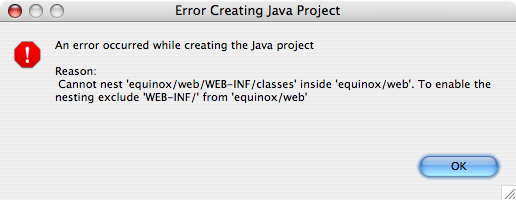
Eclipse Error

Click Next to continue (I had to click it a few times before it took me to the next screen). On the next screen (Define the Java build settings), select the web directory and click Configure inclusion and exclusion filters. Click the Add button for Exclusion patterns and enter "WEB-INF/classes/" (the trailing slash is important).

You're not done yet, now you need to define the M2_REPO variable that points to all the downloaded dependencies. Click the Libraries tab and then the "Add Variable" button as seen below.
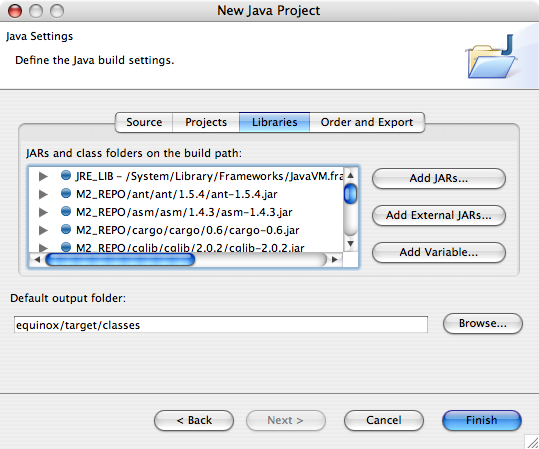
Eclipse Error

Click the Configure Variables button and add a new one with a name of M2_REPO and Path of to your local Maven repository (/Users/${username}/.m2/repository on OS X and C:\Documents and Settings\${username}\.m2\repository on Windows). Click OK, Cancel and then Finish.

Step 3: Configure Jetty Launcher for Equinox

In Eclipse, go to Run » Debug and select Jetty Web in the Configurations panel. Click the New button. In the "Use Options" section, use "web" for the webapp root and (optionally) "/equinox" for the context name.

Jetty has issues running applications that use commons-logging, so you'll need to turn off all the INFO logging from the projects that Equinox uses. To do this, click on the Arguments tab and add the following to the list of VM arguments:

-DDEBUG -DDEBUG_PATTERNS=org.appfuse -DDEBUG_VERBOSE=-1

This can be placed on the line below the -Djetty.home argument. For more information on logging in Jetty, see the Jetty logging and debugging tutorial.

Step 4: Start Jetty in debug mode and modify to your hearts content

Click Apply and then Debug, and watch Jetty startup. If you go to http://localhost:8080/equinox/users.html in your browser, you should see a log message like the following:

11:44:25.855 DEBUG  [SocketListener0-1] org.appfuse.web.UserController.handleRequest
(UserController.java:24) >29> entering 'handleRequest' method...

You should be able to click on "UserController.java:24" to navigate to the UserController.java class. In this class, modify the log.debug(...) message, save the file and hit refresh on your browser. The console should spit out your updated log message. If it didn't, go to Window » Preferences » Workspace and make sure Build automatically is checked.

As far as I can tell, edit/save/refresh will work for .java and .jsp files, but not for .xml files. For that, the Jetty Launcher adds a Stop/Restart Jetty icon to your Eclipse toolbar. This setup seems to work great, except for the fact that you can't see when Jetty is done starting up in the console.

NOTE: I tried to get a similar setup working with the Tomcat Eclipse Plugin (v3.1 beta) and the Eclipse Web Tools Project (v0.7.1). Neither worked as smoothly, and the WTP wouldn't even deploy to Tomcat.


Posted in Java at Nov 28 2005, 11:58:15 AM MST 8 Comments

RE: WebWork joins Struts

From the struts-dev mailing list:

Between the Clarity hubbub and the Java Web Alignment brouhaha, it came up that WebWork would like to merge with another framework. Ted and Don followed up with the two core WebWork developers, Patrick Lightbody and Jason Carreira. As it turns out, they are very interested in merging WebWork with Struts. An archive of our discussions is available as a Quick Topic thread.

As some of you know, the underlying idea behind Ti was to use WebWork as the core of Struts Action Framework 2.x. Conceptually, WebWork and Struts 1.x are very similar. We've often said, without embarrassment, that WebWork does many things better than Struts 1.x. Meanwhile, WebWork has the ability to provide a layer of almost full backwards-compatibility for Struts 1.x, and we have already demonstrated we can integrate Beehive's (very cool) Page Flow with WebWork.

Patrick Lightbody:

Yes, it's true. The WebWork development team (Jason and I) have been working with the Struts development team (Don Brown and Ted Husted) and have come to the conclusion that the best thing for Java community would be to merge WebWork in to Struts.

Read Ted's email here, but the gist of it is this: WebWork is a great technology, and Struts is a great community. It's a perfect match and bringing the two together will only be better for WebWork and Struts users alike. The only down side for me is that I'll be working less with OpenSymphony, but I believe that is a small price for all the great benefits that come from this merger.
...
With this renewed energy, larger development team, and larger community, the combined efforts of Struts and WebWork will surely make the Struts platform the easiest, fastest, and most powerful Java web framework available. We hope that all the WebWork users and developers are as excited about this as we are and are ready to take WebWork to the next level.

IMO, this is good for both Struts and WebWork. WebWork gets the additional marketing it needs, and Struts users get a kick-ass framework to develop with. If you're a Struts user and haven't tried WebWork, prepare to be impressed. I was and still am.

I plan to upgrade AppFuse and Equinox to WebWork 2.2 as soon as its released. Hopefully I'll be able to migrate both the Struts and WebWork versions to SAF 2.0 w/in a few months.

Posted in Java at Nov 27 2005, 04:18:55 PM MST 4 Comments

Equinox 1.5 Beta 1 Released

This release is mainly to test out dependency downloading using Maven 2's Ant tasks. In addition, a few bugs have been fixed, but there's quite a few more on the roadmap. I plan to fix all of these before releasing 1.5 in a couple weeks.

Please test out this release if you have a chance. One of the nice things about using Maven 2's Ant Tasks, is you can download Maven 2 and generate your Eclipse or IDEA (possibly even Netbeans) project files using "mvn eclipse:eclipse" or "mvn idea:idea". You can also use Maven 2 to build and test things if you like. The only thing that doesn't currently work with Maven is the web tests with Cargo. I can try to get those working if there's enough demand. For now, you'll have to use Ant if you want to test the UI.

The download is much smaller now - barely over 1MB vs. ~20MB for 1.4. Most of the size comes from the Maven 2 Ant Tasks - which is a 869KB JAR. Of course, I could've made the distribution even smaller and required you to download the JAR and put it in $ANT_HOME/lib, but I decided to make things easier by including it.

For more information about installing the various options, see the README.txt file. Currently, you can use the following persistence frameworks:

  • Hibernate
  • iBatis
  • JDO (JPOX
  • OJB
  • Spring JDBC

And a number of web frameworks too, as listed below with links to demos.

Update: I forget to mention that I owe a big thanks to Carlos Sanchez. He (and the other Maven developers) have been great in helping to resolve all the issues I found with transitive dependencies.

Posted in Java at Nov 26 2005, 04:51:48 PM MST 4 Comments

Are you doing client-side validation in your JSF applications?

Are you doing client-side validation in your JSF application? I am in Equinox and AppFuse, but it seems somewhat primitive. I'm using David Geary's corejsf-validator.jar from his Core JSF book. It hooks into Commons Validator, and while it does work - it has some issues. First of all, if you have it in your classpath when testing, it screws up Ant-style path matching in Spring (applicationContext*.xml doesn't work). Secondly, it puts all the JavaScript validation functions right in your page, rather than in an external file that can be cached by your browser.

In reality, I believe that JSF should include client-side validation as part of the spec. After all, all of the other popular Java web frameworks support it. Then again, Rails is growing in popularity and AFAIK, it doesn't support it. In addition, the popular Java webapps I've seen (JIRA, Confluence, Jive Forums) don't use it either. I'm not trying to advocate that we should all be using client-side validation in our apps, I'm merely saying it should be an option in the standard web framework for Java.

The only public (and open source) option I've found is the Commons Validator support in Shale. Will this work in a MyFaces application w/o Shale? Are there other client-validation frameworks for JSF I don't know about? Or is the best option "don't use client-side validation with JSF?"

Posted in Java at Nov 24 2005, 09:02:39 AM MST 6 Comments

RE: Is Ajax gonna kill the web frameworks?

James is asking "Is Ajax gonna kill the web frameworks?" From my personal experience, I can definitely say that Ajax is going to give web frameworks a run for their money. However, I doubt it's going to completely replace web frameworks. There's many companies out there that aren't willing to commit to developing a JavaScript-only UI - not even Google. GMail has a non-javascript version that's used when you disable JavaScript in your browser.

That being said, I'd much rather work on a project that embraces and uses Ajax over a web framework. However, even if you decide to use Ajax, doesn't the same framework proliferation problem still exist? DWR, Scriptaculous, Prototype, AjaxTags, AjaxAnywhere, Rico, Dojo, JSON-RPC - which Ajax frameworks are the best ones to use? If one of these projects joins Apache, will it become the de-facto Ajax framework like Struts did? ;-)

Posted in Java at Nov 16 2005, 11:16:57 AM MST 8 Comments

Editing Java webapps instead of edit/deploy/reload

For the last few years, I've always done Java webapp development the hard way. Yeah, I'm the guy that makes Dion cringe (although I'm pretty sure he's not referring directly to me). I edit a class/jsp/xml file and run "ant deploy reload". Then I wait a few seconds for my context to reload in Tomcat. Luckily, I do mostly test-first development, so it's rare that I have to open my browser to test stuff. However, with the power of CSS and Ajax, manual testing in a browser is becoming more and more useful (although Selenium may solve that).

I've long resisted the power of the IDE, b/c I've always trusted Ant and felt confortable with the command line. However, I'm ready for a change. I'm ready to start developing Equinox and AppFuse-based applications using the edit/save/auto-reload cycle. So how do I get started? Where's the instructions for setting up my IDEs to work this way?

I prefer to use Eclipse and IDEA for development - so I'll likely try to get this working in both. If I get it working, I'll make sure and provide good documentation so others can do the same. I'm also willing to make any changes in project structure to make this happen; modifying build.xml (or pom.xml) to accomodate shouldn't be too difficult.

Posted in Java at Nov 07 2005, 09:16:03 AM MST 23 Comments

Simon begins "The Journey"

It's pretty cool to see that Simon is going to begin a quest to find the best web framework to fit his needs.

Struts, WebWork, Stripes, Spring MVC, Wicket, Tapestry, JSF, etc, or even rolling your own. With so many J2EE web application frameworks to choose from, how do you decide which one to use? Several articles (e.g. JavaServer Faces vs Tapestry) and presentations (e.g. Comparing Web Frameworks) already exist, but they generally concentrate on a small subset of the available frameworks.

This can be a daunting task, but it sounds like he's got a good plan:

Clearly this is a massive task so, to reduce the scope, I'm going to focus on what it takes to build a read only web application. If I were to hazard a guess, I'd say that the 80-20 rule applies. 80% of a web application is read only and 20% is interactive (e.g. HTML forms, AJAX, etc). Of course, this is changing with technologies like AJAX, but we're still on the upward curve. Traditionally, that 20% is the most complex and is an area where many web application frameworks claim their unique selling points. For this reason, I may iterate over the evaluation process to take into account how the frameworks help web developers build interactive webapps. For now, I'm going to look at whether the frameworks make doing the 80% easy.

Notice that Simon has added a couple frameworks that I haven't worked with: Stripes and Wicket. It should be interesting to see his findings. Not every framework is designed to do the same thing, so it'll be cool to find out which one Simon thinks is the best for read-only applications.

Posted in Java at Nov 02 2005, 03:18:32 PM MST 3 Comments

Spring MVC the most popular web framework among AppFuse users

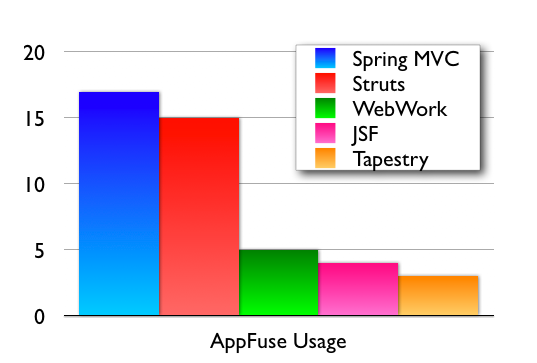
At the beginning of October, I did an informal poll on the AppFuse mailing list to see which web framework users were developing their applications with. Surprisingly, Spring came out on top, and the component frameworks (JSF and Tapestry) are the least used. I find this interesting b/c AppFuse lowers the barriers and reduces the learning curve for all of these frameworks.

Poll Results

If you're an AppFuse user and didn't respond on the mailing list, please leave a comment with the web framework you're using.

On a related note, I noticed that java.net added RSS Feeds for mailing lists today. This means if you have an RSS Reader, you can subscribe to the AppFuse user mailing list.

Heh, I just subscribed and there's no messages in the feed. Maybe this feature needs a little more work.

Posted in Java at Oct 25 2005, 10:29:40 AM MDT 30 Comments