Matt RaibleMatt Raible is a writer with a passion for software. Connect with him on LinkedIn.

The Angular Mini-Book The Angular Mini-Book is a guide to getting started with Angular. You'll learn how to develop a bare-bones application, test it, and deploy it. Then you'll move on to adding Bootstrap, Angular Material, continuous integration, and authentication.

Spring Boot is a popular framework for building REST APIs. You'll learn how to integrate Angular with Spring Boot and use security best practices like HTTPS and a content security policy.

For book updates, follow @angular_book on Twitter.

The JHipster Mini-Book The JHipster Mini-Book is a guide to getting started with hip technologies today: Angular, Bootstrap, and Spring Boot. All of these frameworks are wrapped up in an easy-to-use project called JHipster.

This book shows you how to build an app with JHipster, and guides you through the plethora of tools, techniques and options you can use. Furthermore, it explains the UI and API building blocks so you understand the underpinnings of your great application.

For book updates, follow @jhipster-book on Twitter.

10+ YEARS


Over 10 years ago, I wrote my first blog post. Since then, I've authored books, had kids, traveled the world, found Trish and blogged about it all.
You searched this site for "struts". 659 entries found.

You can also try this same search on Google.

Java Web Application Security - Part V: Penetrating with Zed Attack Proxy

Web Application Security is an important part of developing applications. As developers, I think we often forget this, or simply ignore it. In my career, I've learned a lot about web application security. However, I only recently learned and became familiar with the rapidly growing "appsec" industry.

I found a disconnect between what appsec consultants were selling and what I was developing. It seemed like appsec consultants were selling me fear, mostly because I thought my apps were secure. So I set out on a mission to learn more about web application security and penetration testing to see if my apps really were secure. This article is part of that mission, as are the previous articles I've written in this series.

When I first decided I wanted to do a talk on Webapp Security, I knew it would be more interesting if I showed the audience how to hack and fix an application. That's why I wrote it into my original proposal:

Webapp Security: Develop. Penetrate. Protect. Relax.
In this session, you'll learn how to implement authentication in your Java web applications using Spring Security, Apache Shiro and good ol' Java EE Container Managed Authentication. You'll also learn how to secure your REST API with OAuth and lock it down with SSL.

After learning how to develop authentication, I'll introduce you to OWASP, the OWASP Top 10, its Testing Guide and its Code Review Guide. From there, I'll discuss using WebGoat to verify your app is secure and commercial tools like webapp firewalls and accelerators.

At the time, I hadn't done much webapp pentesting. You can tell this from the fact that I mentioned WebGoat as the pentesting tool. From WebGoat's Project page:

WebGoat is a deliberately insecure J2EE web application maintained by OWASP designed to teach web application security lessons. In each lesson, users must demonstrate their understanding of a security issue by exploiting a real vulnerability in the WebGoat application. For example, in one of the lessons the user must use SQL injection to steal fake credit card numbers. The application is a realistic teaching environment, providing users with hints and code to further explain the lesson.

What I really meant to say and use was Zed Attack Proxy, also known as OWASP ZAP. ZAP is a Java Desktop application that you setup as a proxy for your browser, then use to find vulnerabilities in your application. This article explains how you can use ZAP to pentest a web applications and fix its vulnerabilities.

The application I'll be using in this article is the Ajax Login application I've been using throughout this series. I think it's great that projects like Damn Vulnerable Web App and WebGoat exist, but I wanted to test one that I think is secure, rather than one I know is not secure. In this particular example, I'll be testing the Spring Security implementation, since that's the framework I most often use in my open source projects.

Zed Attack Proxy Tutorial

Download and Run the Application
To begin, download the application and expand it on your hard drive. This app is the completed version of the Ajax Login application referenced in Java Web Application Security - Part II: Spring Security Login Demo. You'll need Java 6 and Maven installed to run the app. Run it using mvn jetty:run and open http://localhost:8080 in your browser. You'll see it's a simple CRUD application for users and you need to login to do anything.

Install and Configure ZAP
The Zed Attack Proxy (ZAP) is an easy to use integrated penetration testing tool for finding vulnerabilities in web applications. Download the latest version (I used 1.3.0) and install it on your system. After installing, launch the app and change the proxy port to 9000 (Tools > Options > Local Proxy). Next, configure your browser to proxy requests through port 9000 and allow localhost requests to be proxied. I used Firefox 4 (Preferences > Advanced > Network > Connection Settings). When finished, your proxy settings should look like the following screenshot:

Firefox Proxy Settings

Another option (instead of removing localhost) is to add an entry to your hosts file with your production domain name. This is what I've done for this demo.

127.0.0.1       demo.raibledesigns.com

I've also configured Apache to proxy requests to Jetty with the following mod_proxy settings in my httpd.conf:

<IfModule mod_proxy.c>
    ProxyRequests Off 
    ProxyPreserveHost Off 

    <VirtualHost *:80>
       ProxyPass  /  http://localhost:8080/
    </VirtualHost>

    <VirtualHost *:443>
        SSLEngine on
        SSLProxyEngine on
        SSLCertificateFile "/etc/apache2/ssl.key/server.crt"
        SSLCertificateKeyFile "/etc/apache2/ssl.key/server.key"

        ProxyPass  /  https://localhost:8443/
    </VirtualHost>
</IfModule>

Perform a Scan
Now you need to give ZAP some data to work with. Using Firefox, I navigated to http://demo.raibledesigns.com and browsed around a bit, listing users, added a new one and deleted an existing one. After doing this, I noticed a number of flags in the ZAP UI under Sites. I then right-clicked on each site (one for http and one for https) and selected Attack > Active Scan site. You should be able to do this from the "Active Scan" tab at the bottom of ZAP, but there's a bug when the URLs are the same. After doing this, I received a number of alerts, ranging from high (cross-site scripting) to low (password autocomplete). The screenshot below shows the various issues.
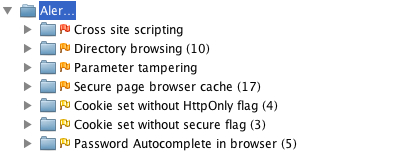
ZAP Alerts

Now let's take a look at how to fix them.

Fix Vulnerabilities
One of the things not mentioned by the scan, but #1 in Seven Security (Mis)Configurations in Java web.xml Files, is Custom Error Pages Not Configured. Custom error pages are configured in this app, but error.jsp contains the following code:

<% if (exception != null) { %>
    <% exception.printStackTrace(new java.io.PrintWriter(out)); %>
<% } else { %>
    Please check your log files for further information.
<% } %>

Stack traces can be really useful to an attacker, so it's important to start by removing the above code from src/main/webapp/error.jsp.

The rest of the issues have to do with XSS, autocomplete, and cookies. Let's start with the easy ones. Fixing autocomplete is easy enough; simply changed the HTML in login.jsp and userform.jsp to have autocomplete="off" as part of the <form> tag.

Then modify web.xml so http-only and secure cookies are used. While you're at it, add session-timeout and tracking-mode as recommended by the aforementioned web.xml misconfigurations article.

<session-config>
    <session-timeout>15</session-timeout>
    <cookie-config>
        <http-only>true</http-only>
        <secure>true</secure>
    </cookie-config>
    <tracking-mode>COOKIE</tracking-mode>
</session-config>

Next, modify Spring Security's Remember Me configuration so it uses secure cookies. To do this, add use-secure-cookies="true" to the <remember-me> element in security.xml.

<remember-me user-service-ref="userService" key="e37f4b31-0c45-11dd-bd0b-0800200c9a66"
             use-secure-cookie="true"/>

Unfortunately, Spring Security doesn't support HttpOnly cookies, but will in a future release.

The next issue to solve is disabling directory browsing. You can do this by copying Jetty's webdefault.xml (from the org.eclipse.jetty:jetty-webapp JAR) into src/test/resources and changing its "dirAllowed" <init-param> to false:

<servlet>
  <servlet-name>default</servlet-name>
  <servlet-class>org.mortbay.jetty.servlet.DefaultServlet</servlet-class>
  <init-param>
    <param-name>acceptRanges</param-name>
    <param-value>true</param-value>
  </init-param>
  <init-param>
    <param-name>dirAllowed</param-name>
    <param-value>false</param-value>
  </init-param>
  <init-param>

You'll also need to modify the plugin's configuration to point to this file by adding it to the <webAppConfig> section in pom.xml.

<configuration>
    <webAppConfig>
        <contextPath>/</contextPath>
        <defaultsDescriptor>src/test/resources/webdefault.xml</defaultsDescriptor>
    </webAppConfig>

Of course, if you're running in production you'll want to configure this in your server's settings rather than in your pom.xml file.

Next, I set out to fix secure page browser cache issues. I had the following settings in my SiteMesh decorator:

<meta http-equiv="Cache-Control" content="no-store"/>
<meta http-equiv="Pragma" content="no-cache"/>

However, according to ZAP, the first meta tag should have "no-cache" instead of "no-store", so I changed it to "no-cache".

After making all these changes, I created a new ZAP session and ran an active scan on both sites again. Below are the results:
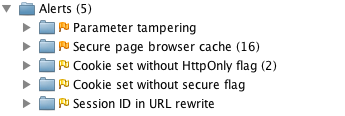
Active Scan after Fixes

I believe the first issue (parameter tampering) is because I show the error page when a duplicate user exists. To fix this, I changed UserFormController so it catches a UserExistsException and sends the user back to the form.

try {
    userManager.saveUser(user);
} catch (UserExistsException uex) {
    result.addError(new ObjectError("user", uex.getMessage()));
    return "userform";
}

However, this still doesn't seem to cause the alert to go away. This is likely because I'm not filtering/escaping HTML when it's first submitted. I believe the best solution for this would be to use something like OWASP's ESAPI to filter parameter values. However, I was unable to find integration with Spring MVC's data binding, so I decided not to try and fix this vulnerability.

Finally, I tried to disable jsessionid in URLs using suggestions from Stack Overflow. The previous setting in web.xml (<tracking-mode>COOKIE</tracking-mode>) should do this, but it doesn't seem to work with Jetty 8. The other issues (secure page browser cache, HttpOnly cookies and secure cookies), I was unable to solve. The last two are issues caused by Spring Security as far as I can tell.

Summary
In this article, I've shown you how to pentest a web application using Firefox and OWASP's Zed Attack Proxy (ZAP). I found ZAP to be a nice tool for figuring out vulnerabilities, but it'd be nice if it had a "retest" feature to see if you fixed an issue for a particular URL. It does have a "resend" feature, but running it didn't seem to clear alerts after I'd fixed them.

The issues I wasn't able to solve seemed to be mostly related to frameworks (e.g. Spring Security and HttpOnly cookies) or servers (Jetty not using cookies for tracking). My suspicion is the Jetty issues are because it doesn't support Servlet 3 as well as it advertises. I believe this is fair; I am using a milestone release after all. I tried scanning http://demo.raibledesigns.com/ajax-login (which runs on Tomcat 7 at Contegix) and confirmed that no jsessionid exists.

Hopefully this article has helped you understand how to figure out security vulnerabilities in your web applications. I believe ZAP will continue to get more popular as developers become aware of it. If you feel ambitious and want to try and solve all of the issues in my Ajax Login application, feel free to fork it on GitHub.

If you're interested in talking more about Webapp Security, please leave a comment, meet me at Jazoon later this week or let's talk in July at Über Conf.

Posted in Java at Jun 21 2011, 07:45:41 AM MDT 4 Comments

AppFuse 2.1 Released!

The AppFuse Team is pleased to announce the release of AppFuse 2.1. This release includes upgrades to all dependencies to bring them up-to-date with their latest releases. Most notable are JPA 2, JSF 2, Tapestry 5 and Spring 3. In addition, we've migrated from XFire to CXF and enabled REST for web services. There's even a new appfuse-ws archetype that leverages Enunciate to generate web service endpoints, documentation and downloadable clients. This release fixes many issues with archetypes, improving startup time and allowing jetty:run to be used for quick turnaround while developing. For more details on specific changes see the release notes.

What is AppFuse?
AppFuse is an open source project and application that uses open source frameworks to help you develop Web applications with Java quickly and efficiently. It was originally developed to eliminate the ramp-up time when building new web applications. At its core, AppFuse is a project skeleton, similar to the one that's created by your IDE when you click through a wizard to create a new web project. If you use JRebel with IntelliJ, you can achieve zero-turnaround in your project and develop features without restarting the server.

Release Details
Archetypes now include all the source for the web modules so using jetty:run and your IDE will work much smoother now. The backend is still embedded in JARs, enabling you to choose with persistence framework (Hibernate, iBATIS or JPA) you'd like to use. If you want to modify the source for that, add the core classes to your project or run "appfuse:full-source".

AppFuse comes in a number of different flavors. It offers "light", "basic" and "modular" and archetypes. Light archetypes use an embedded H2 database and contain a simple CRUD example. Light archetypes allow code generation and full-source features, but do not currently support Stripes or Wicket. Basic archetypes have web services using CXF, authentication from Spring Security and features including signup, login, file upload and CSS theming. Modular archetypes are similar to basic archetypes, except they have multiple modules which allows you to separate your services from your web project.

AppFuse provides archetypes for JSF, Spring MVC, Struts 2 and Tapestry 5. The light archetypes are available for these frameworks, as well as for Spring MVC + FreeMarker, Stripes and Wicket. You can see demos of these archetypes at http://demo.appfuse.org.

For information on creating a new project, please see the QuickStart Guide.

If you have questions about AppFuse, please read the FAQ or join the user mailing list. If you find any issues, please report them on the mailing list or create an issue in JIRA.

Thanks to everyone for their help contributing patches, writing documentation and participating on the mailing lists.

We greatly appreciate the help from our sponsors, particularly Atlassian, Contegix and JetBrains. Atlassian and Contegix are especially awesome: Atlassian has donated licenses to all its products and Contegix has donated an entire server to the AppFuse project.

Posted in Java at Apr 04 2011, 09:38:05 AM MDT 5 Comments

Adding Search to AppFuse with Compass

Over 5 years ago, I recognized that AppFuse needed to have a search feature and entered an issue in JIRA. Almost 4 years later, a Compass Tutorial was created and shortly after Shay Banon (Compass Founder), sent in a patch. From the message he sent me:

A quick breakdown of enabling search:

  1. Added Searchable annotations to the User and Address.
  2. Defined Compass bean, automatically scanning the model package for mapped searchable classes. It also automatically integrates with Spring transaction manager, and stores the index on the file system ([work dir]/target/test-index).
  3. Defined CompassTemplate (similar in concept to HibernateTemplate).
  4. Defined CompassSearchHelper. Really helps to perform search since it does pagination and so on.
  5. Defined CompassGps, basically it allows for index operation allowing to completely reindex the data from the database. JPA and Hiberante also automatically mirror changes done through their API to the index. iBatis uses AOP.

Fast forward 2 years and I finally found the time/desire to put a UI on the backend Compass implementation that Shay provided. Yes, I realize that Compass is being replaced by ElasticSearch. I may change to use ElasticSearch in the future; now that the search feature exists, I hope to see it evolve and improve.

Since Shay's patch integrated the necessary Spring beans for indexing and searching, the only thing I had to do was to implement the UI. Rather than having an "all objects" results page, I elected to implement it so you could search on an entity's list screen. I started with Spring MVC and added a search() method to the UserController:

@RequestMapping(method = RequestMethod.GET)
public ModelAndView handleRequest(@RequestParam(required = false, value = "q") String query) throws Exception {
    if (query != null && !"".equals(query.trim())) {
        return new ModelAndView("admin/userList", Constants.USER_LIST, search(query));
    } else {
        return new ModelAndView("admin/userList", Constants.USER_LIST, mgr.getUsers());
    }
}

public List<User> search(String query) {
    List<User> results = new ArrayList<User>();
    CompassDetachedHits hits = compassTemplate.findWithDetach(query);
    log.debug("No. of results for '" + query + "': " + hits.length());
    for (int i = 0; i < hits.length(); i++) {
        results.add((User) hits.data(i));
    }
    return results;
}

At first, I used compassTemplate.find(), but got an error because I wasn't using an OpenSessionInViewFilter. I decided to go with findWithDetach() and added the following search form to the top of the userList.jsp page:

<div id="search">
<form method="get" action="${ctx}/admin/users" id="searchForm">
    <input type="text" size="20" name="q" id="query" value="${param.q}"
           placeholder="Enter search terms"/>
    <input type="submit" value="<fmt:message key="button.search"/>"/>
</form>
</div>

NOTE: I tried using HTML5's <input type="search">, but found Canoo WebTest doesn't support it.

Next, I wrote a unit test to verify everything worked as expected. I found I had to call compassGps.index() as part of my test to make sure my index was created and up-to-date.

public class UserControllerTest extends BaseControllerTestCase {
    @Autowired
    private CompassGps compassGps;
    @Autowired
    private UserController controller;

    public void testSearch() throws Exception {
        compassGps.index();
        ModelAndView mav = controller.handleRequest("admin");
        Map m = mav.getModel();
        List results = (List) m.get(Constants.USER_LIST);
        assertNotNull(results);
        assertTrue(results.size() >= 1);
        assertEquals("admin/userList", mav.getViewName());
    }
}

After getting this working, I started integrating similar code into AppFuse's other web framework modules (Struts, JSF and Tapestry). When I was finished, they all looked pretty similar from a UI perspective.

Struts:

<div id="search">
<form method="get" action="${ctx}/admin/users" id="searchForm">
    <input type="text" size="20" name="q" id="query" value="${param.q}"
           placeholder="Enter search terms..."/>
    <input type="submit" value="<fmt:message key="button.search"/>"/>
</form>
</div>

JSF:

<div id="search">
<h:form id="searchForm">
    <h:inputText id="q" name="q" size="20" value="#{userList.query}"/>
    <h:commandButton value="#{text['button.search']}" action="#{userList.search}"/>
</h:form>
</div>

Tapestry:

<div id="search">
<t:form method="get" t:id="searchForm">
    <t:textfield size="20" name="q" t:id="q"/>
    <input t:type="submit" value="${message:button.search}"/>
</t:form>
</div>

One frustrating thing I found was that Tapestry doesn't support method="get" and AFAICT, neither does JSF 2. With JSF, I had to make my UserList bean session-scoped or the query parameter would be null when it listed the results. Tapestry took me the longest to implement, mainly because I had issues figuring out how it's easy-to-understand-once-you-know onSubmit() handlers worked and I had the proper @Property and @Persist annotations on my "q" property. This tutorial was the greatest help for me. Of course, now that it's all finished, the code looks pretty intuitive.

Feeling proud of myself for getting this working, I started integrating this feature into AppFuse's code generation and found I had to add quite a bit of code to the generated list pages/controllers.

So I went on a bike ride...

While riding, I thought of a much better solution and added the following search method to AppFuse's GenericManagerImpl.java. In the code I added to pages/controllers previously, I'd already refactored to use CompassSearchHelper and I continued to do so in the service layer implementation.

@Autowired
private CompassSearchHelper compass;

public List<T> search(String q, Class clazz) {
    if (q == null || "".equals(q.trim())) {
        return getAll();
    }

    List<T> results = new ArrayList<T>();

    CompassSearchCommand command = new CompassSearchCommand(q);
    CompassSearchResults compassResults = compass.search(command);
    CompassHit[] hits = compassResults.getHits();

    if (log.isDebugEnabled() && clazz != null) {
        log.debug("Filtering by type: " + clazz.getName());
    }

    for (CompassHit hit : hits) {
        if (clazz != null) {
            if (hit.data().getClass().equals(clazz)) {
                results.add((T) hit.data());
            }
        } else {
            results.add((T) hit.data());
        }
    }

    if (log.isDebugEnabled()) {
        log.debug("Number of results for '" + q + "': " + results.size());
    }

    return results;
}

This greatly simplified my page/controller logic because now all I had to do was call manager.search(query, User.class) instead of doing the Compass login in the controller. Of course, it'd be great if I didn't have to pass in the Class to filter by object, but that's the nature of generics and type erasure.

Other things I learned along the way:

  • To index on startup, I added compassGps.index() to the StartupListener..
  • In unit tests that leveraged transactions around methods, I had to call compassGps.index() before any transactions started.
  • To scan multiple packages for searchable classes, I had to add a LocalCompassBeanPostProcessor.

But more than anything, I was reminded it always helps to take a bike ride when you don't like the design of your code. ;-)

This feature and many more will be in AppFuse 2.1, which I hope to finish by the end of the month. In the meantime, please feel free to try out the latest snapshot.

Posted in Java at Mar 15 2011, 05:11:12 PM MDT 1 Comment

JSR 303 and JVM Web Framework Support

Emmanuel Bernard recently sent an email to the JSR 303 Experts Group about the next revision of the Bean Validation JSR (303). Rather than sending the proposed changes privately, he blogged about them. I left a comment with what I'd like to see:

+1 for Client-side validation. I'd love to see an API that web frameworks can hook into to add "required" to their tags for HTML5. Or some service that can be registered so the client can make Ajax requests to an API to see if an object is valid.

Emmanuel replied that most of the necessary API already exists for this, but frameworks have been slow to adopt it.

Hi Matt,

The sad thing is that the API is present on the Bean Validation side but presentation frameworks are slow to adopt it and use it :(

RichFaces 4 now has support for it but I wished more presentation frameworks had worked on the integration. If you can convince a few people or have access to a few people, feel free to send them by me :)

The integration API is described here. Let me know if you think some parts are missing or should be improved. We should definitely do some more buzz around it.

In the interest of generating more buzz around it, I decided to do some research and see what JVM Frameworks support JSR 303. Here's what I've come up with so far (in no particular order):

Struts 2 has an open issue, but doesn't seem to support JSR 303. Since I did a quick-n-dirty google search for most of these, I'm not sure if they support client-side JavaScript or HTML5's required. If you know of other JVM-based web frameworks that support JSR 303, please let me know in the comments.

Posted in Java at Mar 08 2011, 11:33:24 AM MST 4 Comments

Fixing XSS in JSP 2

Way back in 2007, I wrote about Java Web Frameworks and XSS. My main point was that JSP EL doesn't bother to handle XSS.

Of course, the whole problem with JSP EL could be solved if Tomcat (and other containers) would allow a flag to turn on XML escaping by default. IMO, it's badly needed to make JSP-based webapps safe from XSS.

A couple months later, I proposed a Tomcat enhancement to escape JSP's EL by default. I also entered an enhancement request for this feature and attached a patch. That issue has remained open and unfixed for 3 and 1/2 years.

Yesterday, Chin Huang posted a handy-dandy ELResolver that XML-escapes EL values.

I tried Chin's resolver in AppFuse today and it works as well as advertised. To do this, I copied his EscapeXML*.java files into my project, changed the JSP API's Maven coordinates from javax.servlet:jsp-api:2.0 to javax.servlet.jsp:jsp-api:2.1 and added the listener to web.xml.

With Struts 2 and Spring MVC, I was previously able to have ${param.xss} and pass in ?xss=<script>alert('gotcha')</script> and it would show a JavaScript alert. After using Chin's ELResolver, it prints the string on the page instead of displaying an alert.

Thanks to Chin Huang for this patch! If you're using JSP, I highly recommend you add this to your projects as well.

Posted in Java at Feb 28 2011, 02:08:46 PM MST 7 Comments

Integration Testing with HTTP, HTTPS and Maven

Earlier this week, I was tasked with getting automated integration tests working in my project at Overstock.com. By automated, I mean that ability to run "mvn install" and have the following process cycled through:

  • Start a container
  • Deploy the application
  • Run all integration tests
  • Stop the container

Since it makes sense for integration tests to run in Maven's integration-test phase, I first configured the maven-surefire-plugin to skip tests in the test phase and execute them in the integration-test phase. I used the <id>default-phase</id> syntax to override the plugins' usual behavior.

<plugin>
  <artifactId>maven-surefire-plugin</artifactId>
  <executions>
    <execution>
      <id>default-test</id>
      <configuration>
        <excludes>
          <exclude>**/*Test*.java</exclude>
        </excludes>
      </configuration>
    </execution>
    <execution>
      <id>default-integration-test</id>
      <phase>integration-test</phase>
      <goals>
        <goal>test</goal>
      </goals>
      <configuration>
        <includes>
          <include>**/*Test.java</include>
        </includes>
        <excludes>
          <exclude>none</exclude>
          <exclude>**/TestCase.java</exclude>
        </excludes>
      </configuration>
    </execution>
  </executions>
</plugin>

After I had this working, I moved onto getting the container started and stopped properly. In the past, I've done this using Cargo and it's always worked well for me. Apart from the usual setup I use in AppFuse archetypes (example pom.xml), I added a couple additional items:

  • Added <timeout>180000</timeout> so the container would wait up to 3 minutes for the WAR to deploy.
  • In configuration/properties, specified <context.path>ROOT</context.path> so the app would deploy at the / context path.
  • In configuration/properties, specified <cargo.protocol>https</cargo.protocol> since many existing unit tests made requests to secure resources.

I started by using Cargo with Tomcat and had to create certificate keystore in order to get Tomcat to start with SSL enabled. After getting it to start, I found the tests failed with the following errors in the logs:

javax.net.ssl.SSLHandshakeException: sun.security.validator.ValidatorException: 
PKIX path building failed: sun.security.provider.certpath.SunCertPathBuilderException: 
unable to find valid certification path to requested target
	at com.sun.net.ssl.internal.ssl.Alerts.getSSLException(Alerts.java:174)
	at com.sun.net.ssl.internal.ssl.SSLSocketImpl.fatal(SSLSocketImpl.java:1649)

Co-workers told me this was easily solved by adding my 'untrusted' cert to my JVM keystore. Once all this was working, I thought I was good to go, but found that some tests were still failing. The failures turned out to be because they were talking to http and https was the only protocol enabled. After doing some research, I discovered that Cargo doesn't support starting on both http and https ports.

So back to the drawing board I went. I ended up turning to the maven-jetty-plugin and the tomcat-maven-plugin to get the functionality I was looking for. I also automated the certificate keystore generation using the keytool-maven-plugin. Below is the extremely-verbose 95-line profiles section of my pom.xml that allows either container to be used.

Sidenote: I wonder how this same setup would look using Gradle?

<profiles>
  <profile>
    <id>jetty</id>
    <activation>
      <activeByDefault>true</activeByDefault>
    </activation>
    <build>
      <plugins>
        <plugin>
          <groupId>org.mortbay.jetty</groupId>
          <artifactId>maven-jetty-plugin</artifactId>
          <version>6.1.26</version>
          <configuration>
            <contextPath>/</contextPath>
            <connectors>
              <connector implementation="org.mortbay.jetty.nio.SelectChannelConnector">
                <!-- forwarded == true interprets x-forwarded-* headers -->
                <!-- http://docs.codehaus.org/display/JETTY/Configuring+mod_proxy -->
                <forwarded>true</forwarded>
                <port>8080</port>
                <maxIdleTime>60000</maxIdleTime>
              </connector>
              <connector implementation="org.mortbay.jetty.security.SslSocketConnector">
                <forwarded>true</forwarded>
                <port>8443</port>
                <maxIdleTime>60000</maxIdleTime>
                <keystore>${project.build.directory}/ssl.keystore</keystore>
                <password>overstock</password>
                <keyPassword>overstock</keyPassword>
              </connector>
            </connectors>
            <stopKey>overstock</stopKey>
            <stopPort>9999</stopPort>
          </configuration>
          <executions>
            <execution>
              <id>start-jetty</id>
              <phase>pre-integration-test</phase>
              <goals>
                <goal>run-war</goal>
              </goals>
              <configuration>
                <daemon>true</daemon>
              </configuration>
            </execution>
            <execution>
              <id>stop-jetty</id>
              <phase>post-integration-test</phase>
              <goals>
                <goal>stop</goal>
              </goals>
            </execution>
          </executions>
        </plugin>
      </plugins>
    </build>
  </profile>
  <profile>
    <id>tomcat</id>
    <build>
      <plugins>
        <plugin>
          <groupId>org.codehaus.mojo</groupId>
          <artifactId>tomcat-maven-plugin</artifactId>
          <version>1.1</version>
          <configuration>
            <addContextWarDependencies>true</addContextWarDependencies>
            <fork>true</fork>
            <path>/</path>
            <port>8080</port>
            <httpsPort>8443</httpsPort>
            <keystoreFile>${project.build.directory}/ssl.keystore</keystoreFile>
            <keystorePass>overstock</keystorePass>
          </configuration>
          <executions>
            <execution>
              <id>start-tomcat</id>
              <phase>pre-integration-test</phase>
              <goals>
                <goal>run-war</goal>
              </goals>
            </execution>
            <execution>
              <id>stop-tomcat</id>
              <phase>post-integration-test</phase>
              <goals>
                <goal>shutdown</goal>
              </goals>
            </execution>
          </executions>
        </plugin>
      </plugins>
    </build>
  </profile>
</profiles>

With this setup in place, I was able to automate running our integration tests by simply typing "mvn install" (for Jetty) or "mvn install -Ptomcat" (for Tomcat). For running in Hudson, it's possible I'll have to further enhance things to randomize the port and pass that into tests as a system property. The build-helper-maven-plugin and its reserve-network-port goal is a nice way to do this. Note: if you want to run more than one instance of Tomcat at a time, you might have to randomize the ajp and rmi ports to avoid collisions.

The final thing I encountered was our app didn't shutdown gracefully. Luckily, this was fixed in a newer version of our core framework and upgrading fixed the problem. Here's the explanation from an architect on the core framework team.

The hanging problem was caused by the way the framework internally aggregated statistics related to database connection usage and page response times. The aggregation runs on a separate thread but not as a daemon thread. Previously, the aggregation threads weren't being terminated on shutdown so the JVM would hang waiting for them to finish. In the new frameworks, the aggregation threads are terminated on shutdown.

Hopefully this post helps you test your secure and unsecure applications at the same time. At the same time, I'm hoping it motivates the Cargo developers to add simultaneous http and https support. ;)

Update: In the comments, Ron Piterman recommended I use the Maven Failsafe Plugin because its designed to run integration tests while Surefire Plugin is for unit tests. I changed my configuration to the following and everything still passes. Thanks Ron!

<plugin>
  <artifactId>maven-surefire-plugin</artifactId>
  <version>2.7.2</version>
  <configuration>
    <skipTests>true</skipTests>
  </configuration>
</plugin>
<plugin>
  <artifactId>maven-failsafe-plugin</artifactId>
  <version>2.7.2</version>
  <configuration>
    <includes>
      <include>**/*Test.java</include>
    </includes>
    <excludes>
      <exclude>**/TestCase.java</exclude>
    </excludes>
  </configuration>
  <executions>
    <execution>
      <id>integration-test</id>
      <phase>integration-test</phase>
      <goals>
        <goal>integration-test</goal>
      </goals>
    </execution>
    <execution>
      <id>verify</id>
      <phase>verify</phase>
      <goals>
        <goal>verify</goal>
      </goals>
    </execution>
  </executions>
</plugin>

Update 2: In addition to application changes to solve hanging issues, I also had to change my Jetty Plugin configuration to use a different SSL connector implementation. This also required adding the jetty-sslengine dependency, which has been renamed to jetty-ssl for Jetty 7.

<connector implementation="org.mortbay.jetty.security.SslSelectChannelConnector">
...
<dependencies>
  <dependency>
    <groupId>org.mortbay.jetty</groupId>
    <artifactId>jetty-sslengine</artifactId>
    <version>6.1.26</version>
  </dependency>
</dependencies>

Posted in Java at Feb 11 2011, 03:54:16 PM MST 9 Comments

Implementing Extensionless URLs with Tapestry, Spring MVC, Struts 2 and JSF

For the past couple of weeks, I've spent several evening hours implementing extensionless URLs in AppFuse. I've been wanting to do this ever since I wrote about how to do it a few years ago. This article details my experience and will hopefully help others implement this feature in their webapps.

First of all, I used the UrlRewriteFilter, one of my favorite Java open source projects. Then I followed a pattern I found in Spring's "mvc-basic" sample app from MVC Simplifications in Spring 3.0. The app has since changed (because SpringSource integrated UrlRewriteFilter-type functionality in Spring MVC), but the pattern was basically path-matching instead of extension-mapping. That is, the "dispatcher" for the web framework was mapped to /app/* instead of *.html.

Prior to the move to extensionless URLs, AppFuse used *.html for its mapping and this seemed to cause users problems when they wanted to serve up static HTML files. To begin with, I removed all extensions from URLs in tests (Canoo WebTest is used for testing the UI). I also did this for any links in the view pages and redirects in the Java code. This provided a decent foundation to verify my changes worked. Below are details about each framework I did this for, starting with the one that was easiest and moving to hardest.

Tapestry 5
Tapestry was by far the easiest to integrate extensionless URLs into. This is because it's a native feature of the framework and was already integrated as part of Serge Eby's Tapestry 5 implementation. In the end, the only things I had to do where 1) add a couple entries for CXF (mapped to /services/*) and DWR (/dwr/*) to my urlrewrite.xml and 2) change the UrlRewriteFilter so it was only mapped to REQUEST instead of both REQUEST and FORWARD. Below are the mappings I added for CXF and DWR.

<urlrewrite default-match-type="wildcard">
    ...
    <rule>
        <from>/dwr/**</from>
        <to>/dwr/$1</to>
    </rule>
    <rule>
        <from>/services/**</from>
        <to>/services/$1</to>
    </rule>
</urlrewrite>

Spring MVC
I had a fair amount of experience with Spring MVC and extensionless URLs. Both the Spring MVC applications we developed last year at Time Warner Cable used them. To change from a *.html mapping to /app/* was pretty easy and involved removing more code than I added. Previously, I had a StaticFilter that looked for HTML files and if it didn't find them, it dispatched to Spring's DispatcherServlet. I was able to remove this class and make the web.xml file quite a bit cleaner.

To make UrlRewriteFilter and Spring Security play well together, I had to move the securityFilter so it came after the rewriteFilter and add an INCLUDE dispatcher so included JSPs would have a security context available to them.

<filter-mapping>
    <filter-name>rewriteFilter</filter-name>
    <url-pattern>/*</url-pattern>
</filter-mapping>
<filter-mapping>
    <filter-name>securityFilter</filter-name>
    <url-pattern>/*</url-pattern>
    <dispatcher>REQUEST</dispatcher>
    <dispatcher>FORWARD</dispatcher>
    <dispatcher>INCLUDE</dispatcher>
</filter-mapping>

The only other things I had to change were security.xml and dispatcher-servlet.xml to remove the .html extensions. The urlrewrite.xml file was fairly straightforward. I used the following at the bottom as a catch-all for dispatching to Spring MVC.

<rule>
    <from>/**</from>
    <to>/app/$1</to>
</rule>
<outbound-rule>
    <from>/app/**</from>
    <to>/$1</to>
</outbound-rule>

Then I added a number of other rules for j_security_check, DWR, CXF and static assets (/images, /scripts, /styles, /favicon.ico). You can view the current urlrewrite.xml in FishEye. The only major issue I ran into was that Spring Security recorded protected URLs as /app/URL so I had to add a rule to redirect when this happened after logging in.

<rule>
    <from>/app/**</from>
    <to last="true" type="redirect">%{context-path}/$1</to>
</rule>

Struts 2
Using extensionless URLs with Struts 2 is likely pretty easy thanks to the Convention Plugin. Even though this plugin is included in AppFuse, it's not configured with the proper constants and I have struts.convention.action.disableScanning=true in struts.xml. It looks like I had to do this when I upgraded from Struts 2.0.x to Struts 2.1.6. It's true AppFuse's Struts 2 support could use a bit of love to be aligned with Struts 2's recommended practices, but I didn't want to spend the time doing it as part of this exercise.

With Struts 2, I tried the path-mapping like I did with Spring MVC, but ran into issues. Instead, I opted to use an ".action" extension by changing struts.action.extension from "html" to "action," in struts.xml. Then I had to do a bunch of filter re-ordering and dispatcher changes. Before, with a .html extension, I had all filters mapped to /* and in the following order.

Filter NameDispatchers
securityFilter request
rewriteFilter request, forward
struts-prepare request
sitemesh request, forward, include
staticFilter request, forward
struts request

Similar to Spring MVC, I had to remove the rewriteFilter in front of the securityFilter and I was able to remove the staticFilter. I also had to map the struts filter to *.action instead of /* to stop Struts from trying to catch static asset and DWR/CXF requests. Below is the order of filters and their dispatchers that seems to work best.

Filter NameDispatchers
rewriteFilter request
securityFilter request, forward, include
struts-prepare request, forward
sitemesh request, forward, include
struts forward

From there, it was a matter of modifying urlrewrite.xml to have the following catch-all and rules for static assets, j_security_check and DWR/CXF.

<rule match-type="regex">
    <from>^([^?]*)/([^?/\.]+)(\?.*)?$</from>
    <to last="true">$1/$2.action$3</to>
</rule>
<outbound-rule match-type="regex">
    <from>^(.*)\.action(\?.*)?$</from>
    <to last="false">$1$2</to>
</outbound-rule>

JSF
JSF was by far the most difficult to get extensionless URLs working with. I'm not convinced it's impossible, but I spent a several hours over a few days and was unsuccessful in completely removing them. I was able to make things work so I could request pages without an extension, but found when clicking buttons and links, the extension would often show up in the URL. I'm also still using JSF 1.2, so it's possible that upgrading to 2.0 would solve many of the issues I encountered.

For the time being, I've changed my FacesServlet mapping from *.html to *.jsf. As with Struts, I had issues when I tried to map it to /app/*. Other changes include changing the order of dispatchers and filters, the good ol' catch-all in urlrewrite.xml and modifying security.xml. For some reason, I wasn't able to get file upload working without adding an exception to the outbound-rule.

<rule match-type="regex">
    <from>^([^?]*)/([^?/\.]+)(\?.*)?$</from>
    <to last="true">$1/$2.jsf</to>
</rule>
<outbound-rule match-type="regex">
  <!-- TODO: Figure out how to make file upload work w/o using *.jsf -->
    <condition type="path-info">selectFile</condition>
    <from>^(.*)\.jsf(\?.*)?$</from>
    <to last="false">$1$2</to>
</outbound-rule>

I also spent a couple hours trying to get Pretty Faces to work. I wrote about my issues on the forums. I tried writing a custom Processor to strip the extension, but found that I'd get into an infinite loop where the processor kept getting called. To workaround this, I tried using Spring's RequestContextHolder to ensure the processor only got invoked once, but that proved fruitless. Finally, I tried inbound and outbound custom processors, but failed to get those working. The final thing I tried was url-mappings for each page in pretty-config.xml.

<url-mapping>
  <pattern value="/admin/users"/>
  <view-id value="/admin/users.jsf"/>
</url-mapping>
<url-mapping>
  <pattern value="/mainMenu"/>
  <view-id value="/mainMenu.jsf"/>
</url-mapping>

The issue with doing this was that some of the navigation rules in my faces-config.xml stopped working. I didn't spend much time trying to diagnose the problem because I didn't like having to add an entry for each page in the application. The one nice thing about Pretty Faces is it did allow me to do things like the following, which I formerly did with a form that auto-submitted when the page loaded.

<url-mapping>
  <pattern value="/passwordHint/#{username}"/>
  <view-id value="/passwordHint.jsf"/>
  <action>#{passwordHint.execute}</action>
</url-mapping>

Conclusion
My journey implementing extensionless URLs was an interesting one, and I solidified my knowledge about ordering of filters, dispatchers and the UrlRewriteFilter. I still think I have more to learn about properly implementing extensionless URLs in Struts 2 and JSF and I hope to do that in the near future. I believe Struts' Convention Plugin will help me and JSF 2 + Pretty Faces will hopefully work nicely too. Of course, it'd be great if all Java Web Frameworks had an easy mechanism for producing and consuming extensionless URLs. In the meantime, thank goodness for the UrlRewriteFilter.

If you'd like to try AppFuse and its shiny new URLs, see the QuickStart Guide and choose the 2.1.0-SNAPSHOT version.

Posted in Java at Feb 10 2011, 04:53:27 PM MST 10 Comments

How I Calculated Ratings for My JVM Web Frameworks Comparison

When I re-wrote my Comparing JVM Web Frameworks presentation from scratch, I decided to add a matrix that allows you to rate a framework based on 20 different criteria. The reason I did this was because I'd used this method when choosing an Ajax framework for Evite last year. The matrix seemed to work well for selecting the top 5 frameworks, but it also inspired a lot of discussion in the community that my ratings were wrong.

I expected this, as I certainly don't know every framework as well as I'd like. The mistake I made was asking for the community to provide feedback on my ratings without describing how I arrived at them. From Peter Thomas's blog:

What you are doing is adjusting ratings based on who in the community shouts the loudest. I can't help saying that this approach comes across as highly arrogant and condescending, you seem to expect framework developers and proponents to rush over and fawn over you to get better ratings, like waiters in a restaurant trying to impress a food-critic for Michelin stars.

I apologize for giving this impression. It certainly wasn't my intent. By having simple numbers (1.0 == framework does well, 0.5 == framework is OK and 0 == framework not good at criteria) with no rationalization, I can see how the matrix can be interpreted as useless (or to put it bluntly, as something you should wipe your ass with). I don't blame folks for getting angry.

For my Rich Web Experience presentation, I documented why I gave each framework the rating I did. Hopefully this will allow folks to critique my ratings more constructively and I can make the numbers more accurate. You can view this document below or on Google Docs.

In the end, what I was hoping to do with this matrix was to simply highlight a technique for choosing a web framework. Furthermore, I think adding a "weight" to each criteria is important because things like books often aren't as important as REST support. To show how this might be done, I added a second sheet to the matrix and made up some weighting numbers. I'd expect anyone that wants to use this to downloaded the matrix, verify the ratings are accurate for your beliefs and weight the criteria accordingly.

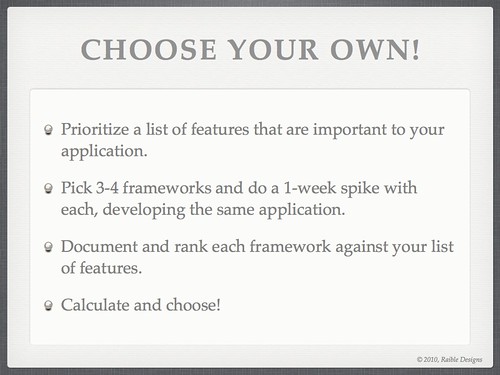
Of course, as I and many others have said, the best way to choose a web framework is to try them yourself. I emphasized this at the end of my presentation with the following two slides.

Slide #77 from Comparing JVM Web Frameworks Talk at RWX2010

Slide #76 from Comparing JVM Web Frameworks Talk at RWX2010

Posted in Java at Dec 06 2010, 11:55:18 AM MST 10 Comments

An Awesome Trip to Amsterdam and Antwerp for Devoxx 2010

I've often heard that Devoxx (formerly Javapolis) is one of the best Java-related conferences in the world. I've also heard it has the best speaking and viewing facilities (a movie theater) of any conference. When I was invited to speak earlier this year, I jumped at the opportunity. When I met Trish last summer, I even used it in a pickup line: "Wanna go to Belgium with me in November?"

I bet "chug your beer" for every touchdown with these 3 Last week was one of the most memorable weeks of my life. It all started with a tremendously fun Broncos vs. Chiefs game at Invesco Field in Denver. Trish's company, FishNet Security, was hosting a tailgate party and had rented a suite for the game. I was irrationally confident that the Broncos would win, so proceeded to place bets with many of her co-workers. Since FishNet is headquartered out of Kansas City, most of the folks in the suite were Kansas City fans. You can imagine my excitement when the CEO's wife agreed to chug a beer every time the Broncos scored. I talked a couple of other folks into the same bet and proceeded to giggle and grin for the duration of the 49-29 routing.

I tell this story because it put us in the perfect mood to begin our trip to Devoxx the next day.

Trish and I left Denver at noon on Monday, stopped in Chicago for a 2-hour layover and continued to Amsterdam on an overnight flight. In Chicago, we journeyed into the Red Carpet Club, where I performed a long overdue release of AppFuse. We'd both started to come down with my kids' cold, so we popped some NyQuil a couple hours into the flight and slept through the night.

Amsterdam
We arrived in Amsterdam on Tuesday morning and proceeded on a walkabout of the city. We stumbled into Dam Square, found some breakfast and checked our bags into a nearby hotel. Our first stop was the Van Gogh Museum, where we proceeded to enjoy the audio tour and learn about the life and works of Van Gogh. From there, we headed to the Heineken Brewery for a tour and some extra cold beers. While walking back to Amsterdam Central Station to catch a train to Antwerp, we stopped in at the Ice Bar to experience drinks in sub-zero temperatures. All the brochures said it was the #1 attraction in Amsterdam, but that was obviously just good marketing. Regardless, we enjoyed the "4D" experience and cool bartender tricks.

Beautiful day in Amsterdam Best. Travel Partner. Ever. Bikes Rijksmuseum Amsterdam

Heineken Brewery Be The Beer Extra Cold

Amsterdam is one of my favorite cities in the world, offering some of the best scenes and photo opportunities I've ever seen. We marveled at a gorgeous sunset over a canal on our walk back to the train station.

Sunset in Amsterdam

On the train to Antwerp, we scarfed down delicious bread and cheese, chased it with wine and watched a movie on my iPad. Upon arrival, we were instantly mesmerized by the architecture and beauty of the Antwerpen Centraal Station. We hailed a taxi and proceeded to our accommodations at the Holiday Inn Express.

Devoxx
I knew that Devoxx was a great conference and I could learn a lot by attending. However, it was also my first time in Belgium and I knew there was a lot to learn by exploring too. Much to my delight, while lying in bed on Wednesday morning, I quickly realized I could get all the key highlights via Twitter. I also learned that, as a speaker, I'd get full access to all the sessions via Parleys.com. So Wednesday was spent registering for the conference and traveling to Antwerp's shopping district to explore and drink a few delicious Belgium beers.

Hey Baby - wanna go to Devoxx with me? Shopping District with Antwerpen Centraal in the background Delicious Beer Always Time for a Guinness

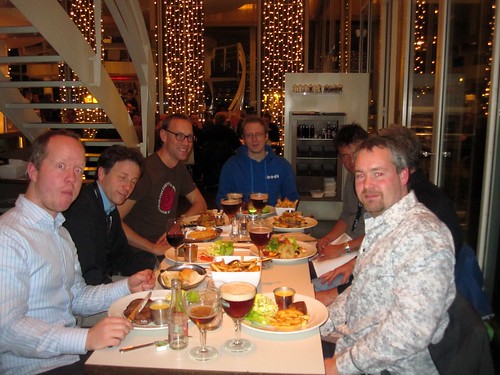
That evening, we attended the Open Source Dinner at Zuiderterras with Mathias Bogaert, Tom Baeyens, a couple ZeroTurnaround guys, a few Struts 2 Developers and many other fun folks. We walked to Pelgrom after dinner and savored a few Kwaks in the coolest beer-drinking establishment I've ever been to.

Open Source Dinner Open Source Dinner Open Source Dinner Kwak!

On Thursday, we woke up early and walked the 35 minute journey to the conference to catch The Future Roadmap of Java EE talk. The session was so packed that many overflow rooms were created and we nestled ourselves into the front row of one across the hall. My talk on Comparing JVM Web Frameworks was next and I fought the crowd to get into the keynote room to deliver it. I don't know how many people attended (est. 500), but it was definitely the largest audience I'd ever spoken in front of. Based on Twitter mentions, the majority of people seemed to enjoy it and that put a smile on my face for the rest of the day.

Since Trish and I didn't have time for breakfast, we walked back to the hotel, dropped off my laptop and headed downtown to find some grub. We found Madre Tierra, had a delicious breakfast and continued on to Cathedral of Our Lady. The artwork inside was amazing, as demonstrated by the pictures below.

Cathedral of our Lady, Antwerp Cathedral of our Lady, Antwerp Cathedral of our Lady, Antwerp Cathedral of our Lady, Antwerp

That evening, we joined the Java Posse dinner at Pelgrom. This was a fun dinner where we got to sit with Dick Wall and Carl Quinn on one side and Mark Reinhold, Chet Haase and Romain Guy on the other. Good food, great beer and excellent conversation. From there, we met up with James Ward and other Adobe folks before attending the Devoxx party to close the night.

Partying with the Adobe Crew Devoxx Party with the Norway Crew

Friday, we slept in and tracked down some delicious Belgium Waffles at Désiré de Lille before catching a train to Ghent. We arrived at sunset, but that didn't stop Trish's Nikon D300 from capturing many spectacular shots throughout the night.

Waffles at Désiré de Lille

The Canal in Ghent Ghent Ghent

On Saturday, we began our journey back to the US, starting with taking the fast train from Antwerp to Amsterdam. We checked into a fancy hotel and snuggled in for a cozy dinner at Tibet Restaurant. We spent most of the night walking around, taking sweet photos and making our Irish heritage proud.

Amsterdam by Night Shooting the Swans Car Bombs in Amsterdam

Traveling to Belgium and speaking at Devoxx was definitely a highlight of my life. Not only were the sites fantastic, but the conference attendees were super nice and I had the best travel partner in the world. The beers were delicious, the food was excellent and I can't wait to return in the future. Thanks to the Devoxx Crew for having me!

To see all the pictures I took on this trip, check out my Devoxx 2010 set on Flickr.

Posted in Java at Nov 25 2010, 12:36:10 PM MST 5 Comments

My Comparing JVM Web Frameworks Presentation from Devoxx 2010

This week, I've been having a great time in Antwerp, Belgium at the Devoxx Conference. This morning, I had the pleasure of delivering my Comparing JVM Web Frameworks talk. I thoroughly enjoyed giving this presentation, especially to such a large audience. You can view the presentation below (if you have Flash installed) or download it here.

Unlike previous years, I chose to come up with a spreadsheet matrix that shows why I chose the 5 I did. This spreadsheet and rankings given to each framework are likely to be debated, as I don't know all the frameworks as well as I'd like to. Also, the missing column on this spreadsheet is a "weighting" column where you can prioritize certain criteria like I've done in the past when Comparing Ajax Frameworks. If you believe there are incorrect numbers, please let me know and I'll try to get those fixed before I do this talk again at The Rich Web Experience.

One thing that doesn't come across in this presentation is that I believe anyone can use this matrix, and weightings, to make any of these frameworks come out on top. I also believe web frameworks are like spaghetti sauce in The Ketchup Conundrum. That is, the only way to make more happy spaghetti sauce lovers was to make more types of spaghetti sauce. You can read more about this in my There is no "best" web framework article.

Update: If you disagree with the various ratings I gave to web frameworks in this presentation, please provide your opinions by filling out this survey. Thanks to Sebastien Arbogast for setting this up.

Update: Sebastien has posted his survey results at JVM Web Framework Survey, First Results.

Update 12/6: A video of this presentation is now available on Parleys.com.

P.S. My current gig is ending in mid-December. If you're looking for a UI Architect with a passion for open source frameworks, please let me know.

Posted in Java at Nov 18 2010, 05:23:10 AM MST 39 Comments