Loading Twitter updates
Follow me on Twitter
20090423 Thursday April 23, 2009

Ajax Framework Analysis Results Way back in January, I wrote about how my colleagues and I were evaluating Ajax frameworks to build a SOFEA-style architecture. To make our choice, we used the following process:

  1. Choose a short list of frameworks to prototype with.
  2. Create an application prototype with each framework.
  3. Document findings and create a matrix with important criteria.
  4. Create presentation to summarize document.
  5. Deliver document, presentation and recommendation.

When I wrote that entry, we had just finished step 2 and were starting step 3. I first wrote this blog post a week later, when we delivered step 5. Here is the comparison and conclusion sections of the analysis document we composed.

Framework Comparison
In order to evaluate the different frameworks against important criteria, we created a matrix with weights and ranks for each framework. This matrix shows how our weighting and rankings lead us to the winner for our project. You can view this matrix online or see below for a summary.

Note: Criteria whose values were identical across all candidates were weighted at zero. Charting capability was weighted at zero b/c we decided to use Flash for this.

This matrix indicates that GWT is the best candidate for our team to develop SOFEA-style applications with. In addition to the matrix, below are graphs that illustrate interesting (and possibly meaningless) statistics about each project.

Number of Committers

Books on Amazon

Conclusion
After working with the various frameworks, we believe that all the frameworks were very good and could be used to write applications with. If all weights are equal, these frameworks were almost even when compared against our evaluation criteria. The graph below illustrates this.

Ranking with equal criteria weights

Even after applying the weighted criteria, the evenness doesn't change a whole lot.

Ranking with weighted criteria

Without considering the even or weighted criteria, we believe the decision all comes down to what the developers on the project feel they will be most comfortable with. If you're developing with Dojo or YUI, chances are you're dressing up existing HTML and possibly using progressive enhancement to add more rich functionality. On the other hand, Ext JS and GWT are similar to Swing programming where you build the UI with code (JavaScript for Ext JS, Java for GWT).

The tools available for JavaScript development have gotten increasingly better in recent years. IntelliJ IDEA has a JavaScript Editor that provides many of the same features as its Java editor. Aptana Studio also has excellent support for authoring and debugging JavaScript. However, we believe the Java debugging and authoring support in IDEs is much better. Furthermore, we are more familiar with organizing code in Java projects and feel more comfortable in this development environment.

Based on this evaluation, we believe that GWT is the best framework for our team to develop SOFEA-style applications with.

Flash Forward to Today...
The core GWT library from Google doesn't have a whole lot of widgets, nor do they look good out-of-the-box. So early on, we experimented with two alternative implementations that continue to leverage GWT concepts and tools:

  • GXT: a GWT version of Ext JS
  • SmartGWT: a GWT version of SmartClient

Unfortunately, over the past few months, we've found that both of these implementations are too heavy for our requirements, mostly because of the file size of the generated JavaScript code. For example, a feature I wrote generated a 275K *.cache.html file using GXT. After determining that was too slow to give users the initial "pop", I re-wrote it without GXT. After a day, we had an application with *.cache.html files of 133K. Yes, that's over a 50% reduction in size!*

Because of these findings, we are proceeding with the core GWT library from Google and adding in new components as needed. It is cool to know you can make a UI "pop" with GWT, as long as you stick to the core - close-to-the-metal - components. For those applications that can afford an initial "loading..." state, I'd definitely recommend looking at GXT and SmartGWT.

* To make refactoring easier, I copied GXT MVC into our source tree and modified all imports.

Posted in Java at Apr 23 2009, 08:34:44 PM MDT 52 Comments

20090405 Sunday April 05, 2009

My Drunk on Software Interview Back in February, I met up with James Ward and Jon Rose for a Drunk on Software interview. We enjoyed some good beer and had a great conversation about SOFEA, open source and RIA. See larger video here.

Posted in Java at Apr 05 2009, 10:23:57 PM MDT 8 Comments

20090205 Thursday February 05, 2009

Ajax: The State of the Art with Dion and Ben This morning, I added Dion and Ben's talk titled Ajax: The State of the Art. Below are my notes from the event.

Ajax started out as a bunch of hacks. It showed that we could take our web interfaces and do a lot more with them. A hack isn't necessarily a bad thing. Often, they turn into something much more elegant over time. The new browsers have many amazing capabilities that we haven't taken advantage of yet. We've seen discussions on Ajax go from how to do XHR to frameworks and how rich and mature they are. Dojo is great for Enterprise Development (packing system, namespaces). jQuery is well-suited for lightweight developers (PHP). Prototype is fantastic for people who do a lot of JavaScript development and take it very seriously.

Today's Ajax landscape is mature, really rich, and really exciting. Today, Dion and Ben are going to talk about technologies they're really excited about for the future.

Canvas
The building blocks of the web are text, boxes and images. With canvas, it really makes a lot more things possible. You can do bitmap rendering and image manipulation. They're showing a slide with Doom and Mario Kart running. Canvas 3D does true 3D rendering. Firefox and Opera have done prototypes of this. Can you do canvas-type things today in a browser? Yes, if you use Flash or Curl. Dion and Ben are excited about canvas over plugins for the following reasons:

  • No start-up delay
  • Available on mobile devices today
  • Rendering fidelity with browser (especially important for typography)
  • No bridges necessary (no marshalling/unmarshalling)
  • Not a plug-in

The <canvas> tag originally came from Apple's Dashboard. Dashboard's programming model was in HTML and JavaScript. Dashboard is using WebKit under the covers. Today, canvas support exists in every major browser except for IE. The good news is there are Flash and Silverlight bridges to add support to IE. There's also an ActiveX component that wraps the Firefox implementation and allows it to run in IE.

SVG
Dion and Ben aren't that excited about SVG because it's such a huge spec. We've been struggling with the HTML standard for the last 10 years and the thought of another huge spec for the next 10 years isn't that appealing.

Fast JavaScript
Almost all major browsers have a Fast JavaScript implementation. Chrome has V8, Safari has SquirrelFish Extreme, Firefox has TraceMonkey and Opera has Carakan. This is exciting because of industry trends and how companies are trying to reduce computation cycles in data centers. The more computing that can be put on the client, the better. IE doesn't have anything, but Dion and Ben believe they are working on something.

Web Workers
Interface latency is awful for applications. Jakob Nielsen once said:

0.1 second is about the limit for having the user feel that the system is reacting instantaneously. 1.0 second is about the limit for the user's flow of thought to stay uninterrupted, even though the user will notice the delay.

Anything that takes longer than a tenth of a second should be pushed to a background thread. Unfortunately, there are no threads in the web. Maybe we can add threads to JavaScript? Brendan Eich has said that "Threads suck" and there's very little chance for threads getting into JavaScript. Gears brought Worker Pools and this is going into HTML 5 as Web Workers. You could also use Java applets to do this. With the latest Java Plugin, many of applets' long-standing issues have been solved.

Desktop Integration
The ability to build desktop apps as web apps is very exciting. There's a few technologies that demonstrate this: Fluid, Mozilla Prism, Adobe AIR, Appcelerator Titanium and Gears. The Palm Pre demonstrates the logical extension of this. The Palm Pre uses the web stack as its developer SDK. It's very cool that web developers don't have to learn anything new to become a Palm developer. Desktop integration is exciting especially if we can access desktop applications like email and address book.

The Ajax frameworks that are out there have done a lot to make web development simpler. However, there's still a lot of pain with CSS and cross-browser issues. What if you took canvas and combined it with a sophisticated grid-based layout in JavaScript?

There's a lot of platforms out there: Microsoft Silverlight, Adobe Flash, Apple Cocoa and Sun's JavaFX. The web often isn't considered a platform. Dion and Ben believe there should be an Open Web Platform. The problem right now is there is no central location to find out how to get stuff done. You have to search and find resources from many different locations. Mozilla is putting it's resources into creating an Open Web Platform. This site will consist of 4 different areas:

  • Home
  • Documentation (for different frameworks, browsers, quirks)
  • Dashboard (state of the open web)
  • Roadmap (what's going on)

This is not just Mozilla, it's very much a community effort. This is something that Ben and Dion have been working on. But there's something else they've been working on too. They've been talking about all these cool things, but what about an interesting application to test all these technologies?

Bespin
As they looked at code editors, most of them provide awful user experiences. Bespin is the Editor of Your Dreams and contains the following features:

  • Accessible from anywhere - any device in any location
  • Simple to use, like Textmate (not heavyweight like Eclipse) - an editor, not an IDE
  • Wicked Fast - performance, performance, performance
  • Rock-solid real-time collaboration, like SubEthaEdit - it just works
  • Integrated command-line, like vi - Fun like Quicksilver, social like Ubiquity
  • "Self-hosted" environment, like Emacs - For extreme extensibility, but with JavaScript!
Dion and Ben are showed a screen shot of Bespin and now they're doing a demo. The core editor has what you'd expect with syntax highlighting and line numbers. Canvas doesn't have text-selection by default, so they had to write it from scratch. The command line allows you to get help, run core command and also to subscribe to commands that others write. You can change your keybindings to emacs or vi as well as many other settings. Much of Bespin is event-driven, so you can easily plugin new behavior for different events.

For viewing files, they couldn't bring themselves to use a tree. Instead, they developed a file-browsing interface that looks very much like Apple's Finder. Personally, I like Finder, but wish it had Windows Explorer's path bar that allows you to simply type in the path without mouse clicks. Back to the command line. They've done a lot to make things more discoverable so users can easily find the power of the editor.

Bespin could be used to engage developers more with open source projects. Checking out projects, modifying code and creating patches can be a real pain. Bespin could be used to interface with open source projects in the cloud. You could login, modify code and easily patch/build with the click of a button. One other thing they want to do is to have the server do code-analysis as you're developing.

Is it OK to love a software tool? You must love your software tools. What we do as Software Developers is one of the most difficult jobs on the planet. Programmers, like poets, start with a blank slate and create something from nothing. If you don't love your tools, you'll start resenting what you do. If you don't love your tools, it shows in your work. -- Dave Thomas at RubyConf08

Thunderhead
A GUI Toolkit written with canvas and JavaScript. Allows you to do layouts with very little thought. It's a lab experiment that's in progress, stay tuned for more information.

All users care about is the user interface. Dion and Ben believe there's a key to creating compelling user experiences. It all has to do with managing expectations. It's not that different from how you manage relationships in your life. Expectations for movies and games have changes drastically over the years. What used to be the web (animated gifs and awful web pages) has also changed drastically (video of Apple's online store). What was cool with MapQuest got changed drastically with Google Maps. What we have today isn't the end of the game - expectations will continue to change. However, users have different expectations for software.

Alan Cooper has done some interesting work in this area. The software designer needs to focus in on a user's goals. There are basic things you can apply to all users, for instance "sex sells". An example of this is Delicious Library. This application allows you to keep track of things in your home such as books, movies, music and games. They made $500K in 3 months and made $54K the first day, with no advertising.

The quality of any software is determined by the interaction. If the interaction isn't good, it will poison the entire experience. Donald Norman has a good quote: "Attractive things work better". In society, this is often called "Dress for Success".

The Open Web is hear to stay because it has:

  • An Easy Programming Model
  • Easy Remoting
  • Extensive Customization Vectors (e.g. GreaseMonkey)
  • Easy Deployment
  • Great Widgets
  • Great Visual Effects
  • Great Mobile Story
  • Desktop Integration
  • State-of-the-Art Plug-ins

Bespin is a tech preview that they hope to release next week. Thunderhead will be released at the same time.

Conclusion
This was a great talk and easily the most inspiring of the conference. Dion and Ben always do a great job and the sexiness of their presentation made it all the more appealing. Posted in The Web at Feb 05 2009, 11:03:10 AM MST 4 Comments

20090108 Thursday January 08, 2009

Choosing an Ajax Framework This past week, my colleagues and I have been researching Ajax Frameworks. We're working on a project that's following SOFEA-style architecture principles and we want the best framework for our needs. I'm writing this post to see 1) if you, the community, agree with our selection process and 2) to learn about your experiences with the frameworks we're evaluating. Below is the process we're following to make our choice.

  1. Choose a short list of frameworks to prototype with.
  2. Create an application prototype with each framework.
  3. Document findings and create a matrix with important criteria.
  4. Create presentation to summarize document.
  5. Deliver document, presentation (with demos) and recommendation.

For #1, we chose Ext JS, Dojo, YUI and GWT because we feel these Ajax libraries offer the most UI widgets. We also considered Prototype/Scriptaculous, jQuery and MooTools, but decided against them because of their lack of UI widgets.

For #2, we time-boxed ourselves to 3 days of development. In addition to basic functionality, we added several features (i.e. edit in place, drag and drop, calendar widgets, transitions, charts, grid) that might be used in the production application. We all were able to complete most of the functionality of the application. Of course, there's still some code cleanup as well as styling to make each app look good for the demo. The nice thing about doing this is we're able to look at each others code and see how the same thing is done in each framework. None of us are experts in any of the frameworks, so it's possible we could do things better. However, I think it's good we all started somewhat green because it shows what's possible for someone relatively new to the frameworks.

For #3, we're creating a document with the following outline:

Introduction

Ajax Framework Candidates
(intro and explanation)

  Project Information
  (history)
  (license / cost)
  (number of committers)
  (support options)
  (mailing list traffic (nov/dec 2008))

Matrix and Notes

Conclusion

For the Matrix referenced in the outline above, we're using a table with weights and ranks:

Weight Criteria Dojo YUI GWT Ext JS Notes
# Important Criteria for Customer 0..1 0..1 0..1 0..1 Notes about rankings

Our strategy for filling in this matrix:

  • Customer adjusts the weight for each criteria (removing/adding as needed) so all weights add up to 1.
  • We rank each framework with 0, .5 or 1 where 0 = doesn't satisfy criteria, .5 = partially satisfies, 1 = satisfies.

The list of criteria provided to us by our client is as follows (in no particular order).

  • Quality of Documentation/Tutorials/Self Help
  • Browser support (most important browsers/versions based on web stats)
  • Testability (esp. Selenium compatibility)
  • Licensing
  • Project health/adoption
  • Performance
  • Scalability
  • Flexibility/extensibility
  • Productivity (app dev, web dev)
  • Richness of widget/component library
  • Charting capability
  • Ability to create new widgets
  • Match to existing Java team skill-set
  • Ease of deployment (on Ops, QA, Users)
  • Degree of risk generally
  • Ability to integrate with existing site (which includes Prototype)
  • Easy to style with CSS
  • Validation (esp. marking form elements invalid)
  • Component Theme-ing/Decoration
  • CDN Availability (i.e. Google's Ajax Libraries API or Ext CDN)

What do you think? How could this process be improved? Of course, if you have framework answers (0, .5 or 1) for our matrix, we'd love to hear your opinions. Posted in Java at Jan 08 2009, 09:36:22 PM MST 39 Comments

20081028 Tuesday October 28, 2008

Colorado Software Summit 2008 Wrapup Snowman in Keystone Last week, I attended the Colorado Software Summit in Keystone and had a great time. Not only was the weather beautiful and the food delicious, the sessions I attended were awesome. If you ever get a chance to go to this conference, I highly recommend it. It's like being on vacation and learning with a bunch of old friends.

Yan Pujante also attended this conference and documents his experience, photography and presentations in Colorado Software Summit 2008.

Below is a list of my entries for all the sessions I attended.

For next year, I think the conference should shorten its sessions (from 90 to 60 minutes), invite more speakers and cut the price in half (to $999 per person). How do you think the Software Summit could be improved? Posted in Java at Oct 28 2008, 11:03:23 PM MDT 2 Comments

20081007 Tuesday October 07, 2008

Appcelerator with Matt Quinlan This evening I attended the Denver Open Source User Group meeting where the Basic Concepts talk was on Appcelerator. Matt Quinlan (Twitter, Blog, LinkedIn) was the presenter. I arrived 10 minutes late, so I didn't hear any of the intro stuff. Below are my notes from the event.

The Appcelerator developers liked the "onclick" syntax, but found it was too limited to do everything they wanted. Rather than onclick, they use an on attribute. For example:

<div on="click then l:show.box">
Click me
<div>

"DOM Manipulation is JavaScript cruft."

Appcelerator allows you to implement the Observer pattern in the browser. In addition to allowing DOM elements to subscribe to messages, server-side objects (in any language) can subscribe as well. In Appcelerator syntax "l:" means local and "r:" means remote. The messages that are passed to the server are JSON and have payloads. JSON is more popular than XML because you can eval() it and create JavaScript objects from it. Appcelerator allows you to do Declarative Ajax. On the server-side, you can annotation Java and C# classes with @Service to subscribe to messages. In other languages (i.e. PHP), Javadoc-style comments are used.

Tagline: The seamless fusion of RIA and SOA.

Web Expression Language
Goal is to eliminate 90% of the JavaScript you write. Example syntax:

on="[condition] then [action]"

Conditions include DOM events (click, focus, blur, change, mouse events), key events (up, down, press), other (history, drag/drop, selected, resize, iPhone orient, sortXYZ), subscribe to custom message. Actions include Scriptaculous effects (show/hide, fade, move, drop, grow), set element value (static, dynamic, bind), set CSS class or attribute, execute custom JavaScript, publish custom message.

Now Matt is doing a demo on http://try.appcelerator.org. This site consists of a form that allows you to type in Appcelerator code and run it. 3 attributes can be added to any tag: draggable, droppable and resizeable.

Client-Side
Add simple tags to your HTML to inject RIA widgets. Add single property to existing HTML elements for dynamic behavior. Eclipse Plugin built on Aptana, but is generally targeted towards web developers moreso than business analysts (no drag and drop of widgets).

Server-Side
Server-side development done with your IDE of choices. Based on your server-side tehchnology platform. Easily create services using annotations.

App Command
The app command is similar to Rails' GEM command. Allows you to build scaffolding and deploy to cloud (AppEngine, Amazon S3). It also allows you to pulldown components from the main server and auto-updating.

Examples:

Appcelerator allows you to create prototypes easily by using a JavaScript file with mocks for the server-side objects. In the next version, you can "annotate" the UI and allow end-users to Ctrl+Click on elements and add feedback. For an example of this, see http://dev.appcelerator.com/pearson.

When starting with Appcelerator, you can start by crawling (including appcelerator.js for widgets) then move to walking (decouple server-side and client-side) and finally running (developing working prototypes with mocks for server-side).

"Let's face it, ASP, JSP, PHP and Ruby are just lipstick on CGI." Posted in Open Source at Oct 07 2008, 07:08:19 PM MDT 5 Comments

Ajaxified Body: Now with Back Button and Bookmarking Support I uploaded a new version of Ajaxified Body to its demo site a few minutes ago. Changelog:

Added RSH for history and bookmarking and changed to use Prototype and Scriptaculous from Google's CDN.

I found Really Simple History easy to use but poorly documented. Brad Neuberg's AJAX: How to Handle Bookmarks and Back Buttons article was the one that got me over the learning curve. Hat tip to Ignacio for the RSH suggestion.

Let me know if you see any issues or have suggestions for improvement. Posted in Java at Oct 07 2008, 12:14:00 AM MDT 4 Comments

20081003 Friday October 03, 2008

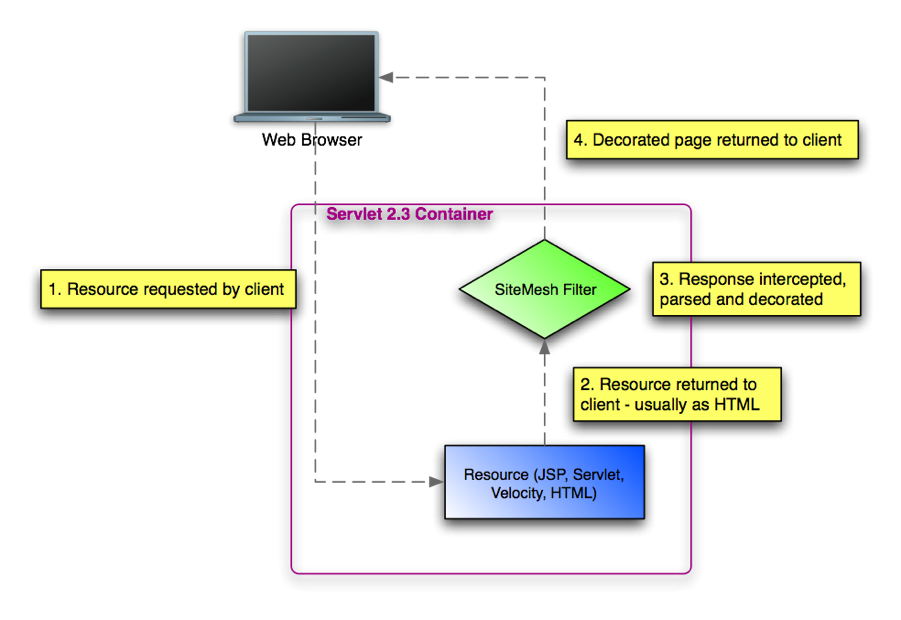
Ajaxified Body I've often wondered if it was possible to use Ajax to reload the main content of a web application without reloading the header, menu and footer. SiteMesh allows you to move these common elements to a decorator that gets wrapped around each page. Below is a diagram of how SiteMesh works.

SiteMesh

You can read the Introduction to SiteMesh article if you're interested in learning more about SiteMesh's basic features. By default, SiteMesh decorates text/html responses and ignores any other content type (e.g. image/gif). It also contains an <excludes> configuration element that allows you to turn off decoration when a URL matches a certain pattern. For example, the following allows you to disable decoration when "ajax=true" is passed in the URL.

<excludes>
    <pattern>**ajax=true</pattern>
</excludes>

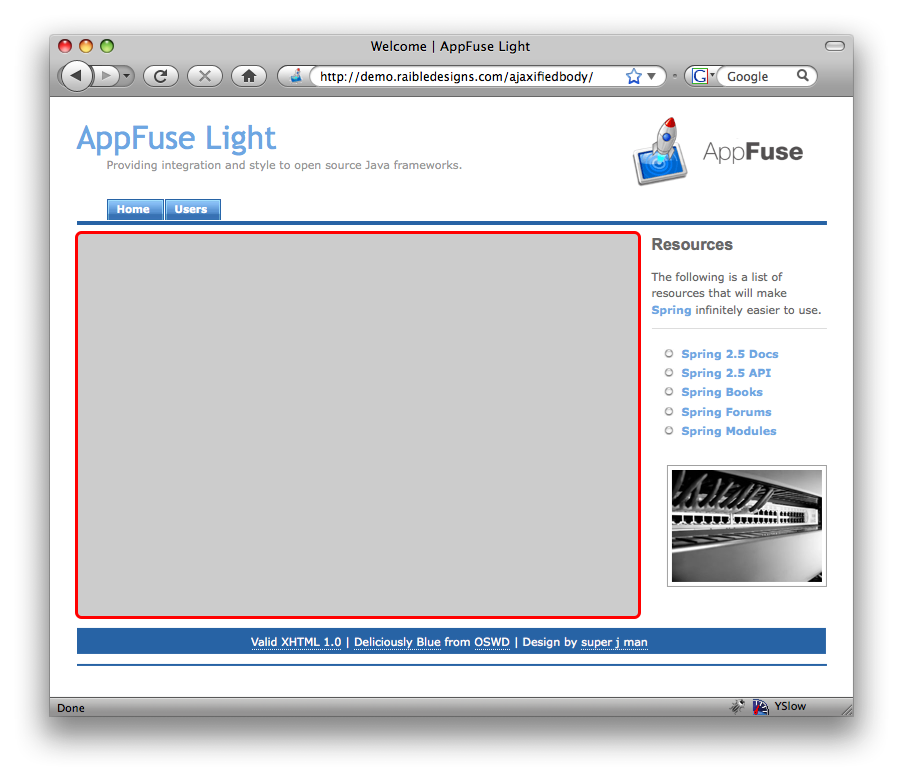
To optimize the loading of an application so the common elements aren't loaded for each page, it should be possible to create an Ajaxified Body where the primary content area (PCA) of the site is loaded via Ajax rather than refreshing the whole page. The header, footer and navigation bar often stays the same from page-to-page, so it doesn't seem to make a whole lot of sense to load them each time the page loads. The image below shows the PCA (of an AppFuse Light application) as a grey square with a red border.

Ajaxified Body - AppFuse Light

Implementing an Ajaxified Body consists of the following steps:

  1. Adding SiteMesh and moving common elements to a decorator.
  2. Remove common elements from each individual page (if you're using includes).
  3. Configure SiteMesh so decoration is disabled when the requested URL contains "ajax=true".
  4. Write JavaScript that modifies all <a href=""> links (and buttons with onclick='location.href') in the PCA to have an onclick handler.
  5. The onclick handler should call a JavaScript function that loads the link's URL + ajax=true using XMLHttpRequest (XHR).
  6. Add XHR success handling to replace the PCA with the loaded content.
  7. Add XHR error handling to go to the URL normally when response.status != 200.
  8. Inspect the response HTML for <title> element and replace document.title if exists.
  9. Inspect the response HTML for <head> element and append to current if exists.
  10. Inspect the response HTML for <script> and <link> elements (JavaScript and CSS) and evaluate them if they exist.

As a proof of concept, I created a prototype using AppFuse Light (Prototype/Scriptaculous for Ajax). You can see a demo at the following URL. You can also download a patch or the source for this project.

http://demo.raibledesigns.com/ajaxifiedbody

Below are a number of things I discovered while writing this prototype:

  • The hardest part of implementing this seems to be coding the exceptions. It's possible you'll have some links with existing onclick handlers and you may have to disable "ajaxifying links" for those links.
  • A progress indicator is important or the page might load so fast that the user doesn't visually detect it changed. This can lead to a worse user experience because they don't see the flash of the blank page they're used to when a page load occurs.
  • While forms can be submitted via Ajax, there's no harm in leaving existing form behavior in place where the full site is reloaded after submitting a form.
  • If a particular page needs to change the common elements (header, menu, footer), it should be possible to do that with JavaScript after the PCA content loads.
  • If the success/error indicator is outside the PCA, it may need to be populated and displayed/hidden with JavaScript after the PCA loads.

I'm sure my implementation can be improved, but I'm also curious to see what you think of this idea. I know it's not revolutionary, but it's something I'm considering adding by default to AppFuse and AppFuse Light. Do any Ajax frameworks do something like this out-of-the-box?

Update: Thanks to everyone for the great feedback - keep it coming. I agree that adding history support is a must. I'll try to do that in the next day or two. This post has also been featured on Javalobby and Ajaxian.

Update 2: Added history support. Posted in Java at Oct 03 2008, 02:33:09 PM MDT 19 Comments

20080511 Sunday May 11, 2008

AppFuse Light 1.8.2 Released AppFuse Light 1.8.2 is a bug fixes release that includes upgrades for Spring, Spring Security, Hibernate, Wicket, Tapestry and many others. In addition, Spring bean definitions were replaced with annotations (@Repository, @Service and @Controller). See the Release Notes for more information on what's changed since the last release.

AppFuse Light now offers 60 possible combinations for download:

  • Web Frameworks: JSF (MyFaces), Spring MVC (with Ajax, Acegi Security, JSP, FreeMarker or Velocity), Stripes, Struts 1.x, Struts 2.x, Tapestry, WebWork, Wicket
  • Persistence Frameworks: Hibernate, iBATIS, JDO (JPOX), OJB, Spring JDBC

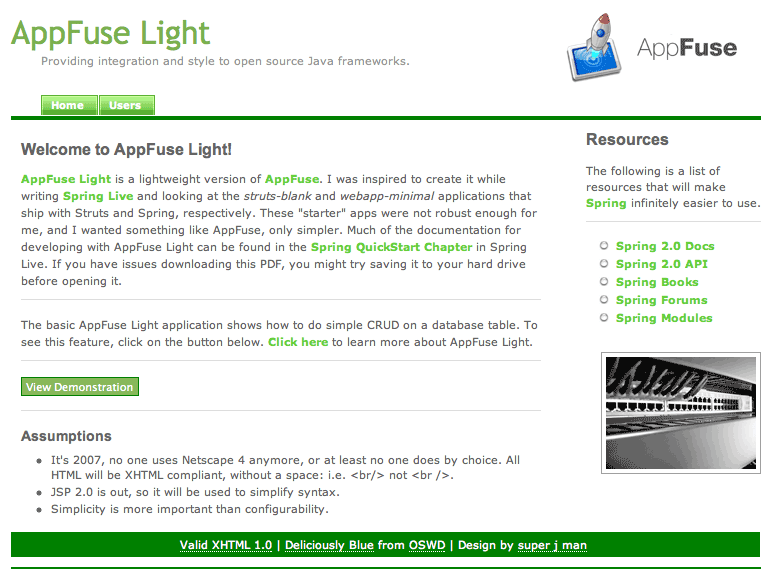
AppFuse Light Screenshot - click on the box at the bottom right of AL to activate StyleSheet Switcher

If you have any questions about this release, please subscribe to the AppFuse user mailing list by sending a blank e-mail to users-subscribe@appfuse.dev.java.net. You can also post questions in a forum-like fashion using Nabble: http://appfuse.org/forum/user. Posted in Java at May 11 2008, 10:16:17 PM MDT Add a Comment

20080122 Tuesday January 22, 2008

Ext JS Tag Library James Carr in Making extJS More Accessible to Java Developers:

With my recent interest in extjs, I was playing with the idea of making a Struts2/WebWork component library or a tag library to handle a lot of the boilerplate extjs code (i.e. creating layouts and such) but, luckily, discovered someone beat me to the punch!

I randomly came across ExtTLD this morning while sifting through my rss feeds, and I must say I am rather impressed. Although I consider myself a pretty good javascript developer, there seems to be a lot of java developers who aren?t that hot at javascript... which is why whenever I attend any java related conference there is always several sessions touting "javascript free ajax!" frameworks like GWT, Ajax4JSF, or IceFaces. Although I've always been skeptical of such frameworks, I do see their benefits... especially for the java developer who excels at serverside JEE development but generally sucks when it comes to adding javascript behavior to the presentation layer.

I can definitely see how Ajax-with-IDE-code-completion would appeal to many developers. However, I do have to agree with James:

So far it looks good, but I haven't had a chance to play with it yet. Basically, I'll have to see if it passes my "good javascript generator framework" test. I?m a pretty staunch advocate of unobtrusive javascript, and generally hate any presentation layer framework that seeks to dump several hundred (or thousand) lines of javascript inline in the html document.

For development shops that have UI-only developers for the front-end and Java developers for the controller/validation part of an application, frameworks that generate JavaScript usually don't make sense.

ExtTLD's license:

ExtTLD is published under GPL 3.0 license however restricts use by companies participating in animal abuse, such as animal testing laboratories etc.

Posted in Java at Jan 22 2008, 10:01:27 AM MST 5 Comments