Matt RaibleMatt Raible is a writer with a passion for software. Connect with him on LinkedIn.

The Angular Mini-Book The Angular Mini-Book is a guide to getting started with Angular. You'll learn how to develop a bare-bones application, test it, and deploy it. Then you'll move on to adding Bootstrap, Angular Material, continuous integration, and authentication.

Spring Boot is a popular framework for building REST APIs. You'll learn how to integrate Angular with Spring Boot and use security best practices like HTTPS and a content security policy.

For book updates, follow @angular_book on Twitter.

The JHipster Mini-Book The JHipster Mini-Book is a guide to getting started with hip technologies today: Angular, Bootstrap, and Spring Boot. All of these frameworks are wrapped up in an easy-to-use project called JHipster.

This book shows you how to build an app with JHipster, and guides you through the plethora of tools, techniques and options you can use. Furthermore, it explains the UI and API building blocks so you understand the underpinnings of your great application.

For book updates, follow @jhipster-book on Twitter.

10+ YEARS


Over 10 years ago, I wrote my first blog post. Since then, I've authored books, had kids, traveled the world, found Trish and blogged about it all.

Best Practices for using Foundation with AngularJS Revisited

Angular Foundation A couple weeks ago I wrote about using Foundation with AngularJS. Based on research I'd done, I concluded that it was best to use Foundation for Apps for any webapps my client created and Foundation for Sites for any websites (e.g. a WordPress-based intranet).

After doing my initial research, I did some prototyping with Foundation for Apps (F4A). What I discovered is that F4A does not include all the same components as Foundation for Sites (F5). For example, the top-bar and dropdown functionality are missing. I posted my issues to the Foundation Forums.

The response I received:

It should work. You would need to copy over all the Scss and global mixins that you used in top-bar or at least all the output CSS from it. Otherwise there is no reason the components won't fit into the grid.

I was able to import Foundation for Sites into my project by adding it to bower.json:

  "dependencies": {
    "foundation-apps": "~1.0.2",
    "foundation": "~5.5.1"
  }

After doing this, I added the new path to Gulpfile.js:

var sassPaths = [
  'client/assets/scss',
  'bower_components/foundation/scss',
  'bower_components/foundation-apps/scss'
];

After making this change, the top-bar rendered and my dropdowns worked. Since there was no jQuery in the page, I thought this might be a viable option. However, Jason Demitri quickly pointed out it probably wouldn't work with mobile. He was right.

While using F4A, I noticed that its components, and much of its look-n-feel, was different than F5. If you look at its Email App template, you'll see it looks kinda like a mobile app, even in a desktop browser. After trying F4A myself, I decided that F4A wasn't for us. First of all, it doesn't seem to provide a consistent look and feel with a website that's written using F5. Furthermore, F4A only supports IE10+. In the healthcare industry, there's a lot of older browsers out there, so my client needs to support IE9 as a minimum.

For these reasons, I decided to try Angular directives for Foundation. I took a prototype I'd written with F5, removed its JavaScript, added Angular Foundation + Foundation dependencies to bower.json, added references to the respective scripts in index.html and added 'mm.foundation' as a dependency in app.js. The experiment worked beautifully and I was quite happy with the results. I shared my findings with the team and we decided Angular Foundation is the best way to integrate Foundation and AngularJS.

F4A is pretty new and I imagine it'll add more of F5's features as it evolves. However, I don't know if the two will ever be so similar that they can live side-by-side and allow a seamless experience for users. If you're interested in mixing F4A and F5, you might want to watch Jason Demitri's foundationUltra. This project combines Angular Foundation, Foundation for Sites, Foundation for Apps and Font Awesome. You can see a demo at http://relutiondev.github.io/foundationUltra/.
Posted in The Web at Feb 19 2015, 09:38:42 AM MST 1 Comment

How to ReactJS and Tooling is Awesome at HTML5 Denver

Last night, I had the pleasure of attending the HTML5 Denver Meetup with two talks by Will Klein. I was motivated to attend because React has been on my radar for a while and Will's first talk was titled How to ReactJS. Will's presentation doesn't show the real meat of this talk, which contained lots of live coding. Will started with a static webapp, then converted it to use React bit-by-bit. His live coding was greatly helped by the fact that he had 3-4 co-workers in the room, so there was a sense of pair programming when things didn't work. During the presentation, he mentioned the JavaScript Jabber Podcast on React. I listened to it this morning, and I recommend it if you want to learn about the history of React.

Will's second talk was titled Tooling is Awesome. In this presentation, he showed us how to use npm and webpack. Again, the presentation doesn't capture the vast amount of knowledge demonstrated during the live-cli session. I hadn't heard of webpack before, so I was pumped to learn about it. If you need to complete/translate to JavaScript or CSS from another language, chances are that webpack will work well for you. During this demo, Will converted the previously developed React code to require/export modules, as well to do transpilation using webpack's jsx-loader. He also mentioned Keith Cirkel's How to Use npm as a Build Tool. If you're just getting started with JavaScript development and don't want to learn tools like Grunt or Gulp, this article will help you use npm as your only build tool.

Even though you can't experience the live-coding that happened last night, the code has been posted to GitHub. If you're looking to have talks about developing with React, I'd suggest contacting Will. He delivered great talks on subjects I've been keen to learn more about. Thanks Will!

In other Denver-related tech news, ThingMonk is coming March 3-4 and HTML5 Denver has lightning talks on March 23rd. ThingMonk is "a meeting of the tribes for people building the Internet of Things" and is sure to be a great conference. The Redmonk crew is always fun to hang out with and knows how to create a conference. Did I mention it's at a distillery?! The lightning talks in March are always a great time too. You can really learn a lot in a short period of time and it's a great way to share knowledge about cool technology you've recently used. Heck, you could attend ThingMonk, then create a lightning talk about what you learned for HTML5 Denver!

Posted in The Web at Feb 17 2015, 10:16:08 AM MST Add a Comment

Best Practices for using Foundation with AngularJS

What You Need To Know About Zurb Foundation for Apps I was recently tasked with doing some research to figure out the best way to use Foundation with AngularJS. Goals for this research included:

  1. Identify use cases of Foundation for Sites vs Foundation for Apps and recommend when to use each.
  2. Look at pros and cons of using AngularJS with Foundation for Sites.

I'm writing this blog post to get feedback from you, fellow web developers, on your experience with Foundation. Have you tried using Foundation for Sites with AngularJS? If so, did you experience any pain?

From what I can tell, it looks like Foundation for Apps (FA) was created because folks had issues making AngularJS and Foundation 5 play nicely together. The Next Foundation explains why FA was created. Reddit's web_design zone has quite a few comments related to this article.

From there, I found a few ZURB blog posts that describe FA's three main advantages over Foundation for Sites (FS):

  1. A New Grid
  2. Motion UI
  3. AngularJS Integration

This thread on the Foundation forums seems to indicate that FA would be good for developing applications while FS would be good for an intranet built on WordPress (since it's more of a website than a webapp).

[Read More]

Posted in The Web at Feb 05 2015, 09:21:50 AM MST 1 Comment

The Art of AngularJS in 2015

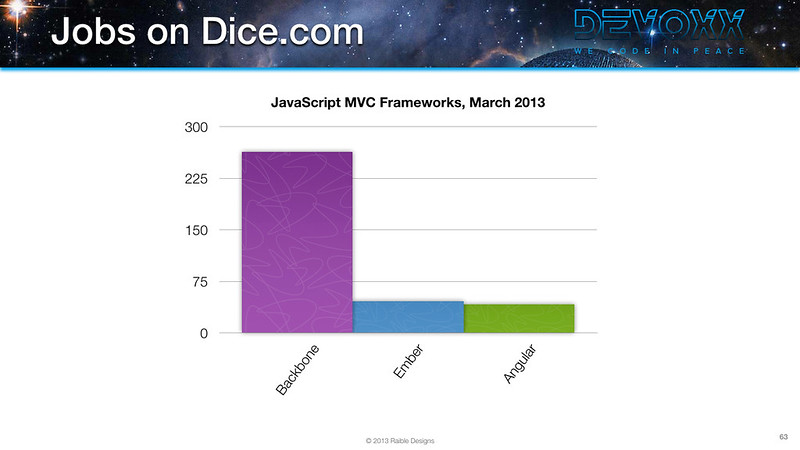
I've been tracking statistics on jobs and skills for JavaScript MVC frameworks ever since I Compared JVM Web Frameworks at Devoxx France in 2013. At that time, Backbone was the dominant framework.

2013 Dice Jobs for JavaScript MVC Frameworks 2013 LinkedIn Skills for JavaScript MVC Frameworks

Last year, I updated those statistics for a presentation on AngularJS at Denver's Derailed. Angular had a similar amount of jobs as Backbone and a lot of people added it to their LinkedIn profiles. I found that Ember had grown around 300%, Backbone 200% and Angular 1000%!

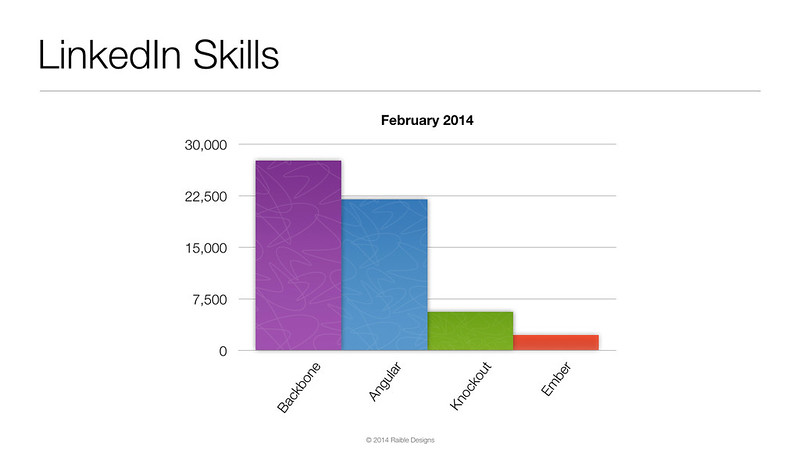
2014 Dice Jobs for JavaScript MVC Frameworks 2014 LinkedIn Skills for JavaScript MVC Frameworks

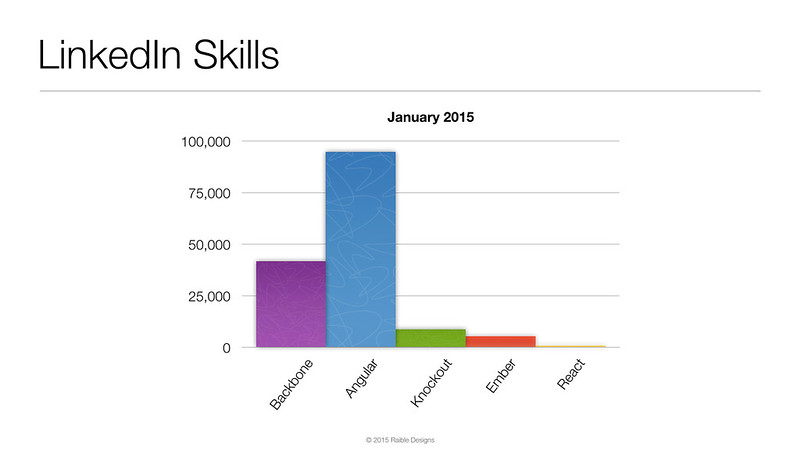
Before presenting on AngularJS at last night's Denver Open Source Users Group, I updated these statistics once again. The charts below show how the number of jobs for Angular has doubled in the last year, while jobs for Ember and Backbone have fallen slightly. As far as skills, developers learning Ember and Backbone has increased 200%, while skilled Angular folks has risen 400%.

2015 Dice Jobs for JavaScript MVC Frameworks 2015 LinkedIn Skills for JavaScript MVC Frameworks

Yes, AngularJS has experienced huge growth in the last couple of years. You might even say it's the Struts of the JavaScript world.

For the presentation I delivered last night, I made a number of improvements over last year's. I added a live coding demo based on my Getting Started with AngularJS tutorial. I used IntelliJ's live templates to make it look easy. However, since the audience was quiet, and some were falling asleep, I skipped over the testing demo.

[Read More]

Posted in The Web at Feb 04 2015, 09:14:57 AM MST Add a Comment

Testing AngularJS Applications

This article is the second in a series about learning AngularJS. It describes how to test a simple AngularJS application. In a previous article, Getting Started with AngularJS, I showed how to develop a simple search and edit feature.

What you'll learn

You'll learn to use Jasmine for unit testing controllers and Protractor for integration testing. Angular's documentation has a good developer's guide to unit testing if you'd like more information on testing and why it's important.

The best reason for writing tests is to automate your testing. Without tests, you'll likely be testing manually. This manual testing will take longer and longer as your codebase grows.

What you'll need

  • About 15-30 minutes
  • A favorite text editor or IDE. We recommend IntelliJ IDEA.
  • Git installed.
  • Node.js and NPM installed.
[Read More]

Posted in The Web at Feb 02 2015, 10:11:56 AM MST Add a Comment