Matt RaibleMatt Raible is a writer with a passion for software. Connect with him on LinkedIn.

The Angular Mini-Book The Angular Mini-Book is a guide to getting started with Angular. You'll learn how to develop a bare-bones application, test it, and deploy it. Then you'll move on to adding Bootstrap, Angular Material, continuous integration, and authentication.

Spring Boot is a popular framework for building REST APIs. You'll learn how to integrate Angular with Spring Boot and use security best practices like HTTPS and a content security policy.

For book updates, follow @angular_book on Twitter.

The JHipster Mini-Book The JHipster Mini-Book is a guide to getting started with hip technologies today: Angular, Bootstrap, and Spring Boot. All of these frameworks are wrapped up in an easy-to-use project called JHipster.

This book shows you how to build an app with JHipster, and guides you through the plethora of tools, techniques and options you can use. Furthermore, it explains the UI and API building blocks so you understand the underpinnings of your great application.

For book updates, follow @jhipster-book on Twitter.

10+ YEARS


Over 10 years ago, I wrote my first blog post. Since then, I've authored books, had kids, traveled the world, found Trish and blogged about it all.
You searched this site for "jsf". 312 entries found.

You can also try this same search on Google.

Upcoming Conferences: TSSJS in Las Vegas and 33rd Degree in Kraków, Poland

It's that time of year again - the beginning of Conference Season. I generally like to speak at a few conferences a year and 2011 is no different. For March Madness, I'll be heading to Las Vegas to speak at TheServerSide Java Symposium. I'll be giving updated talks similar to the ones I gave at last year's Rich Web Experience in Fort Lauderdale:

You might remember my Comparing JVM Web Frameworks talk from Devoxx 2010 and some of the interesting debate it caused. I've done some minor updates to my video presentation and some updates to my JVM Web Frameworks presentation as well. Most notably, I'll be including some findings from Peter Thomas's perfbench project. I also hope to update AppFuse to JSF 2 and integrate extensionless URLs in AppFuse Light. Marcin Zajaczkowski was nice enough to provide an upgrade to Wicket 1.4.15, so it'll be interesting to see how well Wicket supports extensionless URLs.

In April, I'll be presenting Comparing JVM Web Frameworks at the 33rd Degree Conference in Kraków, Poland. While I studied in Russia a couple summers in college, I've never been to Poland, so I'm really looking forward to this trip. With any luck, I'll have AppFuse 2.1 released by then and my knowledge of all its web frameworks' latest versions will be update-to-date. As you know, it's unlikely I'll recommend a best web framework (because there isn't one), but I hope to provide some techniques you can use to decide the best framework for your particular needs.

In addition to Vegas and Poland, there's a couple other events I might speak at in the next few months: the Utah Java Users Group (possibly in April), Jazoon and Über Conf (if my proposals are accepted). For these events, I'm hoping to present the following talk:

Webapp Security: Develop. Penetrate. Protect. Relax.
In this session, you'll learn how to implement authentication in your Java web applications using Spring Security, Apache Shiro and good ol' Java EE Container Managed Authentication. You'll also learn how to secure your REST API with OAuth and lock it down with SSL.

After learning how to develop authentication, I'll introduce you to OWASP, the OWASP Top 10, its Testing Guide and its Code Review Guide. From there, I'll discuss using WebGoat to verify your app is secure and commercial tools like webapp firewalls and accelerators.

If you're planning on attending TSSJS or 33rd Degree, hopefully I'll see you there.

Posted in Java at Feb 25 2011, 03:14:59 PM MST 1 Comment

Implementing Extensionless URLs with Tapestry, Spring MVC, Struts 2 and JSF

For the past couple of weeks, I've spent several evening hours implementing extensionless URLs in AppFuse. I've been wanting to do this ever since I wrote about how to do it a few years ago. This article details my experience and will hopefully help others implement this feature in their webapps.

First of all, I used the UrlRewriteFilter, one of my favorite Java open source projects. Then I followed a pattern I found in Spring's "mvc-basic" sample app from MVC Simplifications in Spring 3.0. The app has since changed (because SpringSource integrated UrlRewriteFilter-type functionality in Spring MVC), but the pattern was basically path-matching instead of extension-mapping. That is, the "dispatcher" for the web framework was mapped to /app/* instead of *.html.

Prior to the move to extensionless URLs, AppFuse used *.html for its mapping and this seemed to cause users problems when they wanted to serve up static HTML files. To begin with, I removed all extensions from URLs in tests (Canoo WebTest is used for testing the UI). I also did this for any links in the view pages and redirects in the Java code. This provided a decent foundation to verify my changes worked. Below are details about each framework I did this for, starting with the one that was easiest and moving to hardest.

Tapestry 5
Tapestry was by far the easiest to integrate extensionless URLs into. This is because it's a native feature of the framework and was already integrated as part of Serge Eby's Tapestry 5 implementation. In the end, the only things I had to do where 1) add a couple entries for CXF (mapped to /services/*) and DWR (/dwr/*) to my urlrewrite.xml and 2) change the UrlRewriteFilter so it was only mapped to REQUEST instead of both REQUEST and FORWARD. Below are the mappings I added for CXF and DWR.

<urlrewrite default-match-type="wildcard">
    ...
    <rule>
        <from>/dwr/**</from>
        <to>/dwr/$1</to>
    </rule>
    <rule>
        <from>/services/**</from>
        <to>/services/$1</to>
    </rule>
</urlrewrite>

Spring MVC
I had a fair amount of experience with Spring MVC and extensionless URLs. Both the Spring MVC applications we developed last year at Time Warner Cable used them. To change from a *.html mapping to /app/* was pretty easy and involved removing more code than I added. Previously, I had a StaticFilter that looked for HTML files and if it didn't find them, it dispatched to Spring's DispatcherServlet. I was able to remove this class and make the web.xml file quite a bit cleaner.

To make UrlRewriteFilter and Spring Security play well together, I had to move the securityFilter so it came after the rewriteFilter and add an INCLUDE dispatcher so included JSPs would have a security context available to them.

<filter-mapping>
    <filter-name>rewriteFilter</filter-name>
    <url-pattern>/*</url-pattern>
</filter-mapping>
<filter-mapping>
    <filter-name>securityFilter</filter-name>
    <url-pattern>/*</url-pattern>
    <dispatcher>REQUEST</dispatcher>
    <dispatcher>FORWARD</dispatcher>
    <dispatcher>INCLUDE</dispatcher>
</filter-mapping>

The only other things I had to change were security.xml and dispatcher-servlet.xml to remove the .html extensions. The urlrewrite.xml file was fairly straightforward. I used the following at the bottom as a catch-all for dispatching to Spring MVC.

<rule>
    <from>/**</from>
    <to>/app/$1</to>
</rule>
<outbound-rule>
    <from>/app/**</from>
    <to>/$1</to>
</outbound-rule>

Then I added a number of other rules for j_security_check, DWR, CXF and static assets (/images, /scripts, /styles, /favicon.ico). You can view the current urlrewrite.xml in FishEye. The only major issue I ran into was that Spring Security recorded protected URLs as /app/URL so I had to add a rule to redirect when this happened after logging in.

<rule>
    <from>/app/**</from>
    <to last="true" type="redirect">%{context-path}/$1</to>
</rule>

Struts 2
Using extensionless URLs with Struts 2 is likely pretty easy thanks to the Convention Plugin. Even though this plugin is included in AppFuse, it's not configured with the proper constants and I have struts.convention.action.disableScanning=true in struts.xml. It looks like I had to do this when I upgraded from Struts 2.0.x to Struts 2.1.6. It's true AppFuse's Struts 2 support could use a bit of love to be aligned with Struts 2's recommended practices, but I didn't want to spend the time doing it as part of this exercise.

With Struts 2, I tried the path-mapping like I did with Spring MVC, but ran into issues. Instead, I opted to use an ".action" extension by changing struts.action.extension from "html" to "action," in struts.xml. Then I had to do a bunch of filter re-ordering and dispatcher changes. Before, with a .html extension, I had all filters mapped to /* and in the following order.

Filter NameDispatchers
securityFilter request
rewriteFilter request, forward
struts-prepare request
sitemesh request, forward, include
staticFilter request, forward
struts request

Similar to Spring MVC, I had to remove the rewriteFilter in front of the securityFilter and I was able to remove the staticFilter. I also had to map the struts filter to *.action instead of /* to stop Struts from trying to catch static asset and DWR/CXF requests. Below is the order of filters and their dispatchers that seems to work best.

Filter NameDispatchers
rewriteFilter request
securityFilter request, forward, include
struts-prepare request, forward
sitemesh request, forward, include
struts forward

From there, it was a matter of modifying urlrewrite.xml to have the following catch-all and rules for static assets, j_security_check and DWR/CXF.

<rule match-type="regex">
    <from>^([^?]*)/([^?/\.]+)(\?.*)?$</from>
    <to last="true">$1/$2.action$3</to>
</rule>
<outbound-rule match-type="regex">
    <from>^(.*)\.action(\?.*)?$</from>
    <to last="false">$1$2</to>
</outbound-rule>

JSF
JSF was by far the most difficult to get extensionless URLs working with. I'm not convinced it's impossible, but I spent a several hours over a few days and was unsuccessful in completely removing them. I was able to make things work so I could request pages without an extension, but found when clicking buttons and links, the extension would often show up in the URL. I'm also still using JSF 1.2, so it's possible that upgrading to 2.0 would solve many of the issues I encountered.

For the time being, I've changed my FacesServlet mapping from *.html to *.jsf. As with Struts, I had issues when I tried to map it to /app/*. Other changes include changing the order of dispatchers and filters, the good ol' catch-all in urlrewrite.xml and modifying security.xml. For some reason, I wasn't able to get file upload working without adding an exception to the outbound-rule.

<rule match-type="regex">
    <from>^([^?]*)/([^?/\.]+)(\?.*)?$</from>
    <to last="true">$1/$2.jsf</to>
</rule>
<outbound-rule match-type="regex">
  <!-- TODO: Figure out how to make file upload work w/o using *.jsf -->
    <condition type="path-info">selectFile</condition>
    <from>^(.*)\.jsf(\?.*)?$</from>
    <to last="false">$1$2</to>
</outbound-rule>

I also spent a couple hours trying to get Pretty Faces to work. I wrote about my issues on the forums. I tried writing a custom Processor to strip the extension, but found that I'd get into an infinite loop where the processor kept getting called. To workaround this, I tried using Spring's RequestContextHolder to ensure the processor only got invoked once, but that proved fruitless. Finally, I tried inbound and outbound custom processors, but failed to get those working. The final thing I tried was url-mappings for each page in pretty-config.xml.

<url-mapping>
  <pattern value="/admin/users"/>
  <view-id value="/admin/users.jsf"/>
</url-mapping>
<url-mapping>
  <pattern value="/mainMenu"/>
  <view-id value="/mainMenu.jsf"/>
</url-mapping>

The issue with doing this was that some of the navigation rules in my faces-config.xml stopped working. I didn't spend much time trying to diagnose the problem because I didn't like having to add an entry for each page in the application. The one nice thing about Pretty Faces is it did allow me to do things like the following, which I formerly did with a form that auto-submitted when the page loaded.

<url-mapping>
  <pattern value="/passwordHint/#{username}"/>
  <view-id value="/passwordHint.jsf"/>
  <action>#{passwordHint.execute}</action>
</url-mapping>

Conclusion
My journey implementing extensionless URLs was an interesting one, and I solidified my knowledge about ordering of filters, dispatchers and the UrlRewriteFilter. I still think I have more to learn about properly implementing extensionless URLs in Struts 2 and JSF and I hope to do that in the near future. I believe Struts' Convention Plugin will help me and JSF 2 + Pretty Faces will hopefully work nicely too. Of course, it'd be great if all Java Web Frameworks had an easy mechanism for producing and consuming extensionless URLs. In the meantime, thank goodness for the UrlRewriteFilter.

If you'd like to try AppFuse and its shiny new URLs, see the QuickStart Guide and choose the 2.1.0-SNAPSHOT version.


Posted in Java at Feb 10 2011, 04:53:27 PM MST 10 Comments

Making Code Generation Smarter with Maven

As you might've read in my last entry, I recently started a new gig with Overstock.com. On my first day, I was quickly immersed into the development process by joining the Conversion Team. The Conversion Team is responsible for developing the checkout UI and handling payments from customers. I quickly discovered Overstock was mostly a Linux + Eclipse Shop and did my best to get my favorite Mac + IntelliJ + JRebel installed and configured. Thanks to my new Team Lead, I was able to get everything up and running the first day, as well as checkin my first contribution: making mvn jetty:run work so I didn't have to use my IDE to deploy to Tomcat.

In setting up my environment, I couldn't help but notice running jetty:run took quite a while to run each time. Specifically, the build process took 45 seconds to start executing the Jetty plugin, then another 23 seconds to startup after that. The first suspicious thing I noticed was that the UI templates were being re-generated and compiled on each execution. The UI Templating Framework at Overstock is Jamon, and is described as follows:

Jamon is a text template engine for Java, useful for generating dynamic HTML, XML, or any text-based content. In a typical Model-View-Controller architecture, Jamon clearly is aimed at the View (or presentation) layer.

Because it is compiled to non-reflective Java code, and statically type-checked, Jamon is ideally suited to support refactoring of template-based UI applications. Using mock objects -like functionality, Jamon also facilitates unit testing of the controller and view.

To generate .java files from .jamon templates, we use the Jamon Plugin for Maven. Remembering that the Maven Compiler Plugin has an incremental-compile feature, I turned to its source code to find out how to implement this in the Jamon plugin. I was pleasantly surprised to find the StaleSourceScanner. This class allows you to easily compare two files to see if the source needs to re-examined for generation or compilation.

I noticed the Jamon Plugin had the following code to figure out which files it should generate into .java files:

private List<File> accumulateSources(File p_templateSourceDir)
{
  final List<File> result = new ArrayList<File>();
  if (p_templateSourceDir == null)
  {
    return result;
  }
  for (File f : p_templateSourceDir.listFiles())
  {
    if (f.isDirectory())
    {
      result.addAll(accumulateSources(f));
    }
    else if (f.getName().toLowerCase(Locale.US).endsWith(".jamon"))
    {
      String filePath = f.getPath();
       // FIXME !?
      String basePath = templateSourceDir().getAbsoluteFile().toString();
      result.add(new File(filePath.substring(basePath.length() + 1)));
    }
  }
  return result;
}

I changed it to be smarter and only generate changed templates with the following code:

private List<File> accumulateSources(File p_templateSourceDir) throws MojoExecutionException
{
  final List<File> result = new ArrayList<File>();
  if (p_templateSourceDir == null)
  {
    return result;
  }
  SourceInclusionScanner scanner = getSourceInclusionScanner( staleMillis );
  SourceMapping mapping = new SuffixMapping( ".jamon", ".java");

  scanner.addSourceMapping( mapping );

  final Set<File> staleFiles = new LinkedHashSet<File>();

  for (File f : p_templateSourceDir.listFiles())
  {
    if (!f.isDirectory())
    {
      continue;
    }

    try
    {
      staleFiles.addAll( scanner.getIncludedSources(f.getParentFile(), templateOutputDir()));
    }
    catch ( InclusionScanException e )
    {
      throw new MojoExecutionException(
        "Error scanning source root: \'" + p_templateSourceDir.getPath()
          + "\' " + "for stale files to recompile.", e );
    }
  }

  // Trim root path from file paths
  for (File file : staleFiles) {
    String filePath = file.getPath();
    String basePath = templateSourceDir().getAbsoluteFile().toString();
    result.add(new File(filePath.substring(basePath.length() + 1)));
  }
}

This method references a getSourceInclusionScanner() method, which is implemented as follows:

protected SourceInclusionScanner getSourceInclusionScanner( int staleMillis )
{
  SourceInclusionScanner scanner;

  if ( includes.isEmpty() && excludes.isEmpty() )
  {
      scanner = new StaleSourceScanner( staleMillis );
  }
  else
  {
      if ( includes.isEmpty() )
      {
          includes.add( "**/*.jamon" );
      }
      scanner = new StaleSourceScanner( staleMillis, includes, excludes );
  }

  return scanner;
}

If you're using Jamon and its Maven Plugin, you can view my patch at SourceForge. If you're looking to include this functionality in your project, I invite you to look at the code I learned from in the Maven Compiler's AbstractCompilerMojo class.

After making this change, I was able to reduce the build execution time by over 50%. Now it takes 20 seconds to hit the Jetty plugin and 42 seconds to finishing starting. Of course, in an ideal world, I'd like to get this down to 20 seconds or less. Strangely enough, the easiest way to do this seems to be simple: use Linux.

On the Linux desktop they provided me, it takes 12 seconds to hit the Jetty plugin and 23 seconds to finish starting. I'd like to think this is a hardware thing, but it only get 20% faster on OS X when using an 8GB RAM + SSD machine (vs. a 4GB + 5400 drive). Since Overstock has provided me with a 4GB MacBook Pro, I'm considering installing Ubuntu on it, just to see what the difference is.

Sun over the Snowbird In related news, Overstock.com is looking to hire a whole bunch of Java Developers this year. The pictures of the new Provo office look pretty sweet. Of course, you can also work at HQ, which is a mere 25 minutes from some of the best skiing in the world. Personally, I think Colorado's powder is better, but I can't argue with the convenience of no traffic. In addition to full-time gigs, they've started hiring more remote contractors like myself, so they pretty much have something for everyone. So if you love Java, like to get some turns in before work, and aren't an asshole - you should and I'll try to hook you up.

Update: After writing this post, I received an email from Neil Hartner questioning these numbers. Basically, he was able to get his MacBook Pro to run just as fast as Linux. Turns out, the reason my Mac was so much slower was because JRebel was configured in my MAVEN_OPTS. JRebel's FAQ does state the following:

Does JRebel make the server start up slower?
JRebel needs to do more work on startup (search more places for classes and resources, instrument classes, etc), so some slowdown can be expected. If it's larger than 50% please contact [email protected].

Since it's right around 50% slower, I guess there's no reason to call them. My guess is the best thing to do is remove JRebel from MAVEN_OPTS, but have an alias that can enable it, or simply run it from your IDE.

Posted in Java at Jan 21 2011, 03:26:43 PM MST 7 Comments

How I Calculated Ratings for My JVM Web Frameworks Comparison

When I re-wrote my Comparing JVM Web Frameworks presentation from scratch, I decided to add a matrix that allows you to rate a framework based on 20 different criteria. The reason I did this was because I'd used this method when choosing an Ajax framework for Evite last year. The matrix seemed to work well for selecting the top 5 frameworks, but it also inspired a lot of discussion in the community that my ratings were wrong.

I expected this, as I certainly don't know every framework as well as I'd like. The mistake I made was asking for the community to provide feedback on my ratings without describing how I arrived at them. From Peter Thomas's blog:

What you are doing is adjusting ratings based on who in the community shouts the loudest. I can't help saying that this approach comes across as highly arrogant and condescending, you seem to expect framework developers and proponents to rush over and fawn over you to get better ratings, like waiters in a restaurant trying to impress a food-critic for Michelin stars.

I apologize for giving this impression. It certainly wasn't my intent. By having simple numbers (1.0 == framework does well, 0.5 == framework is OK and 0 == framework not good at criteria) with no rationalization, I can see how the matrix can be interpreted as useless (or to put it bluntly, as something you should wipe your ass with). I don't blame folks for getting angry.

For my Rich Web Experience presentation, I documented why I gave each framework the rating I did. Hopefully this will allow folks to critique my ratings more constructively and I can make the numbers more accurate. You can view this document below or on Google Docs.

In the end, what I was hoping to do with this matrix was to simply highlight a technique for choosing a web framework. Furthermore, I think adding a "weight" to each criteria is important because things like books often aren't as important as REST support. To show how this might be done, I added a second sheet to the matrix and made up some weighting numbers. I'd expect anyone that wants to use this to downloaded the matrix, verify the ratings are accurate for your beliefs and weight the criteria accordingly.

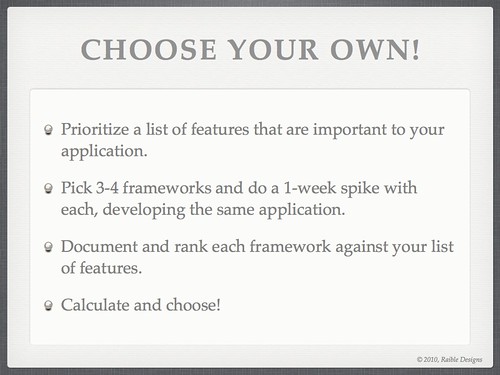
Of course, as I and many others have said, the best way to choose a web framework is to try them yourself. I emphasized this at the end of my presentation with the following two slides.

Slide #77 from Comparing JVM Web Frameworks Talk at RWX2010

Slide #76 from Comparing JVM Web Frameworks Talk at RWX2010

Posted in Java at Dec 06 2010, 11:55:18 AM MST 10 Comments

My Comparing JVM Web Frameworks Presentation from Devoxx 2010

This week, I've been having a great time in Antwerp, Belgium at the Devoxx Conference. This morning, I had the pleasure of delivering my Comparing JVM Web Frameworks talk. I thoroughly enjoyed giving this presentation, especially to such a large audience. You can view the presentation below (if you have Flash installed) or download it here.

Unlike previous years, I chose to come up with a spreadsheet matrix that shows why I chose the 5 I did. This spreadsheet and rankings given to each framework are likely to be debated, as I don't know all the frameworks as well as I'd like to. Also, the missing column on this spreadsheet is a "weighting" column where you can prioritize certain criteria like I've done in the past when Comparing Ajax Frameworks. If you believe there are incorrect numbers, please let me know and I'll try to get those fixed before I do this talk again at The Rich Web Experience.

One thing that doesn't come across in this presentation is that I believe anyone can use this matrix, and weightings, to make any of these frameworks come out on top. I also believe web frameworks are like spaghetti sauce in The Ketchup Conundrum. That is, the only way to make more happy spaghetti sauce lovers was to make more types of spaghetti sauce. You can read more about this in my There is no "best" web framework article.

Update: If you disagree with the various ratings I gave to web frameworks in this presentation, please provide your opinions by filling out this survey. Thanks to Sebastien Arbogast for setting this up.

Update: Sebastien has posted his survey results at JVM Web Framework Survey, First Results.

Update 12/6: A video of this presentation is now available on Parleys.com.

P.S. My current gig is ending in mid-December. If you're looking for a UI Architect with a passion for open source frameworks, please let me know.

Posted in Java at Nov 18 2010, 05:23:10 AM MST 39 Comments

AppFuse 2.1 Milestone 2 Released

I'm pleased to announce the 2nd milestone release of AppFuse 2.1. This release includes upgrades to all dependencies to bring them up-to-date with their latest releases. Most notable are Spring 3 and Struts 2.1. This release fixes many issues with archetypes and contains many improvements to support Maven 3. For more details on specific changes see the 2.1.0 M2 release notes.

What is AppFuse?
AppFuse is an open source project and application that uses open source frameworks to help you develop Web applications quickly and efficiently. It was originally developed to eliminate the ramp-up time when building new web applications. At its core, AppFuse is a project skeleton, similar to the one that's created by your IDE when you click through a wizard to create a new web project. If you use JRebel with AppFuse, you can achieve zero-turnaround in your project and develop features without restarting the server.

Release Details
Archetypes now include all the source for the web modules so using jetty:run and your IDE will work much smoother now. The backend is still embedded in JARs, enabling you to choose with persistence framework (Hibernate, iBATIS or JPA) you'd like to use. If you want to modify the source for that, add the core classes to your project or run "appfuse:full-source".

AppFuse comes in a number of different flavors. It offers "light", "basic" and "modular" and archetypes. Light archetypes use an embedded H2 database and contain a simple CRUD example. In the final 2.1.0 release, the light archetypes will allow code generation like the basic and modular archetypes. Basic archetypes have web services using CXF, authentication from Spring Security and features including signup, login, file upload and CSS theming. Modular archetypes are similar to basic archetypes, except they have multiple modules which allows you to separate your services from your web project.

AppFuse provides archetypes for JSF, Spring MVC, Struts 2 and Tapestry 5. The light archetypes are available for these frameworks, as well as for Spring MVC + FreeMarker, Stripes and Wicket.

Please note that this release does not contain updates to the documentation. Code generation will work, but it's likely that some content in the tutorials won't match. For example, you can use annotations (vs. XML) for Spring MVC and Tapestry is a whole new framework. I'll be working on documentation over the next several weeks in preparation for the 2.1 final release.

For information on creating a new project, please see the QuickStart Guide.

If you have questions about AppFuse, please read the FAQ or join the user mailing list. If you find bugs, please create an issue in JIRA.

Thanks to everyone for their help contributing patches, writing documentation and participating on the mailing lists.

Posted in Java at Nov 15 2010, 03:28:57 PM MST 2 Comments

RE: Moving from Spring to Java EE 6: The Age of Frameworks is Over

Last Tuesday, Cameron McKenzie wrote an interesting article on TheServerSide titled Moving from Spring to Java EE 6: The Age of Frameworks is Over. In this article, Cameron says the following:

J2EE represents the past, and Java EE 6 represents the future. Java EE 6 promises us the ability to go beyond frameworks. Frameworks like Spring are really just a bridge between the mistakes of the J2EE past and the success of the Java EE 6 future. Frameworks are out, and extensions to the Java EE 6 platform are in. Now is the time to start looking past Spring, and looking forward to Seam and Weld and CDI technologies.

He then links to an article titled Spring to Java EE - A Migration Experience, an article written by JBoss's Lincoln Baxter. In this article, Lincoln talks about many of the technologies in Java EE 6, namely JPA, EJB, JSF, CDI and JAX-RS. He highlights all the various XML files you'll need to know about and the wide variety of Java EE 6 application servers: JBoss AS 6 and GlassFish v3.

I don't have a problem with Lincoln's article, in fact I think it's very informative and some of the best documentation I've seen for Java EE 6.

I do have some issues with Cameron's statements that frameworks are mistakes of the J2EE past and that Java EE 6 represents the future. Open source frameworks made J2EE successful. Struts and Hibernate came out in the early days of J2EE and still exist today. Spring came out shortly after and has turned into the do-everything J2EE implementation it was trying to fix. Java EE 6 might be a better foundation to build upon, but it's certainly not going to replace frameworks.

To prove my point, let's start by looking at the persistence layer. We used to have Hibernate based on JDBC, now we have JPA implementations built on top of the JPA API. Is JPA a replacement for all persistence frameworks? I've worked with it and think it's a good API, but the 2.0 version isn't available in a Maven repo and Alfresco recently moved away from Hibernate (which == JPA IMO) to iBATIS for greater data access layer control and scalability. Looks like the age of frameworks isn't over for persistence frameworks.

The other areas that Java EE 6 covers that I believe frameworks will continue to excel in: EJB, CDI, JSF and JAX-RS. Personally, I don't have a problem with EJB 3 and think it's a vast improvement on EJB 2.x. I don't have an issue with CDI either, and as long as it resembles Guice for dependency injection, it works for me. However, when you get into the space I've been living in for the last couple years (high-traffic public internet sites), EJB and things like the "conversation-scope" feature of CDI don't buy you much. The way to make web application scale is to eliminate state and cache as much as possible, both of which Java EE doesn't provide much help for. In fact, to disable sessions in a servlet-container, you have to write a Filter like the following:

public class DisabledSessionFilter extends OncePerRequestFilter {

    /**
     * Filters requests to disable URL-based session identifiers.
     */
    @Override
    protected void doFilterInternal(final HttpServletRequest request,
                                    final HttpServletResponse response,
                                    final FilterChain chain)
            throws IOException, ServletException {

        HttpServletRequestWrapper wrappedRequest = new HttpServletRequestWrapper(request) {

            @Override
            public HttpSession getSession(final boolean create) {
                if (create) {
                    throw new UnsupportedOperationException("Session support disabled");
                }
                return null;
            }

            @Override
            public HttpSession getSession() {
                throw new UnsupportedOperationException("Session support disabled");
            }
        };

        // process next request in chain
        chain.doFilter(wrappedRequest, response);
    }
}

What about JAX-RS? Does it replace the need for frameworks? I like the idea of having a REST API in Java. However, its reference implementation is Jersey, which seems more like a framework than just Java EE. If you choose to use JAX-RS in your application, you still have to choose between CXF, Jersey, RESTEasy and Restlet. I compared these frameworks last year and found the Java EE implementation lacking in the features I needed.

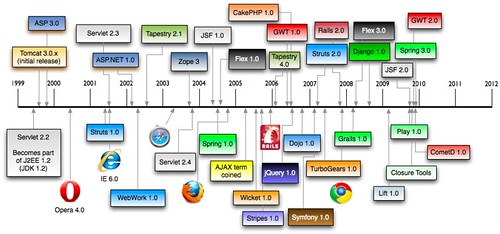
Finally, let's talk about my-least-framework-web-framework: JSF. The main reason I don't like JSF is because of its 1.x version. JSF 1.0 was released a year before the Ajax term was coined (see timeline below). Not only did it take forever to develop as a spec, but it tried to be a client-component framework that was very stateful by default.

History of Web Frameworks

Now that JSF 2.0 is out, it has Ajax integrated and allows you to use GET instead of POST-for-everything. However, the only people that like Ajax integrated into their web frameworks are programmers scared of JavaScript (who probably shouldn't be developing your UI). Also, the best component development platform for the web is JavaScript. I recommend using an Ajax framework for your components if you really want a rich UI.

Sure you can use the likes of Tapestry and Wicket if you like POJO-based web development, but if you're looking to develop a webapp that's easy to maintain and understand, chances are that you'll do much better with traditional MVC frameworks like Spring MVC and Struts 2. The simplicity and popularity of Rails and Grails further emphasize that developers prefer these types of web frameworks.

Another reason I don't like JSF: there's very few developers in the wild happy with it. The major promoters of JSF are book authors, trainers, Java EE Vendors and MyFaces developers. Whenever I speak at conferences, I ask folks to raise their hands for the various web frameworks they're using. I always ask the JSF users to keep their hands up if they like it. Rarely do they stay up.

So it looks like we still need web frameworks.

Eberhard Wolff has an interesting post where he defends Spring and talks about the productivity comparisons between Spring and Java EE. He recommends using Grails or Spring Roo if you want the level of productivity that Ruby on Rails provides. That's a valid recommendation if you're building CRUD-based webapps, but I haven't developed those in quite some time. Nowadays, the apps I develop are true SOFEA apps, where the backend serves up XML or JSON and the frontend client is HTML/JavaScript/CSS, Android, iPad or Sony Blu-Ray players. On my current project, our services don't even talk to a database, they talk to a CMS via RESTful APIs. We use Spring's RestTemplate for this and HttpClient when it doesn't have the features we need. Not much in Java EE 6 for this type of communication. Sure, Jersey has a client, but it's certainly not part of the Java EE spec.

As far as getting Ruby on Rails' zero-turnaround productivity, I don't need Grails or Spring Roo, I simply use IDEA and JRebel.

Conclusion
I don't see how new features in Java EE 6 can mean the age of frameworks is over. Java SE and J2EE have always been foundations for frameworks. The Java EE 6 features are often frameworks in themselves that can be used outside of a Java EE container. Furthermore, Java EE 6 doesn't provide all the features you need to build a high-scale web app today. There's no caching, no stateless web framework that can serve up JSON and HTML and no hot-reload productivity enhancements like JRebel. Furthermore, there's real excitement in Javaland for languages like Scala, Groovy and JRuby. All of these languages have web frameworks that've made many developers happy.

Here's to the Age of Frameworks - may it live as long as the JVM!

P.S. If you'd like to hear me talk about web frameworks on the JVM, I'll be speaking at The Colorado Springs Open Source Meetup and Devoxx 2010 in the near future.

Posted in Java at Oct 16 2010, 03:19:07 PM MDT 37 Comments

My TSSJS 2010 Presentations and Summary

This afternoon, I delivered my last talk at TSSJS 2010 on The Future of Web Frameworks. It's true that I made some bold statements, but please remember that this is my personal opinion, based on my experience. For the most part, I've been involved in super high-traffic websites for the last few years and this has influenced my opinion on web frameworks. Just because I don't recommend your favorite framework doesn't mean it won't work for you. In fact, many of the best web applications today were built without an open source (or commercial) web framework. In the end, it's not as much about the web framework you're using as it is about hiring smart people. Below is my slide deck from this talk.

Yesterday, I did a GWT vs. Flex Smackdown with James Ward. While there wasn't as much trash talking as I'd hoped, I enjoyed delivering it and disputing the greatness of Flex. Below is the presentation that James and I delivered.

The show itself was great this year. It had more attendees than I've seen in a long time. There were a lot of really interesting sessions and and an often humorous Twitter back-channel. I attended quite a few talks and jotted down my notes from several of them. Please see the links below if you're interested in the sessions I attended. You can view all of the presentations from TSSJS 2010 on SlideShare.

Thanks to everyone who came to Vegas and to TheServerSide for an excellent conference.

Posted in Java at Mar 19 2010, 05:29:08 PM MDT 8 Comments

My Future of Web Frameworks Presentation

Earlier this week, I tweeted about a history of web frameworks timeline I created for my upcoming Future of Web Frameworks talk at TSSJS Vegas 2010. I immediately received a lot of feedback and requests for adding new frameworks and releases. The image below is the result of that Twitter conversation. Thanks to everyone who contributed.

History of Web Frameworks

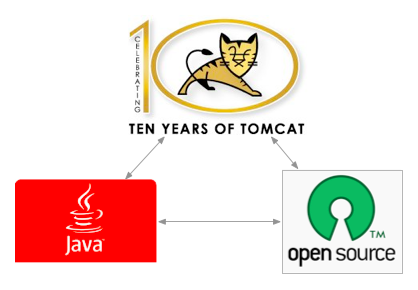
Back in November, I wrote about my proposals for TSSJS. I've been thinking a lot about web frameworks lately and I can't help but think we live in a very exciting time. As a Java developer, I've been exposed to one of the most vibrant language ecosystems on the planet. As Tim Bray talks about, the Java Platform has 3 legs: the language, the virtual machine and a huge, immense library of APIs (both in the JDK and in open source libraries). The diagram below is something I created based on Tim's podcast.

Java has 3 Legs

Tim says, "One of those legs is replaceable and that's the language." And he's right, there's many Java.next languages that run efficiently on the JVM. This is one of the most exciting parts of being a Java web developer today. There's many proven web frameworks and languages that you can pick to build your next web application.

The best part is many of the best web frameworks run on the JVM. Not only that, but the best code editors are the IDEs that you're familiar with and have grown to love. Furthermore, much of the literature for Java.next languages is written for Java developers. As someone who knows Java, you have wealth of web frameworks and languages just waiting for you to learn them.

To create my presentation on the future of web frameworks, I followed the outline I posted previously. I plan on explaining the evolution and history of web frameworks and how we got to where we are today. From there, I'll be speculating on what web applications we'll be developing in the future. Finally, I'll touch on the necessary features of web frameworks that will allow us to develop these applications.

Of course, I haven't actually presented this talk yet, so it's likely to change in the coming weeks before the conference. The good news is this gives you the opportunity to provide constructive criticism on this presentation and help make it better. I realize that a presentation rarely represents the conversation that takes place during a conference. However, I believe it can portray the jist of my thinking and lead to a meaningful conversation in the comments of this post. Below is the presentation I created - thanks in advance for any feedback.

For those who will be joining me at TSSJS ... it's gonna be a great show. St. Patrick's Day in Vegas, what more could you ask for? ;-)

Update: This article has been re-posted on Javalobby and contains additional community feedback in the comments.

Posted in Java at Feb 26 2010, 08:55:39 AM MST 5 Comments

AppFuse 2.1 Milestone 1 Released

The AppFuse Team is pleased to announce the first milestone release of AppFuse 2.1. This release includes upgrades to all dependencies to bring them up-to-date with their latest releases. Most notable are Hibernate, Spring and Tapestry 5.

What is AppFuse?
AppFuse is an open source project and application that uses open source tools built on the Java platform to help you develop Web applications quickly and efficiently. It was originally developed to eliminate the ramp-up time found when building new web applications for customers. At its core, AppFuse is a project skeleton, similar to the one that's created by your IDE when you click through a wizard to create a new web project.

Release Details
Archetypes now include all the source for the web modules so using jetty:run and your IDE will work much smoother now. The backend is still embedded in JARs, enabling you to choose which persistence framework (Hibernate, iBATIS or JPA) you'd like to use. If you want to modify the source for that, add the core classes to your project or run appfuse:full-source.

In addition, AppFuse Light has been converted to Maven and has archetypes available. AppFuse provides archetypes for JSF, Spring MVC, Struts 2 and Tapestry 5. The light archetypes are available for these frameworks, as well as for Spring MVC + FreeMarker, Stripes and Wicket.

Other notable improvements:

Please note that this release does not contain updates to the documentation. Code generation will work, but it's likely that some content in the tutorials won't match. For example, you can use annotations (vs. XML) for dependency injection and Tapestry is a whole new framework. I'll be working on documentation over the next several weeks in preparation for Milestone 2.

AppFuse is available as several Maven archetypes. For information on creating a new project, please see the QuickStart Guide.

To learn more about AppFuse, please read Ryan Withers' Igniting your applications with AppFuse.

The 2.x series of AppFuse has a minimum requirement of the following specification versions:

  • Java Servlet 2.4 and JSP 2.0 (2.1 for JSF)
  • Java 5+

If you have questions about AppFuse, please read the FAQ or join the user mailing list. If you find bugs, please create an issue in JIRA.

Thanks to everyone for their help contributing code, writing documentation, posting to the mailing lists, and logging issues.

Posted in Java at Nov 19 2009, 07:16:36 AM MST 8 Comments