Matt RaibleMatt Raible is a writer with a passion for software. Connect with him on LinkedIn.

The Angular Mini-Book The Angular Mini-Book is a guide to getting started with Angular. You'll learn how to develop a bare-bones application, test it, and deploy it. Then you'll move on to adding Bootstrap, Angular Material, continuous integration, and authentication.

Spring Boot is a popular framework for building REST APIs. You'll learn how to integrate Angular with Spring Boot and use security best practices like HTTPS and a content security policy.

For book updates, follow @angular_book on Twitter.

The JHipster Mini-Book The JHipster Mini-Book is a guide to getting started with hip technologies today: Angular, Bootstrap, and Spring Boot. All of these frameworks are wrapped up in an easy-to-use project called JHipster.

This book shows you how to build an app with JHipster, and guides you through the plethora of tools, techniques and options you can use. Furthermore, it explains the UI and API building blocks so you understand the underpinnings of your great application.

For book updates, follow @jhipster-book on Twitter.

10+ YEARS


Over 10 years ago, I wrote my first blog post. Since then, I've authored books, had kids, traveled the world, found Trish and blogged about it all.
You searched this site for "jsf". 312 entries found.

You can also try this same search on Google.

Why the bias against JSF?

In my last post about InfoQ's Top 20 Web Frameworks for the JVM, I received a thought-provoking comment from henk53:

There is one little thing that does bother me in those presentations, and that's your fairly obvious bias against JSF.
...
If you are presenting yourself as, more or less, an authority on comparing web frameworks, then having a fairly obvious biased against one of them is just peculiar. I, all of my team, and various clients distrust your ranking of JSF. We do look at your data if the choice is between other frameworks, but as soon as JSF comes into the picture we just look elsewhere.

I'm not really sure where this bias comes from. Yes, JSF 1.0 sucked and 1.2 was only marginally better, but 2.0 is really cool and productive and there are SUPERB component and utility libraries now like PrimeFaces and OmniFaces. As a researcher of this topic I think you should keep up the date and not stick to some old grudge.

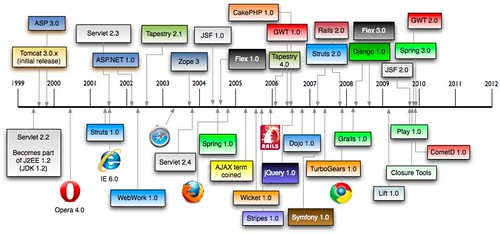
This is true, I am biased against JSF. It all started with my first JSF experience back in August 2004. If you remember correctly, 2004 was a big year: JSF 1.0, Spring 1.0 and Flex 1.0 were all released. The "AJAX" term was coined in early 2005.

History of Web Frameworks

By 2007 and 2008, JSF still hadn't gotten any better. In late 2009, JSF 2.0 was released and I upgraded in March 2011. As you can see from the aforementioned post, I ran into quite a few issues upgrading. JSF was also the hardest one to get working with extension-less URLs.

Most of my issues with JSF come from having maintained an application built with it since 2004. If I were to start a new application without any legacy migration issues, I imagine it wouldn't be as difficult. However, if you compare it to Struts 2 and Spring MVC, I've had little-to-no issues upgrading those applications over the years.

Also, I'm not just biased against JSF, but most component-based web frameworks. Just ask the Tapestry and Wicket folks. They've felt my criticisms over the years. My reason for preferring request-based frameworks like Struts 2/Spring MVC and Grails/Play has been because I've never seen the appeal in component-based frameworks. Often I've found that their components are just widgets that you can get from any decent JavaScript framework. And chances are that JavaScript framework can work with any web framework. Also, I've worked on a lot of high-traffic web applications that require statelessness for scalability.

I see the value in component-based frameworks, I just don't think components should be authored on the server-side. Most of the Java-based component frameworks require 2+ files for components (one for the component, one for the view, possibly one for the config). I love GWT's component concept in that you can just extract a class and re-use it. With JS frameworks, you can often just include a script. These days, when I think of good component-based frameworks, I think of jQuery UI and Twitter Bootstrap.

All that being said, there's a lot of folks praising JSF 2 (and PrimeFaces moreso). That's why I'll be integrating it (or merging your pull request) into the 2.3 release of AppFuse. Since PrimeFaces contains a Bootstrap theme, I hope this is a pleasant experience and my overall opinion of JSF improves.

In other component-based frameworks in AppFuse news, Tapestry 5 has gotten really fast in the last year. I imagine this is because we have a Tapestry expert, Serge Eby, working on it. And we're planning on adding Wicket in the 2.3 release.

So even though I prefer request-based frameworks with REST support and Bootstrap, that doesn't mean everyone does. I'll do my best to be less-biased in the future. However, please remember that my view on web frameworks is as a developer, not an analyst. And aren't developers supposed to be opinionated? ;)

Posted in Java at Nov 08 2012, 09:24:27 AM MST 11 Comments

InfoQ's Top 20 Web Frameworks for the JVM

Back in early October, InfoQ.com published a community research article titled Top 20 Web Frameworks for the JVM. Their goal seemed to be fairly simple:

Using the new community research tool, we at InfoQ want to get YOUR opinions on the relative importance and maturity of a variety of web frameworks that are targeted for the JVM. Please vote by dragging each practice across two dimensions – how important is the framework relative to the other frameworks, and how much is it actually used in real teams and projects.

When I first saw this article, I noticed some strange web frameworks listed. Namely, Netty, SiteMesh and Spark. I haven't heard of many folks using Netty for a web framework, but I'm sure it's possible. SiteMesh is certainly not a web framework and I've never even heard of Spark. And where is GWT and Vaadin? Regardless of the choices, I went ahead and voted.

Last week, InfoQ posted their top content for October on Facebook.

First of all, it's interesting to see that JVM Web Frameworks is still a hot topic for developers. Whenever I do my Comparing JVM Web Frameworks talk at conferences, I always see a few jabs about "he's still doing that talk!?" Yes, it seems strange that a talk I first did in 2004 is still in high demand.

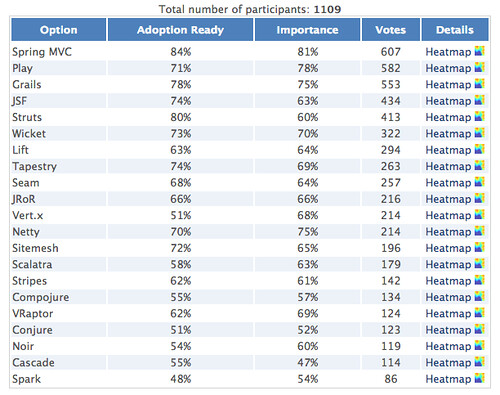
Secondly, I think InfoQ does good in showing how the frameworks ranked and showing their heatmaps. Below are their rankings from 1109 participants.

InfoQ's Top 20 Web Frameworks for the JVM

According to this research, the top 5 web frameworks for the JVM are Spring MVC, Play, Grails, JSF and Struts (I hope those surveyed meant Struts 2, not Struts 1).

In my research from last February (slide 21), I ranked them (with no particular weightings) as Grails, GWT, JRuby on Rails, Spring MVC and Vaadin. So I guess you could say I got 2 out of 5 right (Grails and Spring MVC). Not bad considering InfoQ didn't even consider GWT and Vaadin.

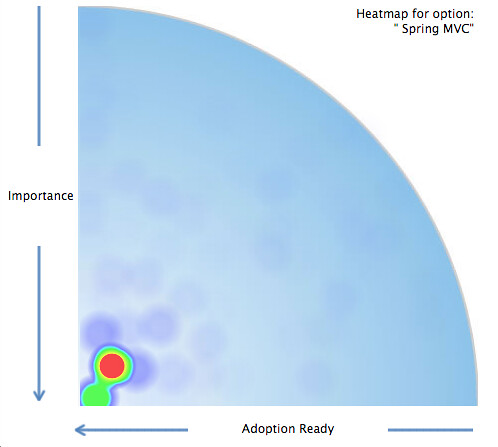
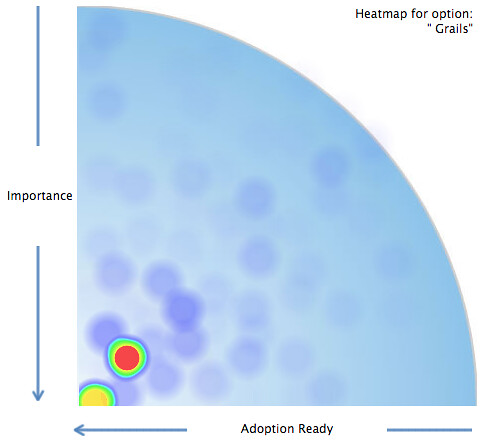
Another intriguing data point in this study is each frameworks' heatmap. For example, below are heatmaps for the top 4 frameworks.

Spring MVC Heatmap Grails Heatmap

Play Heatmap JSF Heatmap

Notice how Grails and Spring MVC are both hotter in the bottom right corner? It seems the community's overall opinions of these two frameworks are more aligned than JSF and Play, which a fair amount of folks rank as hyped and unimportant.

What I really like about this research is it's the community's opinions, visualized. It also confirms that some of my favorite frameworks are still on top. I don't know if JSF belongs as a top framework, however it seems a lot of folks do. I recently thought about removing it from AppFuse, but decided to keep it (at least for the next release). I hope InfoQ does more research projects like this, especially if they get their list of web frameworks right.

Posted in Java at Nov 06 2012, 12:04:28 PM MST 5 Comments

Comparing Web Frameworks and HTML5 with Play Scala at Jfokus 2012

Riddenholm Church Stockholm seems a lot like Denver this time of year. Cold, snowy and beautiful. Trish and I arrived in Stockholm (Sweden) on Monday for the Jfokus conference and we're traveling to Madrid today for the Spring I/O conference. I was invited to Jfokus within minutes of delivering my HTML5 with Play Scala talk at Devoxx.

Both the Jfokus and Spring I/O Organizers were interested in my Comparing JVM Web Frameworks talk, so I updated it to reflect my latest thoughts. First of all, I mentioned that there's a lot of great frameworks out there and I think the reason people are so apprehensive to choose one is because they've chosen badly at one point. This might've been Struts back in the day (even thought it was one of the best frameworks at the time) or it might be because a vendor talked them into it. However, if you look at the modern JVM frameworks today, you should be able to see that they're all pretty awesome.

I mentioned how I think Web developers should know JavaScript and CSS. If you're a Java developer and you call yourself a web developer, you're letting your framework do too much of the work for you. I mentioned Rich Manalang's Modern Principles in Web Development, where he talks about his core web development principles.

  • Designing for mobile first (even if you’re not building a mobile app)
  • Build only single page apps
  • Create and use your own REST API
  • “Sex sells” applies to web apps

I've found these principles to be true in my own experience and suggested that if you want to be a web developer, the frameworks you might want to learn are not traditional JVM web frameworks, but rather client-side MVC frameworks. For those Java developers that don't want to be web developers, I suggest they strengthen their services development knowledge by reading Hot to GET a Cup of Coffee.

You can see my updated presentation below, on Slideshare or as a downloadable PDF. You can also watch the video.

I delivered my 2nd presentation on HTML5 with Play Scala, CoffeeScript and Jade on Wednesday morning. This talk is one of my favorites and I prepared for it over the last several weeks by adding JSON CRUD Services and SecureSocial to my HTML5 Fitness Tracking application. Right before we left for Jfokus, I was able to get everything to work, but didn't spend as much time as I'd like working on the mobile client. If this talk gets accepted for Devoxx France, I plan on spending most of my time enhancing the mobile client. After my latest experience developing, I can see how Rich's first principle (above) makes a lot of sense.

Below is my presentation for this talk. Of course, it's on Slideshare and downloadable as a PDF.

I also updated the Developing Play More demo video to show my latest efforts.

Delivering these talks at Jfokus was a lot of fun. Yes, it was a lot of work and stress to prepare them. However, I also learned a lot creating them and I hope the audience benefitted from that.

Jfokus 2012 The conference itself was incredible. I got to meet Peter Hilton and Helena Hjertén as I was registering. The speaker's dinner at F12 was off-the-hook good and I had the pleasure of finally meeting Rickard Öberg.

I also attended some fantastic presentations, including Peter Hilton's Play Framework 2.0, Bodil Stokke's CoffeeScript: JavaScript without the Fail, Pamela Fox's Client-side Storage and Heiko Seeberger's Scala in Action. I don't know if Heiko has published any slides, but I'm guessing not since most of his presentation was live coding.

I have lots of good memories from Jfokus. Many thanks to Mattias for inviting me!

Posted in Java at Feb 16 2012, 12:01:05 AM MST 5 Comments

Refreshing AppFuse's UI with Twitter Bootstrap

The last time AppFuse had an update done to its look and feel was in way back in 2006. I've done a lot of consulting since then, which has included a fair bit of page speed optimization, HTML5 development and integrating smarter CSS. It was way back in '05 when we first started looking at adding a CSS Framework to AppFuse. It was Mike Stenhouse's CSS Framework that provided the inspiration and my CSS Framework Design Contest that provided its current themes (puzzlewithstyle, andreas01 and simplicity).

Since then, a lot of CSS Frameworks have been invented, including Blueprint in 2007 and Compass in 2008. However, neither has taken the world by storm like Twitter Bootstrap. From Building Twitter Bootstrap:

A year-and-a-half ago, a small group of Twitter employees set out to improve our team’s internal analytical and administrative tools. After some early meetings around this one product, we set out with a higher ambition to create a toolkit for anyone to use within Twitter, and beyond. Thus, we set out to build a system that would help folks like us build new projects on top of it, and Bootstrap was conceived.
...
Today, it has grown to include dozens of components and has become the most popular project on GitHub with more than 13,000 watchers and 2,000 forks.

The fact that Bootstrap has become the most popular project on GitHub says a lot. For AppFuse.next, I'd like to integrate a lot of my learnings over the past few years, as well as support HTML5 and modern browsers as best we can. This means page speed optimizations, getting rid of Prototype and Scriptaculous in favor of jQuery, adding wro4j for resource optimization and integrating HTML5 Boilerplate. I've used Twitter Bootstrap for my Play More! app, as well as some recent client projects. Its excellent documentation has made it easy to use and I love the way you can simply add classes to elements to make them transform into something beautiful.

Last week, I spent a couple late nights integrating Twitter Bootstrap 2.0 into the Struts 2 and Spring MVC versions of AppFuse. The layout was pretty straightforward thanks to Scaffolding. Creating the Struts Menu Velocity template to produce dropdowns wasn't too difficult. I added class="table table-condensed" to the list screen tables, class="well form-horizontal" to forms and class="btn primary" to buttons.

I also added validation errors with the "help-inline" class. This is also where things got tricky with Struts and Spring MVC. For the form elements in Bootstrap, they recommend you use a "control-group" element that contains your label and a "controls" element. The control contains the input/select/textarea and also the error message if there is one. Here's a sample element waiting for data:

<div class="control-group">
    <label for="name" class="control-label">Name</label>
    <div class="controls">
        <input type="text" id="name" name="name">
    </div>
</div>

Below is what that element should look like to display a validation error:

<div class="control-group error">
    <label for="name" class="control-label">Name</label>
    <div class="controls">
        <input type="text" id="name" name="name" value="">
        <span class="help-inline">Please enter your name.</span>
    </div>
</div>

You can see this markup is pretty easy, you just need to add an "error" class to control-group and span to show the error message. With Struts 2, this was pretty easy thanks to its customizable templates for its tags. All I had to do was create a "template/css_xhtml" directory in src/main/webapp and modify checkbox.ftl, controlfooter.ftl, controlheader-core.ftl and controlheader.ftl to match Bootstrap's conventions.

Spring MVC was a bit trickier. Since its tags don't have the concept of writing an entire control (label and field), I had to do a bit of finagling to get things to work. In the current implementation, Struts 2 forms have a single line for a control-group and its control-label and controls.

<s:textfield key="user.firstName" required="true"/>

With Spring MVC, it's a bit more complex:

<spring:bind path="user.firstName">
<fieldset class="control-group${(not empty status.errorMessage) ? ' error' : ''}">
</spring:bind>
    <appfuse:label styleClass="control-label" key="user.firstName"/>
    <div class="controls">
        <form:input path="firstName" id="firstName" maxlength="50"/>
        <form:errors path="firstName" cssClass="help-inline"/>
    </div>
</fieldset>

You could probably overcome this verbosity with Tag Files.

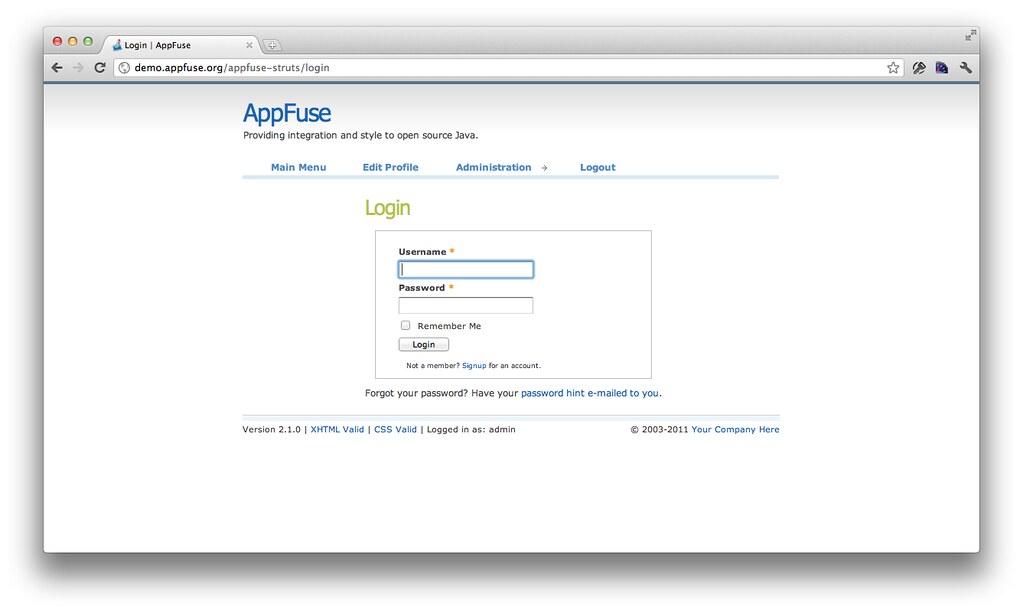
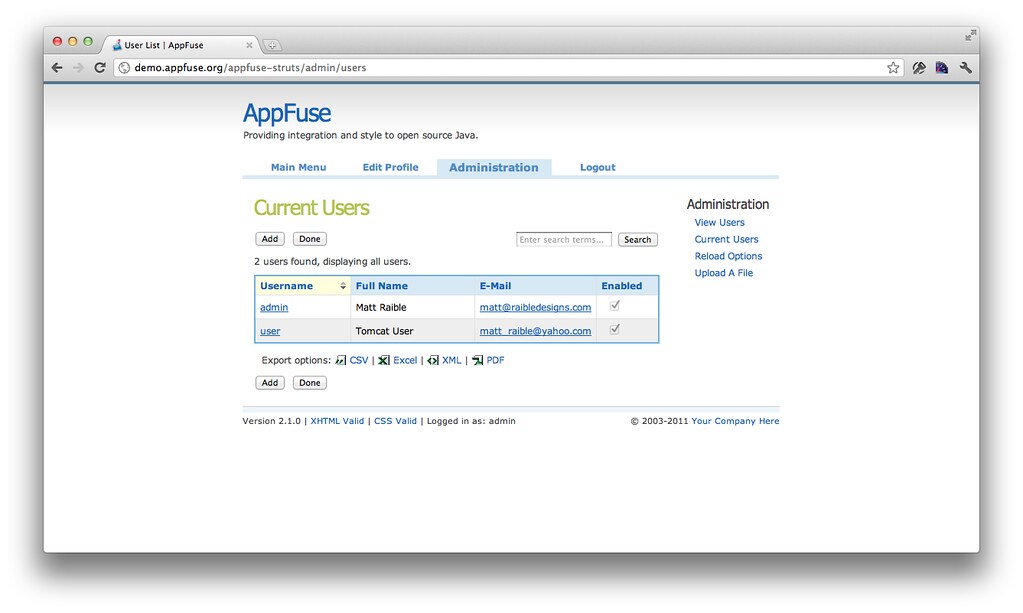
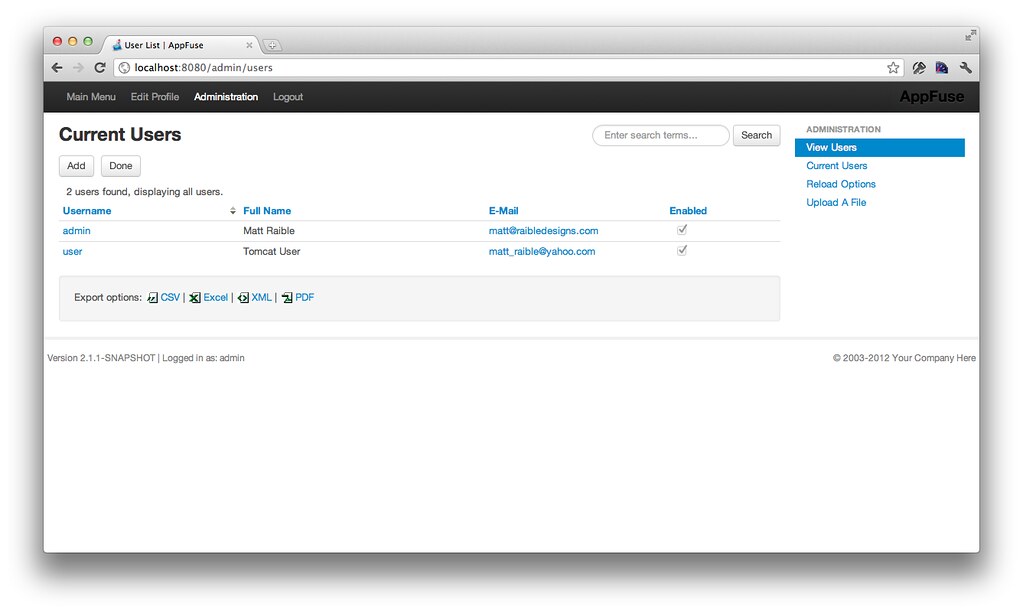
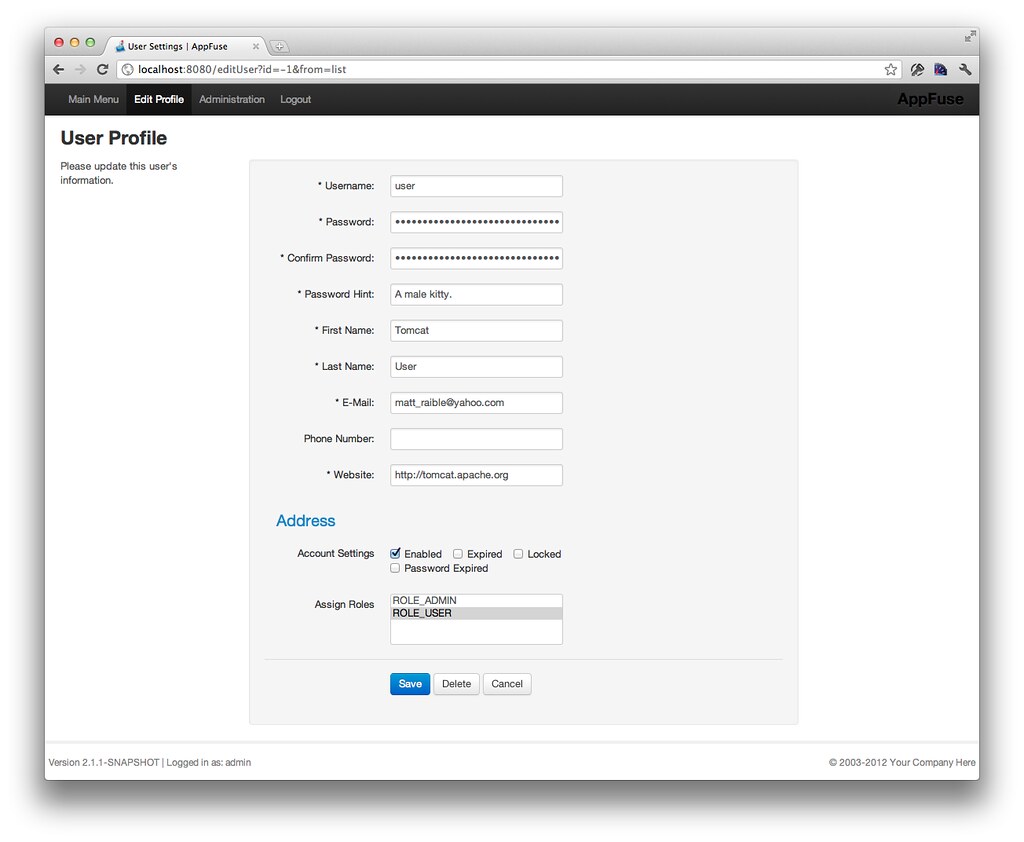
Figuring out if a control-group needed an error class before the input tag was rendered was probably the hardest part of this exercise. This was mostly due to Bootstrap's great documentation and useful examples (viewed by inspecting the markup). Below are some screenshots of the old screens and new ones.

Old UI - Login Old UI - Users Old UI - Edit Profile

New UI - Login New UI - Users New UI - Edit Profile

Check out the full set on Flickr if you'd like a closer look.

Even though I like the look of the old UI, I can't help but think a lot of the themes are designed for blogs and content sites, not webapps. The old Wufoo forms were a lot better looking though. And if you're going to develop kick-ass webapps, you need to make them look good. Bootstrap goes a long way in doing this, but it certainly doesn't replace a good UX Designer. Bootstap simply helps you get into HTML5-land, start using CSS3 and it takes the pain out of making things work cross-browser. Its fluid layouts and responsive web design seems to work great for business applications, which I'm guessing AppFuse is used for the most.

I can't thank the Bootstrap developers enough for helping me make this all look good. With Bootstrap 2 dropping this week, I can see myself using this more and more on projects. In the near future, I'll be helping integrate Bootstrap into AppFuse's Tapestry 5 and JSF versions.

What do you think of this CSS change? Do you change your CSS and layout a fair bit when starting with AppFuse archetypes? What can we do to make AppFuse apps look better out-of-the-box?

Update: I updated AppFuse to the final Bootstrap 2.0 release. Also, Johannes Geppert wrote a Struts 2 Bootstrap Plugin. I hope to integrate this into AppFuse in the near future.

Posted in Java at Jan 31 2012, 05:12:17 PM MST 10 Comments

My HTML5 with Play Scala, CoffeeScript and Jade Presentation from Devoxx 2011

This week, I had the pleasure of traveling to one of my favorite places in the world: Antwerp, Belgium. Like last year, I traveled with the lovely Trish McGinity and spoke at Devoxx 2011. This year, my talk was on developing a web/mobile app with HTML5, Play, Scala, CoffeeScript and Jade. I was inspired to learn Scala at the beginning of this year and added CoffeeScript and Jade to my learning list after talking to James Strachan at TSSJS 2011. You can read more about how my journey began in my first post about learning these technologies.

I started developing with these technologies in August and wrote about my learnings throughout the process. Last week, while writing my presentation, I decided it'd be fun to make my presentation into more of a story-telling-session than a learn-about-new-technologies session. To do this, I focused on talking a bit about the technologies, but more about my experience learning them. I also came up with a challenging idea: create a video that showed the development process, how hard it was to test the app and (hopefully) my success in getting it to work.

It was all a very close call, but I'm happy to say I pulled it off! I got the app to work on an iPhone (thanks to PhoneGap) last Saturday, finished the first draft of my presentation on Sunday night (after pulling an all-nighter) and finished editing the demo video on Wednesday night. My talk was on Thursday afternoon and I had a blast talking about my experience to such a large, enthusiastic audience. You can see the presentation below, on Slideshare or download the PDF.

You can find the "demo" for this talk on YouTube or watch it below.

One of the reasons I really enjoyed this talk is it only represents one milestone in my learning process. I plan on continuing to develop this application and learning more about HTML5, Scala, Play and CoffeeScript and Scalate/Jade. Now that Play 2.0 Beta has been released, I plan on upgrading to it and leveraging its native CoffeeScript and LESS support. I hope to continue using Scalate and its Jade format. And it's very likely PhoneGap will continue to be the bridge that allows everything to run in the background.

I've been talking with the Jfokus folks about doing this talk in Sweden in Feburary and Devoxx France about presenting there in April.

Learning all these technologies has been a challenging, but fun experience so far. As the last slide in my presentation says, I encourage you to do something similar. Pick something new to learn, have fun doing it, but more importantly - get out there and Play!

Update Dec. 20th: A video of this presentation is now available on Parleys.com.

Posted in Java at Nov 18 2011, 11:18:38 AM MST 7 Comments

Hyperproductive JSF 2.0 with Ed Burns at Jazoon

This morning, I attended Ed Burn's Talk on Hyperproductive JSF 2.0 at Jazoon. As you might know, I've been a critic of JSF for many years. However, it is one of the most used Java web frameworks, so I was hoping to learn how it's improved in the latest version. Below are my notes from Ed's presentation.

Ed's Plan for our Time Investment:

  1. Define a productive development environment
  2. JSF for greenfield and brownfield projects
  3. List the top 9 productivity killers with JSF projects and solutions

"I am always doing that which I cannot do, in order that I may learn how to do it." -- Pablo Picasso

Software is an executable representation of knowledge, a byproduct of learning how to solve a problem. Knowledge is something that changes as more information comes in. A productive environment makes it as easy as possible to learn how to solve a problem. Learning is an iterative process. Early iterations don't need to be optimal. Later iterations do ... and they need to be maintainable. First is the hardest. Fast iterations are they key. Spring Roo and Play are examples of frameworks that make the first iteration very fast.

You should use a tool to jumpstart JSF development: copy from an old project, use a Maven archetype or use your IDE. With greenfield development, you don't have to bother learning the byproduct of other people's learning. It's a great opportunity to pad your resume with the latest hot technologies. With brownfield development, it's vitally important to understand the existing solution and hidden assumptions. You're also much more constrained in your technology choices. If you want to change, you'll need to come up with a migration strategy, which can be difficult. JSF works well for both because it's not just a runtime framework, it's also a conceptual framework. You need to understand how your framework handles data conversion, validation, page flow, persistence integration, I18N, L10N, A11Y, Web standards and user friendliness.

Top 9 JSF Productivity Killers:

  1. Time wasting deployment step
  2. The perils of "there's more than one way to do it"
  3. Lengthy and painful developer on-boarding process
  4. Misused logging and misunderstood error messages
  5. Phantoms
  6. Under-utilized developer tools
  7. Premature optimization
  8. Difficulty in doing TDD
  9. Lack of an app framework

Time wasting deployment step
ZeroTurnaround solves this problem with JRebel, but there's other ways to do it. Some of the killers of flow state: 1) one large war file, 2) underutilizing dynamic language features, 3) complex server environment and 4) build process is redoing work unnecessarily. To stop the time wasting deployment step, the most important things you can do are as follows:

  • Configure your IDE correctly. In Eclipse, compile directly into WEB-INF/classes and use continuous compilation. With NetBeans, use GlassFish.
  • Don't do control-flow programming in XML.

Ed then showed a simple demo that showed how you can use Groovy to create a JSF UI Component. He also mentioned that Groovy can be used to author any JSF artifact. The benefit of this is you can simply edit and save a .groovy file without having to recompile or redeploy. Unfortunately, using Groovy didn't eliminate the XML syntax for pages or the XML for defining UI components.

The perils of "there's more than one way to do it"
JSF is very flexible, but flexibility is, more often than not, abused. There's a lack of convention for common things (e.g. master-detail, JSF concepts like converter, validator, etc.). The best way to fix this is to establish the norms for a project and stick with them. For example, Neil Griffin has a good blog entry for the different kind of managed beans you can create. Develop recommendations like Neil's and use them on all your projects.

Lengthy developer on-boarding process
Stick with standards when possible (at least have a common project description and build system across projects). Be committed to periodic cleanup cycles, including documenting for re-use. Pick one JSF component library and stick with it. Support for mixing and switching component libraries has improved with JSF 2, but it's still recommended you use only one.

Misused logging and misunderstood error messages
JSF is notorious for cryptic error messages and very long stack traces. It's still a problem, but the JSF Team is still working on improving them. Good tip: use the <ui:debug> tag. Its recordStateSize="true" attribute can be especially useful. If you're using PrimeFaces, add trace=true to request URLs.

Phantoms
Phantoms is when running code is not the same as the code you are modifying or wrong version of library gets picked up. You should have the capability to hit breakpoints anywhere in your entire software stack, including core Java sources. This is one of the most useful things about open source software. Solutions to phantoms: 1) put a timestamp on every redeploy and have the timestamp appear in the system log 2) write the running library stack to the system log (each library and version being used) and make it easy to compare one developer's runtime stack with another's 3) consider doing all work in tightly controlled VMs (checkout the VM at the beginning of the day, do your work, commit your changes and throw your VM away at the end of the day).

Under-utilizing developer tools
Make sure everyone has the fastest machines available and as much screen real estate as desired. Hardware is much cheaper than developer time. Another tip is to use Hudson as your butler. It's not just the team CI server. In other words, take advantage of automation wherever you can.

Premature Optimization
Keep in mind the trade-offs between readability and performance. When using frameworks such as JSF, don't try to outsmart the implementation. Rather, use the framework as intended and use open-source contributions to treat performance problems. Example, EL expressions got a lot faster between EE5 and EE6. If you spent time trying to optimize EL expressions, you might've been wasting your time.

Difficulty in doing TDD
Try to figure out why TDD is difficult in your company. For JSF, strongly consider JBoss's JSFUnit. Write your testcases to extend from Cactus ServletTestCase and leverage HtmlUnit (JSFUnit does this for you).

Lack of an app framework
Create common components: login panel, CRUD components, etc. If you don't have an app framework, build one over time.

Conclusion
This was an interesting talk by Ed. The dynamics of the room where a bit interesting. Jazoon is held in a movie theater, much like Devoxx. However, it appears there's a spotlight on the speaker that makes it very difficult to see the audience. I don't remember having this problem at Devoxx. Ed asked the audience quite a few questions, but it seemed he had a lot of difficulty in seeing if folks raised their hands. This made for some periods of awkward silence.

Personally, I was hoping to learn some new whizbang tips about JSF that I was not aware of. Unfortunately, I didn't learn anything new and wasn't that impressed with the Groovy demo.

I think Ed's tips about things outside of JSF were good, especially buying developers good hardware. I've seen many companies, including my current client, skimp on developer hardware and cause developer frustration because of it. I think it's great when companies provide developers top-of-the-line hardware and eliminate frustration over CPU and memory resources. LinkedIn and Time Warner Cable both provide their developers with Mac Pros and MacBook Pros as well as huge monitors. IMO, this is one of the best benefits you can provide your engineers.

Posted in Java at Jun 23 2011, 04:53:10 AM MDT 3 Comments

AppFuse 2.1 Released!

The AppFuse Team is pleased to announce the release of AppFuse 2.1. This release includes upgrades to all dependencies to bring them up-to-date with their latest releases. Most notable are JPA 2, JSF 2, Tapestry 5 and Spring 3. In addition, we've migrated from XFire to CXF and enabled REST for web services. There's even a new appfuse-ws archetype that leverages Enunciate to generate web service endpoints, documentation and downloadable clients. This release fixes many issues with archetypes, improving startup time and allowing jetty:run to be used for quick turnaround while developing. For more details on specific changes see the release notes.

What is AppFuse?
AppFuse is an open source project and application that uses open source frameworks to help you develop Web applications with Java quickly and efficiently. It was originally developed to eliminate the ramp-up time when building new web applications. At its core, AppFuse is a project skeleton, similar to the one that's created by your IDE when you click through a wizard to create a new web project. If you use JRebel with IntelliJ, you can achieve zero-turnaround in your project and develop features without restarting the server.

Release Details
Archetypes now include all the source for the web modules so using jetty:run and your IDE will work much smoother now. The backend is still embedded in JARs, enabling you to choose with persistence framework (Hibernate, iBATIS or JPA) you'd like to use. If you want to modify the source for that, add the core classes to your project or run "appfuse:full-source".

AppFuse comes in a number of different flavors. It offers "light", "basic" and "modular" and archetypes. Light archetypes use an embedded H2 database and contain a simple CRUD example. Light archetypes allow code generation and full-source features, but do not currently support Stripes or Wicket. Basic archetypes have web services using CXF, authentication from Spring Security and features including signup, login, file upload and CSS theming. Modular archetypes are similar to basic archetypes, except they have multiple modules which allows you to separate your services from your web project.

AppFuse provides archetypes for JSF, Spring MVC, Struts 2 and Tapestry 5. The light archetypes are available for these frameworks, as well as for Spring MVC + FreeMarker, Stripes and Wicket. You can see demos of these archetypes at http://demo.appfuse.org.

For information on creating a new project, please see the QuickStart Guide.

If you have questions about AppFuse, please read the FAQ or join the user mailing list. If you find any issues, please report them on the mailing list or create an issue in JIRA.

Thanks to everyone for their help contributing patches, writing documentation and participating on the mailing lists.

We greatly appreciate the help from our sponsors, particularly Atlassian, Contegix and JetBrains. Atlassian and Contegix are especially awesome: Atlassian has donated licenses to all its products and Contegix has donated an entire server to the AppFuse project.

Posted in Java at Apr 04 2011, 09:38:05 AM MDT 5 Comments

Adding Search to AppFuse with Compass

Over 5 years ago, I recognized that AppFuse needed to have a search feature and entered an issue in JIRA. Almost 4 years later, a Compass Tutorial was created and shortly after Shay Banon (Compass Founder), sent in a patch. From the message he sent me:

A quick breakdown of enabling search:

  1. Added Searchable annotations to the User and Address.
  2. Defined Compass bean, automatically scanning the model package for mapped searchable classes. It also automatically integrates with Spring transaction manager, and stores the index on the file system ([work dir]/target/test-index).
  3. Defined CompassTemplate (similar in concept to HibernateTemplate).
  4. Defined CompassSearchHelper. Really helps to perform search since it does pagination and so on.
  5. Defined CompassGps, basically it allows for index operation allowing to completely reindex the data from the database. JPA and Hiberante also automatically mirror changes done through their API to the index. iBatis uses AOP.

Fast forward 2 years and I finally found the time/desire to put a UI on the backend Compass implementation that Shay provided. Yes, I realize that Compass is being replaced by ElasticSearch. I may change to use ElasticSearch in the future; now that the search feature exists, I hope to see it evolve and improve.

Since Shay's patch integrated the necessary Spring beans for indexing and searching, the only thing I had to do was to implement the UI. Rather than having an "all objects" results page, I elected to implement it so you could search on an entity's list screen. I started with Spring MVC and added a search() method to the UserController:

@RequestMapping(method = RequestMethod.GET)
public ModelAndView handleRequest(@RequestParam(required = false, value = "q") String query) throws Exception {
    if (query != null && !"".equals(query.trim())) {
        return new ModelAndView("admin/userList", Constants.USER_LIST, search(query));
    } else {
        return new ModelAndView("admin/userList", Constants.USER_LIST, mgr.getUsers());
    }
}

public List<User> search(String query) {
    List<User> results = new ArrayList<User>();
    CompassDetachedHits hits = compassTemplate.findWithDetach(query);
    log.debug("No. of results for '" + query + "': " + hits.length());
    for (int i = 0; i < hits.length(); i++) {
        results.add((User) hits.data(i));
    }
    return results;
}

At first, I used compassTemplate.find(), but got an error because I wasn't using an OpenSessionInViewFilter. I decided to go with findWithDetach() and added the following search form to the top of the userList.jsp page:

<div id="search">
<form method="get" action="${ctx}/admin/users" id="searchForm">
    <input type="text" size="20" name="q" id="query" value="${param.q}"
           placeholder="Enter search terms"/>
    <input type="submit" value="<fmt:message key="button.search"/>"/>
</form>
</div>

NOTE: I tried using HTML5's <input type="search">, but found Canoo WebTest doesn't support it.

Next, I wrote a unit test to verify everything worked as expected. I found I had to call compassGps.index() as part of my test to make sure my index was created and up-to-date.

public class UserControllerTest extends BaseControllerTestCase {
    @Autowired
    private CompassGps compassGps;
    @Autowired
    private UserController controller;

    public void testSearch() throws Exception {
        compassGps.index();
        ModelAndView mav = controller.handleRequest("admin");
        Map m = mav.getModel();
        List results = (List) m.get(Constants.USER_LIST);
        assertNotNull(results);
        assertTrue(results.size() >= 1);
        assertEquals("admin/userList", mav.getViewName());
    }
}

After getting this working, I started integrating similar code into AppFuse's other web framework modules (Struts, JSF and Tapestry). When I was finished, they all looked pretty similar from a UI perspective.

Struts:

<div id="search">
<form method="get" action="${ctx}/admin/users" id="searchForm">
    <input type="text" size="20" name="q" id="query" value="${param.q}"
           placeholder="Enter search terms..."/>
    <input type="submit" value="<fmt:message key="button.search"/>"/>
</form>
</div>

JSF:

<div id="search">
<h:form id="searchForm">
    <h:inputText id="q" name="q" size="20" value="#{userList.query}"/>
    <h:commandButton value="#{text['button.search']}" action="#{userList.search}"/>
</h:form>
</div>

Tapestry:

<div id="search">
<t:form method="get" t:id="searchForm">
    <t:textfield size="20" name="q" t:id="q"/>
    <input t:type="submit" value="${message:button.search}"/>
</t:form>
</div>

One frustrating thing I found was that Tapestry doesn't support method="get" and AFAICT, neither does JSF 2. With JSF, I had to make my UserList bean session-scoped or the query parameter would be null when it listed the results. Tapestry took me the longest to implement, mainly because I had issues figuring out how it's easy-to-understand-once-you-know onSubmit() handlers worked and I had the proper @Property and @Persist annotations on my "q" property. This tutorial was the greatest help for me. Of course, now that it's all finished, the code looks pretty intuitive.

Feeling proud of myself for getting this working, I started integrating this feature into AppFuse's code generation and found I had to add quite a bit of code to the generated list pages/controllers.

So I went on a bike ride...

While riding, I thought of a much better solution and added the following search method to AppFuse's GenericManagerImpl.java. In the code I added to pages/controllers previously, I'd already refactored to use CompassSearchHelper and I continued to do so in the service layer implementation.

@Autowired
private CompassSearchHelper compass;

public List<T> search(String q, Class clazz) {
    if (q == null || "".equals(q.trim())) {
        return getAll();
    }

    List<T> results = new ArrayList<T>();

    CompassSearchCommand command = new CompassSearchCommand(q);
    CompassSearchResults compassResults = compass.search(command);
    CompassHit[] hits = compassResults.getHits();

    if (log.isDebugEnabled() && clazz != null) {
        log.debug("Filtering by type: " + clazz.getName());
    }

    for (CompassHit hit : hits) {
        if (clazz != null) {
            if (hit.data().getClass().equals(clazz)) {
                results.add((T) hit.data());
            }
        } else {
            results.add((T) hit.data());
        }
    }

    if (log.isDebugEnabled()) {
        log.debug("Number of results for '" + q + "': " + results.size());
    }

    return results;
}

This greatly simplified my page/controller logic because now all I had to do was call manager.search(query, User.class) instead of doing the Compass login in the controller. Of course, it'd be great if I didn't have to pass in the Class to filter by object, but that's the nature of generics and type erasure.

Other things I learned along the way:

  • To index on startup, I added compassGps.index() to the StartupListener..
  • In unit tests that leveraged transactions around methods, I had to call compassGps.index() before any transactions started.
  • To scan multiple packages for searchable classes, I had to add a LocalCompassBeanPostProcessor.

But more than anything, I was reminded it always helps to take a bike ride when you don't like the design of your code. ;-)

This feature and many more will be in AppFuse 2.1, which I hope to finish by the end of the month. In the meantime, please feel free to try out the latest snapshot.

Posted in Java at Mar 15 2011, 05:11:12 PM MDT 1 Comment

JSR 303 and JVM Web Framework Support

Emmanuel Bernard recently sent an email to the JSR 303 Experts Group about the next revision of the Bean Validation JSR (303). Rather than sending the proposed changes privately, he blogged about them. I left a comment with what I'd like to see:

+1 for Client-side validation. I'd love to see an API that web frameworks can hook into to add "required" to their tags for HTML5. Or some service that can be registered so the client can make Ajax requests to an API to see if an object is valid.

Emmanuel replied that most of the necessary API already exists for this, but frameworks have been slow to adopt it.

Hi Matt,

The sad thing is that the API is present on the Bean Validation side but presentation frameworks are slow to adopt it and use it :(

RichFaces 4 now has support for it but I wished more presentation frameworks had worked on the integration. If you can convince a few people or have access to a few people, feel free to send them by me :)

The integration API is described here. Let me know if you think some parts are missing or should be improved. We should definitely do some more buzz around it.

In the interest of generating more buzz around it, I decided to do some research and see what JVM Frameworks support JSR 303. Here's what I've come up with so far (in no particular order):

Struts 2 has an open issue, but doesn't seem to support JSR 303. Since I did a quick-n-dirty google search for most of these, I'm not sure if they support client-side JavaScript or HTML5's required. If you know of other JVM-based web frameworks that support JSR 303, please let me know in the comments.

Posted in Java at Mar 08 2011, 11:33:24 AM MST 4 Comments

Upgrading to JSF 2

Last week, I spent a few hours upgrading AppFuse from JSF 1.2 to JSF 2.0. In reality, I upgraded from MyFaces 1.2.7 to 2.0.4, but all JSF implementations should be the same, right? All in all, it was a pretty easy upgrade with a few minor AppFuse-specific things. My goal in upgrading was to do the bare minimum to get things working and to leave integration of JSF 2 features for a later date.

In addition to upgrading MyFaces, I had to upgrade Tomahawk by changing the dependency's artifactId to tomahawk20. I was also able to remove the following listener from my web.xml:

<listener>
    <listener-class>org.apache.myfaces.webapp.StartupServletContextListener</listener-class>
<listener>

After that, I discovered that MyFaces uses a new URI (/javax.faces.resource/) for serving up some of its resource files. I kindly asked Spring Security to ignore these requests by adding the following to my security.xml file.

<intercept-url pattern="/javax.faces.resource/**" filters="none"/>

Since JSF 2 includes Facelets by default, I tried removing Facelets as a dependency. After doing this, I received the following error:

ERROR [308855416@qtp-120902214-7] ViewHandlerWrapper.fillChain(158) | Error instantiation parent Faces ViewHandler
java.lang.ClassNotFoundException: com.sun.facelets.FaceletViewHandler
        at org.codehaus.plexus.classworlds.strategy.SelfFirstStrategy.loadClass(SelfFirstStrategy.java:50)
        at org.codehaus.plexus.classworlds.realm.ClassRealm.loadClass(ClassRealm.java:244)
        at org.codehaus.plexus.classworlds.realm.ClassRealm.loadClass(ClassRealm.java:230)
        at org.mortbay.jetty.webapp.WebAppClassLoader.loadClass(WebAppClassLoader.java:401)
        at org.mortbay.jetty.webapp.WebAppClassLoader.loadClass(WebAppClassLoader.java:363)
        at org.ajax4jsf.framework.ViewHandlerWrapper.fillChain(ViewHandlerWrapper.java:144)
        at org.ajax4jsf.framework.ViewHandlerWrapper.calculateRenderKitId(ViewHandlerWrapper.java:68)
        at org.apache.myfaces.lifecycle.DefaultRestoreViewSupport.isPostback(DefaultRestoreViewSupport.java:179)
        at org.apache.myfaces.lifecycle.RestoreViewExecutor.execute(RestoreViewExecutor.java:113)
        at org.apache.myfaces.lifecycle.LifecycleImpl.executePhase(LifecycleImpl.java:171)
        at org.apache.myfaces.lifecycle.LifecycleImpl.execute(LifecycleImpl.java:118)
        at javax.faces.webapp.FacesServlet.service(FacesServlet.java:189)

Figuring this was caused by the following element in my web.xml ...

<context-param>
    <param-name>org.ajax4jsf.VIEW_HANDLERS</param-name>
    <param-value>com.sun.facelets.FaceletViewHandler</param-value>
</context-param>

... I removed it and tried again. This time I received a NoClassDefFoundError:

java.lang.NoClassDefFoundError: com/sun/facelets/tag/TagHandler
        at java.lang.ClassLoader.defineClass1(Native Method)
        at java.lang.ClassLoader.defineClassCond(ClassLoader.java:632)
        at java.lang.ClassLoader.defineClass(ClassLoader.java:616)
        at java.security.SecureClassLoader.defineClass(SecureClassLoader.java:141)
        at java.net.URLClassLoader.defineClass(URLClassLoader.java:283)
        at java.net.URLClassLoader.access$000(URLClassLoader.java:58)
        at java.net.URLClassLoader$1.run(URLClassLoader.java:197)
        at java.security.AccessController.doPrivileged(Native Method)
        at java.net.URLClassLoader.findClass(URLClassLoader.java:190)
        at org.mortbay.jetty.webapp.WebAppClassLoader.loadClass(WebAppClassLoader.java:392)
        at org.mortbay.jetty.webapp.WebAppClassLoader.loadClass(WebAppClassLoader.java:363)
        at java.lang.Class.forName0(Native Method)
        at java.lang.Class.forName(Class.java:247)
        at org.apache.myfaces.shared_impl.util.ClassUtils.classForName(ClassUtils.java:184)
        at org.apache.myfaces.view.facelets.util.ReflectionUtil.forName(ReflectionUtil.java:67)

Since everything seemed to work with Facelets in the classpath, I decided to save this headache for a later date. I entered two issues in AppFuse's JIRA, one for removing Facelets and one for replacing Ajax4JSF with RichFaces.

The next issue I encountered was redirecting from AppFuse's password hint page. The navigation-rule for this page is as follows:

<navigation-rule>
    <from-view-id>/passwordHint.xhtml</from-view-id>
    <navigation-case>
        <from-outcome>success</from-outcome>
        <to-view-id>/login</to-view-id>
        <redirect/>
    </navigation-case>
</navigation-rule>

With JSF 2.0, the rule changes the URL to /login.xhtml when redirecting (where it was left as /login with 1.2) and it was caught by the security setting in my web.xml that prevents users from viewing raw templates.

<security-constraint>
    <web-resource-collection>
        <web-resource-name>Protect XHTML Templates</web-resource-name>
        <url-pattern>*.xhtml</url-pattern>
    </web-resource-collection>
    <auth-constraint/>
</security-constraint>

To solve this issue, I had to make a couple of changes:

  • Comment out the security-constraint in web.xml and move it to Spring Security's security.xml file.
    <intercept-url pattern="/**/*.xhtml" access="ROLE_NOBODY"/>
    
  • Add a rule to urlrewrite.xml that redirects back to login (since login.xhtml doesn't exist and I'm using extensionless URLs).
    <rule match-type="regex">
        <from>^/login.xhtml$</from>
        <to type="redirect">%{context-path}/login</to>
    </rule>
    

After getting the Password Hint feature passing in the browser, I tried running the integration tests (powered by Canoo WebTest). The Password Hint test kept failing with the following error:

[ERROR] /Users/mraible/dev/appfuse/web/jsf/src/test/resources/web-tests.xml:51: JavaScript error loading
page http://localhost:9876/appfuse-jsf-2.1.0-SNAPSHOT/passwordHint?username=admin: syntax error (http://
localhost:9876/appfuse-jsf-2.1.0-SNAPSHOT/javax.faces.resource/oamSubmit.js.jsf?ln=org.apache.myfaces#122)

Figuring this was caused by my hack to submit the form when the page was loaded, I turned to Pretty Faces, which allows you to call a method directly from a URL. After adding the Pretty Faces dependencies to my pom.xml, I created a src/main/webapp/WEB-INF/pretty-config.xml file with the following XML:

<url-mapping>
    <pattern value="/editProfile"/>
    <view-id value="/userForm.jsf"/>
    <action>#{userForm.edit}</action>
</url-mapping>

<url-mapping>
    <pattern value="/passwordHint/#{username}"/>
    <view-id value="/passwordHint.jsf"/>
    <action>#{passwordHint.execute}</action>
</url-mapping>

This allowed me to remove both editProfile.xhtml and passwordHint.xhtml, both of which simply auto-submitted forms.

At this point, I figured I'd be good to go and ran my integration tests again. The first thing I discovered was that ".jsf" was being tacked onto my pretty URL, most likely by the UrlRewriteFilter. Adding the following to my PasswordHint.java class solved this.

if (username.endsWith(".jsf")) {
    username = username.substring(0, username.indexOf(".jsf"));
}

The next thing was a cryptic error that took me a while to figure out.

DEBUG [1152467051@qtp-144702232-0] PasswordHint.execute(38) | Processing Password Hint...
2011-03-05 05:48:52.471:WARN::/passwordHint/admin
com.ocpsoft.pretty.PrettyException: Exception occurred while processing <:#{passwordHint.execute}> null
        at com.ocpsoft.pretty.faces.beans.ActionExecutor.executeActions(ActionExecutor.java:71)
        at com.ocpsoft.pretty.faces.event.PrettyPhaseListener.processEvent(PrettyPhaseListener.java:214)
        at com.ocpsoft.pretty.faces.event.PrettyPhaseListener.afterPhase(PrettyPhaseListener.java:108)
        at org.apache.myfaces.lifecycle.PhaseListenerManager.informPhaseListenersAfter(PhaseListenerManager.java:111)
        at org.apache.myfaces.lifecycle.LifecycleImpl.executePhase(LifecycleImpl.java:185)
        at org.apache.myfaces.lifecycle.LifecycleImpl.execute(LifecycleImpl.java:118)
        at javax.faces.webapp.FacesServlet.service(FacesServlet.java:189)

Digging into the bowels of MyFaces, I discovered a class was looking for a viewId with an extension and no view-id was being set. Adding the following to the top of my execute() method solved this.

getFacesContext().getViewRoot().setViewId("/passwordHint.xhtml");

After making this change, all AppFuse's integration tests are passing and the upgrade seems complete. The only other issues I encountered were logging-related. The first is an error about Tomahawk that doesn't seem to affect anything.

Mar 5, 2011 6:44:01 AM com.sun.facelets.compiler.TagLibraryConfig loadImplicit
SEVERE: Error Loading Library: jar:file:/Users/mraible/.m2/repository/org/apache/myfaces/tomahawk/tomahawk20/1.1.10/tomahawk20-1.1.10.jar!/META-INF/tomahawk.taglib.xml
java.io.IOException: Error parsing [jar:file:/Users/mraible/.m2/repository/org/apache/myfaces/tomahawk/tomahawk20/1.1.10/tomahawk20-1.1.10.jar!/META-INF/tomahawk.taglib.xml]: 
        at com.sun.facelets.compiler.TagLibraryConfig.create(TagLibraryConfig.java:410)
        at com.sun.facelets.compiler.TagLibraryConfig.loadImplicit(TagLibraryConfig.java:431)
        at com.sun.facelets.compiler.Compiler.initialize(Compiler.java:87)
        at com.sun.facelets.compiler.Compiler.compile(Compiler.java:104)

The second is excessive logging from MyFaces. As far as I can tell, this is because MyFaces switched to java.util.logging instead of commons logging. With all the frameworks that AppFuse leverages, I think it has all the logging frameworks in its classpath now. I was hoping to fix this by posting a message to the mailing list, but haven't received a reply yet.

[WARNING] [talledLocalContainer] Mar 5, 2011 6:50:25 AM org.apache.myfaces.config.annotation.TomcatAnnotationLifecycleProvider newInstance
[WARNING] [talledLocalContainer] INFO: Creating instance of org.appfuse.webapp.action.BasePage
[WARNING] [talledLocalContainer] Mar 5, 2011 6:50:25 AM org.apache.myfaces.config.annotation.TomcatAnnotationLifecycleProvider destroyInstance
[WARNING] [talledLocalContainer] INFO: Destroy instance of org.appfuse.webapp.action.BasePage

After successfully upgrading AppFuse, I turned to AppFuse Light, where things were much easier.

Now that AppFuse uses JSF 2, I hope to start leveraging some of its new features. If you're yearning to get started with them today, I invite you to grab the source and start integrating them yourself.


Posted in Java at Mar 07 2011, 01:24:53 PM MST 3 Comments