Thursday June 23, 2011

Hyperproductive JSF 2.0 with Ed Burns at Jazoon This morning, I attended Ed Burn's Talk on Hyperproductive JSF 2.0 at Jazoon. As you might know, I've been a critic of JSF for many years. However, it is one of the most used Java web frameworks, so I was hoping to learn how it's improved in the latest version. Below are my notes from Ed's presentation.
Ed's Plan for our Time Investment:
- Define a productive development environment
- JSF for greenfield and brownfield projects
- List the top 9 productivity killers with JSF projects and solutions
"I am always doing that which I cannot do, in order that I may learn how to do it." -- Pablo Picasso
Software is an executable representation of knowledge, a byproduct of learning how to solve a problem. Knowledge is something that changes as more information comes in. A productive environment makes it as easy as possible to learn how to solve a problem. Learning is an iterative process. Early iterations don't need to be optimal. Later iterations do ... and they need to be maintainable. First is the hardest. Fast iterations are they key. Spring Roo and Play are examples of frameworks that make the first iteration very fast.
You should use a tool to jumpstart JSF development: copy from an old project, use a Maven archetype or use your IDE. With greenfield development, you don't have to bother learning the byproduct of other people's learning. It's a great opportunity to pad your resume with the latest hot technologies. With brownfield development, it's vitally important to understand the existing solution and hidden assumptions. You're also much more constrained in your technology choices. If you want to change, you'll need to come up with a migration strategy, which can be difficult. JSF works well for both because it's not just a runtime framework, it's also a conceptual framework. You need to understand how your framework handles data conversion, validation, page flow, persistence integration, I18N, L10N, A11Y, Web standards and user friendliness.
Top 9 JSF Productivity Killers:
- Time wasting deployment step
- The perils of "there's more than one way to do it"
- Lengthy and painful developer on-boarding process
- Misused logging and misunderstood error messages
- Phantoms
- Under-utilized developer tools
- Premature optimization
- Difficulty in doing TDD
- Lack of an app framework
Time wasting deployment step
ZeroTurnaround solves this problem with JRebel, but there's other ways to do it. Some of the killers of flow state: 1) one large war file, 2) underutilizing dynamic language features, 3) complex server environment and 4) build process is redoing work unnecessarily. To stop the time wasting deployment step, the most important things you can do are as follows:
- Configure your IDE correctly. In Eclipse, compile directly into WEB-INF/classes and use continuous compilation. With NetBeans, use GlassFish.
- Don't do control-flow programming in XML.
Ed then showed a simple demo that showed how you can use Groovy to create a JSF UI Component. He also mentioned that Groovy can be used to author any JSF artifact. The benefit of this is you can simply edit and save a .groovy file without having to recompile or redeploy. Unfortunately, using Groovy didn't eliminate the XML syntax for pages or the XML for defining UI components.
The perils of "there's more than one way to do it"
JSF is very flexible, but flexibility is, more often than not, abused. There's a lack of convention for common things (e.g. master-detail, JSF concepts like converter, validator, etc.). The best way to fix this is to establish the norms for a project and stick with them. For example, Neil Griffin has a good blog entry for the different kind of managed beans you can create. Develop recommendations like Neil's and use them on all your projects.
Lengthy developer on-boarding process
Stick with standards when possible (at least have a common project description and build system across projects). Be committed to periodic cleanup cycles, including documenting for re-use. Pick one JSF component library and stick with it. Support for mixing and switching component libraries has improved with JSF 2, but it's still recommended you use only one.
Misused logging and misunderstood error messages
JSF is notorious for cryptic error messages and very long stack traces. It's still a problem, but the JSF Team is still working on improving them. Good tip: use the <ui:debug> tag. Its recordStateSize="true" attribute can be especially useful. If you're using PrimeFaces, add trace=true to request URLs.
Phantoms
Phantoms is when running code is not the same as the code you are modifying or wrong version of library gets picked up. You should have the capability to hit breakpoints anywhere in your entire software stack, including core Java sources. This is one of the most useful things about open source software. Solutions to phantoms: 1) put a timestamp on every redeploy and have the timestamp appear in the system log 2) write the running library stack to the system log (each library and version being used) and make it easy to compare one developer's runtime stack with another's 3) consider doing all work in tightly controlled VMs (checkout the VM at the beginning of the day, do your work, commit your changes and throw your VM away at the end of the day).
Under-utilizing developer tools
Make sure everyone has the fastest machines available and as much screen real estate as desired. Hardware is much cheaper than developer time. Another tip is to use Hudson as your butler. It's not just the team CI server. In other words, take advantage of automation wherever you can.
Premature Optimization
Keep in mind the trade-offs between readability and performance. When using frameworks such as JSF, don't try to outsmart the implementation. Rather, use the framework as intended and use open-source contributions to treat performance problems. Example, EL expressions got a lot faster between EE5 and EE6. If you spent time trying to optimize EL expressions, you might've been wasting your time.
Difficulty in doing TDD
Try to figure out why TDD is difficult in your company. For JSF, strongly consider JBoss's JSFUnit. Write your testcases to extend from Cactus ServletTestCase and leverage HtmlUnit (JSFUnit does this for you).
Lack of an app framework
Create common components: login panel, CRUD components, etc. If you don't have an app framework, build one over time.
Conclusion
This was an interesting talk by Ed. The dynamics of the room where a bit interesting. Jazoon is held in a movie theater, much like Devoxx. However, it appears there's a spotlight on the speaker that makes it very difficult to see the audience. I don't remember having this problem at Devoxx. Ed asked the audience quite a few questions, but it seemed he had a lot of difficulty in seeing if folks raised their hands. This made for some periods of awkward silence.
Personally, I was hoping to learn some new whizbang tips about JSF that I was not aware of. Unfortunately, I didn't learn anything new and wasn't that impressed with the Groovy demo.
I think Ed's tips about things outside of JSF were good, especially buying developers good hardware. I've seen many companies, including my current client, skimp on developer hardware and cause developer frustration because of it. I think it's great when companies provide developers top-of-the-line hardware and eliminate frustration over CPU and memory resources. LinkedIn and Time Warner Cable both provide their developers with Mac Pros and MacBook Pros as well as huge monitors. IMO, this is one of the best benefits you can provide your engineers.
Posted in Java
at Jun 23 2011, 04:53:10 AM MDT
2 Comments
Upgrading to JSF 2 Last week, I spent a few hours upgrading AppFuse from JSF 1.2 to JSF 2.0. In reality, I upgraded from MyFaces 1.2.7 to 2.0.4, but all JSF implementations should be the same, right? All in all, it was a pretty easy upgrade with a few minor AppFuse-specific things. My goal in upgrading was to do the bare minimum to get things working and to leave integration of JSF 2 features for a later date.
In addition to upgrading MyFaces, I had to upgrade Tomahawk by changing the dependency's artifactId to tomahawk20. I was also able to remove the following listener from my web.xml:
<listener>
<listener-class>org.apache.myfaces.webapp.StartupServletContextListener</listener-class>
<listener>
After that, I discovered that MyFaces uses a new URI (/javax.faces.resource/) for serving up some of its resource files. I kindly asked Spring Security to ignore these requests by adding the following to my security.xml file.
<intercept-url pattern="/javax.faces.resource/**" filters="none"/>
Since JSF 2 includes Facelets by default, I tried removing Facelets as a dependency. After doing this, I received the following error:
ERROR [308855416@qtp-120902214-7] ViewHandlerWrapper.fillChain(158) | Error instantiation parent Faces ViewHandler
java.lang.ClassNotFoundException: com.sun.facelets.FaceletViewHandler
at org.codehaus.plexus.classworlds.strategy.SelfFirstStrategy.loadClass(SelfFirstStrategy.java:50)
at org.codehaus.plexus.classworlds.realm.ClassRealm.loadClass(ClassRealm.java:244)
at org.codehaus.plexus.classworlds.realm.ClassRealm.loadClass(ClassRealm.java:230)
at org.mortbay.jetty.webapp.WebAppClassLoader.loadClass(WebAppClassLoader.java:401)
at org.mortbay.jetty.webapp.WebAppClassLoader.loadClass(WebAppClassLoader.java:363)
at org.ajax4jsf.framework.ViewHandlerWrapper.fillChain(ViewHandlerWrapper.java:144)
at org.ajax4jsf.framework.ViewHandlerWrapper.calculateRenderKitId(ViewHandlerWrapper.java:68)
at org.apache.myfaces.lifecycle.DefaultRestoreViewSupport.isPostback(DefaultRestoreViewSupport.java:179)
at org.apache.myfaces.lifecycle.RestoreViewExecutor.execute(RestoreViewExecutor.java:113)
at org.apache.myfaces.lifecycle.LifecycleImpl.executePhase(LifecycleImpl.java:171)
at org.apache.myfaces.lifecycle.LifecycleImpl.execute(LifecycleImpl.java:118)
at javax.faces.webapp.FacesServlet.service(FacesServlet.java:189)
Figuring this was caused by the following element in my web.xml ...
<context-param>
<param-name>org.ajax4jsf.VIEW_HANDLERS</param-name>
<param-value>com.sun.facelets.FaceletViewHandler</param-value>
</context-param>
... I removed it and tried again. This time I received a NoClassDefFoundError:
java.lang.NoClassDefFoundError: com/sun/facelets/tag/TagHandler
at java.lang.ClassLoader.defineClass1(Native Method)
at java.lang.ClassLoader.defineClassCond(ClassLoader.java:632)
at java.lang.ClassLoader.defineClass(ClassLoader.java:616)
at java.security.SecureClassLoader.defineClass(SecureClassLoader.java:141)
at java.net.URLClassLoader.defineClass(URLClassLoader.java:283)
at java.net.URLClassLoader.access$000(URLClassLoader.java:58)
at java.net.URLClassLoader$1.run(URLClassLoader.java:197)
at java.security.AccessController.doPrivileged(Native Method)
at java.net.URLClassLoader.findClass(URLClassLoader.java:190)
at org.mortbay.jetty.webapp.WebAppClassLoader.loadClass(WebAppClassLoader.java:392)
at org.mortbay.jetty.webapp.WebAppClassLoader.loadClass(WebAppClassLoader.java:363)
at java.lang.Class.forName0(Native Method)
at java.lang.Class.forName(Class.java:247)
at org.apache.myfaces.shared_impl.util.ClassUtils.classForName(ClassUtils.java:184)
at org.apache.myfaces.view.facelets.util.ReflectionUtil.forName(ReflectionUtil.java:67)
Since everything seemed to work with Facelets in the classpath, I decided to save this headache for a later date. I entered two issues in AppFuse's JIRA, one for removing Facelets and one for replacing Ajax4JSF with RichFaces.
The next issue I encountered was redirecting from AppFuse's password hint page. The navigation-rule for this page is as follows:
<navigation-rule>
<from-view-id>/passwordHint.xhtml</from-view-id>
<navigation-case>
<from-outcome>success</from-outcome>
<to-view-id>/login</to-view-id>
<redirect/>
</navigation-case>
</navigation-rule>
With JSF 2.0, the rule changes the URL to /login.xhtml when redirecting (where it was left as /login with 1.2) and it was caught by the security setting in my web.xml that prevents users from viewing raw templates.
<security-constraint>
<web-resource-collection>
<web-resource-name>Protect XHTML Templates</web-resource-name>
<url-pattern>*.xhtml</url-pattern>
</web-resource-collection>
<auth-constraint/>
</security-constraint>
To solve this issue, I had to make a couple of changes:
- Comment out the security-constraint in web.xml and move it to Spring Security's security.xml file.
<intercept-url pattern="/**/*.xhtml" access="ROLE_NOBODY"/>
- Add a rule to urlrewrite.xml that redirects back to login (since login.xhtml doesn't exist and I'm using extensionless URLs).
<rule match-type="regex"> <from>^/login.xhtml$</from> <to type="redirect">%{context-path}/login</to> </rule>
After getting the Password Hint feature passing in the browser, I tried running the integration tests (powered by Canoo WebTest). The Password Hint test kept failing with the following error:
[ERROR] /Users/mraible/dev/appfuse/web/jsf/src/test/resources/web-tests.xml:51: JavaScript error loading page http://localhost:9876/appfuse-jsf-2.1.0-SNAPSHOT/passwordHint?username=admin: syntax error (http:// localhost:9876/appfuse-jsf-2.1.0-SNAPSHOT/javax.faces.resource/oamSubmit.js.jsf?ln=org.apache.myfaces#122)
Figuring this was caused by my hack to submit the form when the page was loaded, I turned to Pretty Faces, which allows you to call a method directly from a URL. After adding the Pretty Faces dependencies to my pom.xml, I created a src/main/webapp/WEB-INF/pretty-config.xml file with the following XML:
<url-mapping>
<pattern value="/editProfile"/>
<view-id value="/userForm.jsf"/>
<action>#{userForm.edit}</action>
</url-mapping>
<url-mapping>
<pattern value="/passwordHint/#{username}"/>
<view-id value="/passwordHint.jsf"/>
<action>#{passwordHint.execute}</action>
</url-mapping>
This allowed me to remove both editProfile.xhtml and passwordHint.xhtml, both of which simply auto-submitted forms.
At this point, I figured I'd be good to go and ran my integration tests again. The first thing I discovered was that ".jsf" was being tacked onto my pretty URL, most likely by the UrlRewriteFilter. Adding the following to my PasswordHint.java class solved this.
if (username.endsWith(".jsf")) {
username = username.substring(0, username.indexOf(".jsf"));
}
The next thing was a cryptic error that took me a while to figure out.
DEBUG [1152467051@qtp-144702232-0] PasswordHint.execute(38) | Processing Password Hint...
2011-03-05 05:48:52.471:WARN::/passwordHint/admin
com.ocpsoft.pretty.PrettyException: Exception occurred while processing <:#{passwordHint.execute}> null
at com.ocpsoft.pretty.faces.beans.ActionExecutor.executeActions(ActionExecutor.java:71)
at com.ocpsoft.pretty.faces.event.PrettyPhaseListener.processEvent(PrettyPhaseListener.java:214)
at com.ocpsoft.pretty.faces.event.PrettyPhaseListener.afterPhase(PrettyPhaseListener.java:108)
at org.apache.myfaces.lifecycle.PhaseListenerManager.informPhaseListenersAfter(PhaseListenerManager.java:111)
at org.apache.myfaces.lifecycle.LifecycleImpl.executePhase(LifecycleImpl.java:185)
at org.apache.myfaces.lifecycle.LifecycleImpl.execute(LifecycleImpl.java:118)
at javax.faces.webapp.FacesServlet.service(FacesServlet.java:189)
Digging into the bowels of MyFaces, I discovered a class was looking for a viewId with an extension and no view-id was being set. Adding the following to the top of my execute() method solved this.
getFacesContext().getViewRoot().setViewId("/passwordHint.xhtml");
After making this change, all AppFuse's integration tests are passing and the upgrade seems complete. The only other issues I encountered were logging-related. The first is an error about Tomahawk that doesn't seem to affect anything.
Mar 5, 2011 6:44:01 AM com.sun.facelets.compiler.TagLibraryConfig loadImplicit
SEVERE: Error Loading Library: jar:file:/Users/mraible/.m2/repository/org/apache/myfaces/tomahawk/tomahawk20/1.1.10/tomahawk20-1.1.10.jar!/META-INF/tomahawk.taglib.xml
java.io.IOException: Error parsing [jar:file:/Users/mraible/.m2/repository/org/apache/myfaces/tomahawk/tomahawk20/1.1.10/tomahawk20-1.1.10.jar!/META-INF/tomahawk.taglib.xml]:
at com.sun.facelets.compiler.TagLibraryConfig.create(TagLibraryConfig.java:410)
at com.sun.facelets.compiler.TagLibraryConfig.loadImplicit(TagLibraryConfig.java:431)
at com.sun.facelets.compiler.Compiler.initialize(Compiler.java:87)
at com.sun.facelets.compiler.Compiler.compile(Compiler.java:104)
The second is excessive logging from MyFaces. As far as I can tell, this is because MyFaces switched to java.util.logging instead of commons logging. With all the frameworks that AppFuse leverages, I think it has all the logging frameworks in its classpath now. I was hoping to fix this by posting a message to the mailing list, but haven't received a reply yet.
[WARNING] [talledLocalContainer] Mar 5, 2011 6:50:25 AM org.apache.myfaces.config.annotation.TomcatAnnotationLifecycleProvider newInstance [WARNING] [talledLocalContainer] INFO: Creating instance of org.appfuse.webapp.action.BasePage [WARNING] [talledLocalContainer] Mar 5, 2011 6:50:25 AM org.apache.myfaces.config.annotation.TomcatAnnotationLifecycleProvider destroyInstance [WARNING] [talledLocalContainer] INFO: Destroy instance of org.appfuse.webapp.action.BasePage
After successfully upgrading AppFuse, I turned to AppFuse Light, where things were much easier.
Now that AppFuse uses JSF 2, I hope to start leveraging some of its new features. If you're yearning to get started with them today, I invite you to grab the source and start integrating them yourself.
Posted in Java
at Mar 07 2011, 01:24:53 PM MST
3 Comments
Implementing Extensionless URLs with Tapestry, Spring MVC, Struts 2 and JSF For the past couple of weeks, I've spent several evening hours implementing extensionless URLs in AppFuse. I've been wanting to do this ever since I wrote about how to do it a few years ago. This article details my experience and will hopefully help others implement this feature in their webapps.
First of all, I used the UrlRewriteFilter, one of my favorite Java open source projects. Then I followed a pattern I found in Spring's "mvc-basic" sample app from MVC Simplifications in Spring 3.0. The app has since changed (because SpringSource integrated UrlRewriteFilter-type functionality in Spring MVC), but the pattern was basically path-matching instead of extension-mapping. That is, the "dispatcher" for the web framework was mapped to /app/* instead of *.html.
Prior to the move to extensionless URLs, AppFuse used *.html for its mapping and this seemed to cause users problems when they wanted to serve up static HTML files. To begin with, I removed all extensions from URLs in tests (Canoo WebTest is used for testing the UI). I also did this for any links in the view pages and redirects in the Java code. This provided a decent foundation to verify my changes worked. Below are details about each framework I did this for, starting with the one that was easiest and moving to hardest.
Tapestry 5
Tapestry was by far the easiest to integrate extensionless URLs into. This is because it's a native feature of the framework and was already integrated as part of Serge Eby's Tapestry 5 implementation. In the end, the only things I had to do where 1) add a couple entries for CXF (mapped to /services/*) and DWR (/dwr/*) to my urlrewrite.xml and 2) change the UrlRewriteFilter so it was only mapped to REQUEST instead of both REQUEST and FORWARD. Below are the mappings I added for CXF and DWR.
<urlrewrite default-match-type="wildcard">
...
<rule>
<from>/dwr/**</from>
<to>/dwr/$1</to>
</rule>
<rule>
<from>/services/**</from>
<to>/services/$1</to>
</rule>
</urlrewrite>
Spring MVC
I had a fair amount of experience with Spring MVC and extensionless URLs. Both the Spring MVC applications we developed last year at Time Warner Cable used them. To change from a *.html mapping to /app/* was pretty easy and involved removing more code than I added. Previously, I had a StaticFilter that looked for HTML files and if it didn't find them, it dispatched to Spring's DispatcherServlet. I was able to remove this class and make the web.xml file quite a bit cleaner.
To make UrlRewriteFilter and Spring Security play well together, I had to move the securityFilter so it came after the rewriteFilter and add an INCLUDE dispatcher so included JSPs would have a security context available to them.
<filter-mapping>
<filter-name>rewriteFilter</filter-name>
<url-pattern>/*</url-pattern>
</filter-mapping>
<filter-mapping>
<filter-name>securityFilter</filter-name>
<url-pattern>/*</url-pattern>
<dispatcher>REQUEST</dispatcher>
<dispatcher>FORWARD</dispatcher>
<dispatcher>INCLUDE</dispatcher>
</filter-mapping>
The only other things I had to change were security.xml and dispatcher-servlet.xml to remove the .html extensions. The urlrewrite.xml file was fairly straightforward. I used the following at the bottom as a catch-all for dispatching to Spring MVC.
<rule>
<from>/**</from>
<to>/app/$1</to>
</rule>
<outbound-rule>
<from>/app/**</from>
<to>/$1</to>
</outbound-rule>
Then I added a number of other rules for j_security_check, DWR, CXF and static assets (/images, /scripts, /styles, /favicon.ico). You can view the current urlrewrite.xml in FishEye. The only major issue I ran into was that Spring Security recorded protected URLs as /app/URL so I had to add a rule to redirect when this happened after logging in.
<rule>
<from>/app/**</from>
<to last="true" type="redirect">%{context-path}/$1</to>
</rule>
Struts 2
Using extensionless URLs with Struts 2 is likely pretty easy thanks to the Convention Plugin. Even though this plugin is included in AppFuse, it's not configured with the proper constants and I have struts.convention.action.disableScanning=true in struts.xml. It looks like I had to do this when I upgraded from Struts 2.0.x to Struts 2.1.6. It's true AppFuse's Struts 2 support could use a bit of love to be aligned with Struts 2's recommended practices, but I didn't want to spend the time doing it as part of this exercise.
With Struts 2, I tried the path-mapping like I did with Spring MVC, but ran into issues. Instead, I opted to use an ".action" extension by changing struts.action.extension from "html" to "action," in struts.xml. Then I had to do a bunch of filter re-ordering and dispatcher changes. Before, with a .html extension, I had all filters mapped to /* and in the following order.
| Filter Name | Dispatchers |
|---|---|
| securityFilter | request |
| rewriteFilter | request, forward |
| struts-prepare | request |
| sitemesh | request, forward, include |
| staticFilter | request, forward |
| struts | request |
Similar to Spring MVC, I had to remove the rewriteFilter in front of the securityFilter and I was able to remove the staticFilter. I also had to map the struts filter to *.action instead of /* to stop Struts from trying to catch static asset and DWR/CXF requests. Below is the order of filters and their dispatchers that seems to work best.
| Filter Name | Dispatchers |
|---|---|
| rewriteFilter | request |
| securityFilter | request, forward, include |
| struts-prepare | request, forward |
| sitemesh | request, forward, include |
| struts | forward |
From there, it was a matter of modifying urlrewrite.xml to have the following catch-all and rules for static assets, j_security_check and DWR/CXF.
<rule match-type="regex">
<from>^([^?]*)/([^?/\.]+)(\?.*)?$</from>
<to last="true">$1/$2.action$3</to>
</rule>
<outbound-rule match-type="regex">
<from>^(.*)\.action(\?.*)?$</from>
<to last="false">$1$2</to>
</outbound-rule>
JSF
JSF was by far the most difficult to get extensionless URLs working with. I'm not convinced it's impossible, but I spent a several hours over a few days and was unsuccessful in completely removing them. I was able to make things work so I could request pages without an extension, but found when clicking buttons and links, the extension would often show up in the URL. I'm also still using JSF 1.2, so it's possible that upgrading to 2.0 would solve many of the issues I encountered.
For the time being, I've changed my FacesServlet mapping from *.html to *.jsf. As with Struts, I had issues when I tried to map it to /app/*. Other changes include changing the order of dispatchers and filters, the good ol' catch-all in urlrewrite.xml and modifying security.xml. For some reason, I wasn't able to get file upload working without adding an exception to the outbound-rule.
<rule match-type="regex">
<from>^([^?]*)/([^?/\.]+)(\?.*)?$</from>
<to last="true">$1/$2.jsf</to>
</rule>
<outbound-rule match-type="regex">
<!-- TODO: Figure out how to make file upload work w/o using *.jsf -->
<condition type="path-info">selectFile</condition>
<from>^(.*)\.jsf(\?.*)?$</from>
<to last="false">$1$2</to>
</outbound-rule>
I also spent a couple hours trying to get Pretty Faces to work. I wrote about my issues on the forums. I tried writing a custom Processor to strip the extension, but found that I'd get into an infinite loop where the processor kept getting called. To workaround this, I tried using Spring's RequestContextHolder to ensure the processor only got invoked once, but that proved fruitless. Finally, I tried inbound and outbound custom processors, but failed to get those working. The final thing I tried was url-mappings for each page in pretty-config.xml.
<url-mapping> <pattern value="/admin/users"/> <view-id value="/admin/users.jsf"/> </url-mapping> <url-mapping> <pattern value="/mainMenu"/> <view-id value="/mainMenu.jsf"/> </url-mapping>
The issue with doing this was that some of the navigation rules in my faces-config.xml stopped working. I didn't spend much time trying to diagnose the problem because I didn't like having to add an entry for each page in the application. The one nice thing about Pretty Faces is it did allow me to do things like the following, which I formerly did with a form that auto-submitted when the page loaded.
<url-mapping>
<pattern value="/passwordHint/#{username}"/>
<view-id value="/passwordHint.jsf"/>
<action>#{passwordHint.execute}</action>
</url-mapping>
Conclusion
My journey implementing extensionless URLs was an interesting one, and I solidified my knowledge about ordering of filters, dispatchers and the UrlRewriteFilter. I still think I have more to learn about properly implementing extensionless URLs in Struts 2 and JSF and I hope to do that in the near future. I believe Struts' Convention Plugin will help me and JSF 2 + Pretty Faces will hopefully work nicely too. Of course, it'd be great if all Java Web Frameworks had an easy mechanism for producing and consuming extensionless URLs. In the meantime, thank goodness for the UrlRewriteFilter.
If you'd like to try AppFuse and its shiny new URLs, see the QuickStart Guide and choose the 2.1.0-SNAPSHOT version.
Posted in Java
at Feb 10 2011, 04:53:27 PM MST
10 Comments
How I Calculated Ratings for My JVM Web Frameworks Comparison When I re-wrote my Comparing JVM Web Frameworks presentation from scratch, I decided to add a matrix that allows you to rate a framework based on 20 different criteria. The reason I did this was because I'd used this method when choosing an Ajax framework for Evite last year. The matrix seemed to work well for selecting the top 5 frameworks, but it also inspired a lot of discussion in the community that my ratings were wrong.
I expected this, as I certainly don't know every framework as well as I'd like. The mistake I made was asking for the community to provide feedback on my ratings without describing how I arrived at them. From Peter Thomas's blog:
What you are doing is adjusting ratings based on who in the community shouts the loudest. I can't help saying that this approach comes across as highly arrogant and condescending, you seem to expect framework developers and proponents to rush over and fawn over you to get better ratings, like waiters in a restaurant trying to impress a food-critic for Michelin stars.
I apologize for giving this impression. It certainly wasn't my intent. By having simple numbers (1.0 == framework does well, 0.5 == framework is OK and 0 == framework not good at criteria) with no rationalization, I can see how the matrix can be interpreted as useless (or to put it bluntly, as something you should wipe your ass with). I don't blame folks for getting angry.
For my Rich Web Experience presentation, I documented why I gave each framework the rating I did. Hopefully this will allow folks to critique my ratings more constructively and I can make the numbers more accurate. You can view this document below or on Google Docs.
In the end, what I was hoping to do with this matrix was to simply highlight a technique for choosing a web framework. Furthermore, I think adding a "weight" to each criteria is important because things like books often aren't as important as REST support. To show how this might be done, I added a second sheet to the matrix and made up some weighting numbers. I'd expect anyone that wants to use this to downloaded the matrix, verify the ratings are accurate for your beliefs and weight the criteria accordingly.
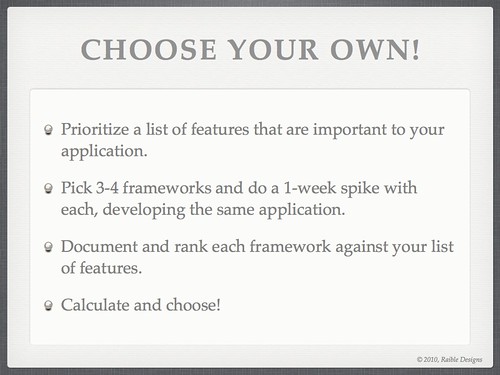
Of course, as I and many others have said, the best way to choose a web framework is to try them yourself. I emphasized this at the end of my presentation with the following two slides.
Posted in Java
at Dec 06 2010, 11:55:18 AM MST
9 Comments
My Comparing JVM Web Frameworks Presentation from Devoxx 2010 This week, I've been having a great time in Antwerp, Belgium at the Devoxx Conference. This morning, I had the pleasure of delivering my Comparing JVM Web Frameworks talk. I thoroughly enjoyed giving this presentation, especially to such a large audience. You can view the presentation below (if you have Flash installed) or download it here.
Unlike previous years, I chose to come up with a spreadsheet matrix that shows why I chose the 5 I did. This spreadsheet and rankings given to each framework are likely to be debated, as I don't know all the frameworks as well as I'd like to. Also, the missing column on this spreadsheet is a "weighting" column where you can prioritize certain criteria like I've done in the past when Comparing Ajax Frameworks. If you believe there are incorrect numbers, please let me know and I'll try to get those fixed before I do this talk again at The Rich Web Experience.
One thing that doesn't come across in this presentation is that I believe anyone can use this matrix, and weightings, to make any of these frameworks come out on top. I also believe web frameworks are like spaghetti sauce in The Ketchup Conundrum. That is, the only way to make more happy spaghetti sauce lovers was to make more types of spaghetti sauce. You can read more about this in my There is no "best" web framework article.
Update: If you disagree with the various ratings I gave to web frameworks in this presentation, please provide your opinions by filling out this survey. Thanks to Sebastien Arbogast for setting this up.
Update: Sebastien has posted his survey results at JVM Web Framework Survey, First Results.
Update 12/6: A video of this presentation is now available on Parleys.com.
P.S. My current gig is ending in mid-December. If you're looking for a UI Architect with a passion for open source frameworks, please let me know.
Posted in Java
at Nov 18 2010, 05:23:10 AM MST
37 Comments
AppFuse 2.1 Milestone 2 Released I'm pleased to announce the 2nd milestone release of AppFuse 2.1. This release includes upgrades to all dependencies to bring them up-to-date with their latest releases. Most notable are Spring 3 and Struts 2.1. This release fixes many issues with archetypes and contains many improvements to support Maven 3. For more details on specific changes see the 2.1.0 M2 release notes.
What is AppFuse?
AppFuse is an open source project and application that uses open source frameworks to help you develop Web applications quickly and efficiently. It was originally developed to eliminate the ramp-up time when building new web applications. At its core, AppFuse is a project skeleton, similar to the one that's created by your IDE when you click through a wizard to create a new web project. If you use JRebel with AppFuse, you can achieve zero-turnaround in your project and develop features without restarting the server.
Release Details
Archetypes now include all the source for the web modules so using jetty:run and your IDE will work much smoother now. The backend is still embedded in JARs, enabling you to choose with persistence framework (Hibernate, iBATIS or JPA) you'd like to use. If you want to modify the source for that, add the core classes to your project or run "appfuse:full-source".
AppFuse comes in a number of different flavors. It offers "light", "basic" and "modular" and archetypes. Light archetypes use an embedded H2 database and contain a simple CRUD example. In the final 2.1.0 release, the light archetypes will allow code generation like the basic and modular archetypes. Basic archetypes have web services using CXF, authentication from Spring Security and features including signup, login, file upload and CSS theming. Modular archetypes are similar to basic archetypes, except they have multiple modules which allows you to separate your services from your web project.
AppFuse provides archetypes for JSF, Spring MVC, Struts 2 and Tapestry 5. The light archetypes are available for these frameworks, as well as for Spring MVC + FreeMarker, Stripes and Wicket.
Please note that this release does not contain updates to the documentation. Code generation will work, but it's likely that some content in the tutorials won't match. For example, you can use annotations (vs. XML) for Spring MVC and Tapestry is a whole new framework. I'll be working on documentation over the next several weeks in preparation for the 2.1 final release.
For information on creating a new project, please see the QuickStart Guide.
If you have questions about AppFuse, please read the FAQ or join the user mailing list. If you find bugs, please create an issue in JIRA.
Thanks to everyone for their help contributing patches, writing documentation and participating on the mailing lists.
Posted in Java
at Nov 15 2010, 03:28:57 PM MST
2 Comments
AppFuse 2.1 Milestone 1 Released
The AppFuse Team is pleased to announce the first milestone release of AppFuse 2.1. This release includes upgrades to all dependencies to bring them up-to-date with their latest releases. Most notable are Hibernate, Spring and Tapestry 5.
What is AppFuse?
AppFuse is an open source project and application that uses open source tools built on the Java platform to help you develop Web applications quickly and efficiently. It was originally developed to eliminate the ramp-up time found when building new web applications for customers. At its core, AppFuse is a project skeleton, similar to the one that's created by your IDE when you click through a wizard to create a new web project.
Release Details
Archetypes now include all the source for the web modules so using jetty:run and your IDE will work much smoother now. The backend is still embedded in JARs, enabling you to choose which persistence framework (Hibernate, iBATIS or JPA) you'd like to use. If you want to modify the source for that, add the core classes to your project or run appfuse:full-source.
In addition, AppFuse Light has been converted to Maven and has archetypes available. AppFuse provides archetypes for JSF, Spring MVC, Struts 2 and Tapestry 5. The light archetypes are available for these frameworks, as well as for Spring MVC + FreeMarker, Stripes and Wicket.
Other notable improvements:
- Added Compass support thanks to a patch from Shay Banon.
- Upgraded from XFire to CXF for Web Services.
- Moved Maven repository to Sonatype's OSS Repository Hosting for snapshots and releasing to Maven Central. There are no longer any AppFuse-specific artifacts, all are available in central. Thanks to Sonatype for this great service and its excellent repository manager.
- Upgraded to Canoo WebTest 3.0. Now if we could just get its Maven Plugin moved to Codehaus.
- Added Ajaxified Body to AppFuse Light archetypes.
- Infrastructure upgrades, including JIRA 4, Confluence 3, FishEye 2, Bamboo 2 and Crowd 1.6. Many thanks to Atlassian and Contegix for their excellent products and services.
- For more details on specific changes see the release notes.
Please note that this release does not contain updates to the documentation. Code generation will work, but it's likely that some content in the tutorials won't match. For example, you can use annotations (vs. XML) for dependency injection and Tapestry is a whole new framework. I'll be working on documentation over the next several weeks in preparation for Milestone 2.
AppFuse is available as several Maven archetypes. For information on creating a new project, please see the QuickStart Guide.
To learn more about AppFuse, please read Ryan Withers' Igniting your applications with AppFuse.
The 2.x series of AppFuse has a minimum requirement of the following specification versions:
- Java Servlet 2.4 and JSP 2.0 (2.1 for JSF)
- Java 5+
If you have questions about AppFuse, please read the FAQ or join the user mailing list. If you find bugs, please create an issue in JIRA.
Thanks to everyone for their help contributing code, writing documentation, posting to the mailing lists, and logging issues.
Posted in Java
at Nov 19 2009, 07:16:36 AM MST
8 Comments
AppFuse Light converted to Maven modules, upgraded to Tapestry 5 and Stripes 1.5 This past week, I stayed up a couple of late nights to do some of the AppFuse Light work I wrote about in October. I converted all web frameworks to Maven modules, as well as made them inherit from the appfuse-web project. Below is what the new module structure looks like:

At this point, the project is ready to import into AppFuse's SVN project. Here's a list of other changes I made:
- Modules now depend on AppFuse's backend and allow you to use Hibernate, JPA or iBATIS as the persistence framework. Implementations for Spring JDBC, OJB and JDO have been removed.
- Upgraded to JWebUnit 2.1, which now uses HtmlUnit under the hood and has much better JavaScript support. It also has Selenium support, but I've yet to try it.
- Ajaxified Body integrated into all frameworks. You can easily turn it off by modifying the global.js file.
- Prototype and Scriptaculous loaded from Google's Ajax Libraries CDN.
- Upgraded to Tapestry 5. Mad props to Serge Eby and his tapestry5-appfuse project for showing me how to do this. Serge became a committer on AppFuse recently, so hopefully we'll continue to see great things from the Tapestry 5 support. I really like the clean URLs and minimum configuration required in Tapestry 5. It's testing framework is nice too, but I believe it could be improved.
- Upgraded to Stripes 1.5. This was easy and painless. I'm definitely a fan of Stripes and look forward to reading the Stripes book on my bookshelf.
- Dropped support for: Struts 1.x, WebWork, Spring MVC + Velocity.
If you want to try any of these applications, you can create archetypes using the following commands:
svn co https://appfuse-light.dev.java.net/svn/appfuse-light/trunk appfuse-light cd appfuse-light/preferred-web-framework mvn archetype:create-from-project cd target/generated-sources/archetype mvn install cd ~/dev mvn archetype:generate # The new archetype should show up as an option
Next steps include figuring out a way to flatten the inherited dependencies and plugins so archetype:create-from-project can create truly standalone projects. Please let me know if you have any questions.
Posted in Java
at Dec 20 2008, 06:42:03 PM MST
9 Comments
RESTful Web Applications with Subbu Allamaraju Subbu works at Yahoo! developing standards, patterns and practices for HTTP web languages. In the past, he was a web service and Java developer. He was also a standards contributor at BEA and an author of books on Java EE. His current passion is HTTP and REST. Subbu confesses that he's not a web developer, has no interest in the internals of programming models used for web frameworks and he's only interested in the visible aspects of the architecture.
"The Web is Mostly Restful"
Being RESTful in an abstract sense means:
- Resources are named by URIs
- Resources have representations (Atom, HTML, JSON, XML)
- Resources contain contextual links to allow navigation of state
- There's a Uniform Interface
In the web today, some resources and URIs are personalized, but most are not. Some depend on sessions, but most do not. The consequence of a personalized UI with a non-unique URI is you cannot rely on browser caching.
The web is full of different representations (HTML, XML, JS, PDF, CSS, Flash). The problem with HTML is you can't tell links that you want a particular representation based of a link. The links are hard-coded to be a particular content-type. However, some media types on responses are ignored. This is often a problem with browsers and whether the user has plugins installed.
The Uniform Interface for the web is HTML and primarily links and forms (GET and POST). There's still some misconceptions (e.g. POST is secure). However, it's not about security, it's about idempotency and safety. You need to make sure you only use POST when you're changing data. POSTs are not repeatable. GET URIs are not always refreshable, which is quite unfortunate. Users shouldn't have to fight the back button.
Caching is a fundamental aspect of the web. Even in a personalized site, most of the content can be cached. The web is read-only for the most part. However, many enterprise web applications don't take advantage of caching. This is fine when there's not that many users, but it's bad when you want to scale to thousands of users. There's several frameworks that use cache-busting and prefer backend caching over HTTP caching. These frameworks are not using the web like they should.
Backend caching (e.g. Memcached) uses a non-uniform interface and you need to explicitly program to it. Frontend/HTTP caching has a uniform interface that's pluggable. Backend caching is generally more expensive to develop and deploy. There are cases where data should be cached on the backend, but you shouldn't focus all on backend caching w/o doing some frontend caching.
With Ajax, you get more opportunities to be RESTful. XMLHttpRequest is another HTTP client that can be programmed to. It has full support for the uniform interface, which allows content negotiation, optimistic concurrency and caching. Cross-domain hacks can be done with <script> and <iframe> to tunnel requests over GET. The W3C has been working for the last two years on how to do cross-domain Ajax w/o using hacks. The problem with current cross-domain implementations is they often use GET for everything, which isn't very RESTful. Subbu recommends using a proxy on the same domain if you do need to talk to other domains. This will allow your Ajax code to remain RESTful.
Web Frameworks
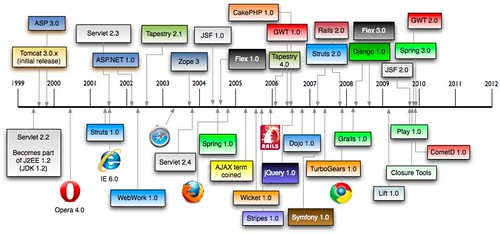
Web development is hard because of all the moving pieces that exist. Because of this, many web frameworks have been created to solve the various problems. In 1997, there were servlets. They provided basic plumbing and closely reflected HTTP/1.1. Servlets provided a poor programming model, but it allowed a lot of frameworks to be built on top of it. We don't use servlets to write applications, only to write application frameworks. The second era came about in 2001 when Action-oriented frameworks became popular. In 2004, JSF and friends came to play. JSF is a component-based framework with known limitations (complex, slow, uses POST for almost everything, Ajax is difficult). These limitations have resulted in a number of third-party patches being developed to solve these issues.
JSF was designed to use the request to create a component tree that maintains state. Unfortunately, the state is not something the developer has control over. It's not the state of the application, it's the state of the components. The client's knowledge of the state is mentioned with a cookie and the server keeps the state in the session. The problem with JSF is you don't have a choice of state in your application - you can't write stateless applications like you can with servlets.
JSF uses overloaded URIs for its resources. When you have one URI with multiple representations, there's no way to tell how a representation was chosen. JSF's compromise is to allow client-side state saving. However, they do this by putting hidden field in the form and requiring POST for navigation.
JSF vs. REST
Basically, these two are at opposite extremes. JSF is focused heavily on a UI component model. The people that developed it misinterpreted how the web works and made some fundamental questionable choices. You can patch it, but you can not fix it.
Web 2.0 Frameworks
GWT is a cross-compilation based framework. You write Java to generate JavaScript (b/c everyone hates writing JavaScript). It mashes client and server code into a single source. These layers communicate using GWT-RPC. Typical RPC concerns do not apply since code generation handles coupling and the client is downloaded from the same application. GWT-PRC does POSTs to the server and uses HTTP like a transport layer. To be fair, GWT does allow you to use a RequestBuilder to use the web like it should be used.
This class allows more control over HTTP requests, it supports GET and POST and it allows so-called RESTful layers (GWT-REST and GET-Restlet). GWT is focused heavily on ease-of-use, which is good. It's modeled after RPC and breaks the uniform interface and focuses on backend caching. Unlike JSF, GWT is fixable, but the community tends to use RPC instead of RequestBuilder.
SOFEA has a central promise of SOA. Business logic is a reusable service that changes less often. The presentation application calls those services and changes more often. The nice thing about this type of architecture is it allows a separation of concerns and loose coupling. However, it doesn't embrace REST like it should. Appcelerator is an implementation of SOFEA that has a Ruby on Rails-like usability. However, it uses a SOAP/HTTP style with messaging and POSTs to a single URI. Appcelerator is interesting, but it introduces a different style of coupling. It breaks URI opacity and client deals with POX instead of links.
Conclusion
Don't fight the architecture of the web. Innovate and enhance instead of breaking. If nothing else, break judiciously. As developers, we should demand more from our frameworks and make sure they use the web and HTTP like it should be used.
Posted in Java
at Oct 24 2008, 09:52:02 AM MDT
16 Comments
What's wrong with JSF The developers of Seam have come up with a list of major issues with JSF. I'm assuming many of these issues are fixed by Seam, but it's interesting to note how they've somewhat admitted that JSF has many flaws. Note that there's a lot of references to Struts and WebWork.
Hopefully many of these will be fixed in JSF 2. If REST support is an important feature for web frameworks, it'll be be interesting to see how the component frameworks handle it. It'd be great if they provided native support. Oh wait, then they'd be action-based frameworks.
Posted in Java
at Aug 25 2008, 06:53:31 PM MDT
5 Comments
Search This Site
Recent Entries
- Wine Tasting in Napa Valley
- How to build a Shot-Ski
- Bus Project Update
- Farewell to the 2011-2012 Ski Season
- Cruising around the Western Caribbean
- Spring Break!
- A Spectacular Trip to Stockholm and Madrid
- Comparing Web Frameworks and HTML5 with Play Scala at Jfokus 2012
- Play Framework 2.0 with Peter Hilton at Jfokus
- Secure JSON Services with Play Scala and SecureSocial