Matt RaibleMatt Raible is a writer with a passion for software. Connect with him on LinkedIn.

The Angular Mini-Book The Angular Mini-Book is a guide to getting started with Angular. You'll learn how to develop a bare-bones application, test it, and deploy it. Then you'll move on to adding Bootstrap, Angular Material, continuous integration, and authentication.

Spring Boot is a popular framework for building REST APIs. You'll learn how to integrate Angular with Spring Boot and use security best practices like HTTPS and a content security policy.

For book updates, follow @angular_book on Twitter.

The JHipster Mini-Book The JHipster Mini-Book is a guide to getting started with hip technologies today: Angular, Bootstrap, and Spring Boot. All of these frameworks are wrapped up in an easy-to-use project called JHipster.

This book shows you how to build an app with JHipster, and guides you through the plethora of tools, techniques and options you can use. Furthermore, it explains the UI and API building blocks so you understand the underpinnings of your great application.

For book updates, follow @jhipster-book on Twitter.

10+ YEARS


Over 10 years ago, I wrote my first blog post. Since then, I've authored books, had kids, traveled the world, found Trish and blogged about it all.
You searched this site for "struts". 659 entries found.

You can also try this same search on Google.

AppFuse 2.2.1 Released!

The AppFuse Team is pleased to announce the release of AppFuse 2.2.1. This release includes upgrades to all dependencies to bring them up-to-date with their latest releases. Most notable are Hibernate 4, Struts 2.3.7, Apache CXF 2.7.0 and Spring Security 3.1.3. In addition, we've integrated HTML5, Twitter Bootstrap, jQuery and replaced Compass with Hibernate Search. Last but not least, we've added full support for Java 7 and integrated many security improvements. For more details on specific changes see the release notes.

What is AppFuse?
AppFuse is a full-stack framework for building web applications on the JVM. It was originally developed to eliminate the ramp-up time when building new web applications. Over the years, it has matured into a very testable and secure system for creating Java-based webapps.

Demos for this release can be viewed at http://demo.appfuse.org. Please see the QuickStart Guide to get started with this release.

A number of blog posts were written about features that went into this release while it was being developed:

If you have questions about AppFuse, please read the FAQ or join the mailing list. If you find any issues, please report them on the users mailing list.

Thanks to everyone for their help contributing patches, writing documentation and participating on the mailing lists.

We greatly appreciate the help from our sponsors, particularly Atlassian, Contegix and JetBrains. We highly recommend using the new IntelliJ IDEA 12 for developing web applications.

Posted in Java at Dec 11 2012, 03:21:44 PM MST 5 Comments

Improving AppFuse's PageSpeed with Apache

One of the most important things when developing webapps is to make them fast. With AppFuse, we've tried to incorporate many of the 14 rules for faster-loading websites. We had a gzip filter before it was cool (2003) and replaced it with the one from EhCache. However, users experienced issues with both of these, both with XFire/CXF and WebWork/Struts 2 and JSPs. Because of these issues, we disabled gzipping a few releases ago.

This article is designed to show you how you can make your AppFuse webapp faster, without modifying any code. The good news is this applies to any webapp that you can deploy behind Apache.

Last Friday, I sent an email to the good folks at Contegix to see if they could install mod_pagespeed on the Apache server that sits in front of *.appfuse.org. My goal was to improve the YSlow and PageSpeed scores of the apps hosted on demo.appfuse.org. I discovered they were getting a dismal score of 24 and figured we could do a lot better. mod_pagespeed speeds up your site and reduces page load time by automatically applying web performance best practices. It seemed like an easy solution.

Unfortunately, we were unable to use mod_pagespeed. From the guys at Contegix:

Attempting to install mod_pagespeed as you requested, we find that it requires Apache httpd 2.2 and libstdc++ 4.1.2, both of which are unsupported in RHEL4. To get mod_pagespeed to work on your present operating system basically means re-rolling the core components, which would make them unsupported. I'm afraid mod_pagespeed is simply not an option on your present configuration.

Since I still wanted to improve performance, I opted for another route instead: using mod_deflate (for gzipping) and mod_expires (for expires headers). I also turned on KeepAlive as recommended by PageSpeed Insights.

mod_deflate
mod_deflate was already installed in Apache (version 2.0.52), so all I had to do was configure it. On RHEL4, Apache is installed at /etc/httpd and there's a conf.d directory that contains all the configuration files. I created a file at /etc/httpd/conf.d/deflate.conf and populated it with the following:

#
# mod_deflate configuration
#
<IfModule mod_deflate.c>
    SetOutputFilter DEFLATE
    
    AddOutputFilterByType DEFLATE text/plain text/html text/xml text/css application/xml application/xhtml+xml application/rss+xml application/javascript application/x-javascript
    
    DeflateCompressionLevel 9
    
    BrowserMatch ^Mozilla/4 gzip-only-text/html
    BrowserMatch ^Mozilla/4\.0[678] no-gzip
    BrowserMatch \bMSIE !no-gzip !gzip-only-text/html
    
    DeflateFilterNote Input instream
    DeflateFilterNote Output outstream
    DeflateFilterNote Ratio ratio
    
    LogFormat '"%r" %{outstream}n/%{instream}n (%{ratio}n%%)' deflate
    
</IfModule>

At first, I had separate lines for all the different content types (as recommended by this article). The Contegix support crew figured out the solution (everything needed to be on one line) in 14 minutes, updated the config and verified it worked using an http compression testing page.

mod_expires
mod_expires was already installed, so I added a config file at /etc/httpd/conf.d/expires.conf. I used this howto and asked Contegix for help when it didn't work. Their response took quite a bit longer this time (49 minutes), but they once again figured it out:

It appears that FilesMatch does not like to play will JkMount. It does work using content type.

My final config for expires.conf:

<IfModule mod_expires.c>
    ExpiresActive On
    
    <FilesMatch "\.(jpe?g|png|gif|js|css)$">
        ExpiresDefault "access plus 1 week"
    </FilesMatch>
    
    ExpiresByType image/jpeg "access plus 1 week"
    ExpiresByType image/png "access plus 1 week"
    ExpiresByType image/gif "access plus 1 week"
    ExpiresByType text/css "access plus 1 week"
    ExpiresByType application/javascript "access plus 1 week"
    ExpiresByType application/x-javascript "access plus 1 week"
</IfModule>

I used "1 week" because we're changing things quite a bit right now and we haven't integrated resource fingerprinting yet.

KeepAlive
The last thing I did to improve performance was to turn on KeepAlive by editing /etc/httpd/conf/httpd.conf and changing Off to On.

#
# KeepAlive: Whether or not to allow persistent connections (more than
# one request per connection). Set to "Off" to deactivate.
#
KeepAlive On

Summary
As a result of these changes, our PageSpeed score went from 24 to 96 and YSlow went from a 90 to a 98. When I started this experiment, I was only trying to fix demo.appfuse.org. However, it also improved the speed of all the other *.appfuse.org sites, including Confluence, Bamboo, JIRA and FishEye. Thanks for all the help Contegix! There's a good chance you've given me back a few minutes in each day.

Originally posted on the AppFuse Blog.

Posted in Java at Dec 04 2012, 09:25:05 AM MST 7 Comments

AppFuse News: Liquibase and wro4j Tutorials from J. García

New committer J. García has been doing a lot of work to improve i18n in AppFuse 2.2, as well as our Struts 2 support. In addition, he's written a couple articles that show you how to integrate Liquibase and wro4j in your AppFuse applications. Thanks for the great documentation J!

The 2.2 release is coming along, and we're down to 16 open issues. I've updated the Hibernate, JPA, Services and Web Services tutorials and hope to finish the web tutorials in the next week. You can try the latest code using the QuickStart Guide or check it out on the demo site:

Please see this thread on the mailing list if you have any questions or suggestions.

In related news, Roger Hughes has a good article titled Ten Things You Can Do With Spring Security. Since AppFuse uses Spring Security extensively, hopefully you can use some of Roger's tips to improve the security of your app.

Posted in Java at Nov 30 2012, 02:32:47 PM MST Add a Comment

Why the bias against JSF?

In my last post about InfoQ's Top 20 Web Frameworks for the JVM, I received a thought-provoking comment from henk53:

There is one little thing that does bother me in those presentations, and that's your fairly obvious bias against JSF.
...
If you are presenting yourself as, more or less, an authority on comparing web frameworks, then having a fairly obvious biased against one of them is just peculiar. I, all of my team, and various clients distrust your ranking of JSF. We do look at your data if the choice is between other frameworks, but as soon as JSF comes into the picture we just look elsewhere.

I'm not really sure where this bias comes from. Yes, JSF 1.0 sucked and 1.2 was only marginally better, but 2.0 is really cool and productive and there are SUPERB component and utility libraries now like PrimeFaces and OmniFaces. As a researcher of this topic I think you should keep up the date and not stick to some old grudge.

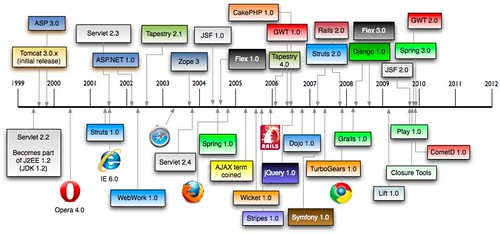
This is true, I am biased against JSF. It all started with my first JSF experience back in August 2004. If you remember correctly, 2004 was a big year: JSF 1.0, Spring 1.0 and Flex 1.0 were all released. The "AJAX" term was coined in early 2005.

History of Web Frameworks

By 2007 and 2008, JSF still hadn't gotten any better. In late 2009, JSF 2.0 was released and I upgraded in March 2011. As you can see from the aforementioned post, I ran into quite a few issues upgrading. JSF was also the hardest one to get working with extension-less URLs.

Most of my issues with JSF come from having maintained an application built with it since 2004. If I were to start a new application without any legacy migration issues, I imagine it wouldn't be as difficult. However, if you compare it to Struts 2 and Spring MVC, I've had little-to-no issues upgrading those applications over the years.

Also, I'm not just biased against JSF, but most component-based web frameworks. Just ask the Tapestry and Wicket folks. They've felt my criticisms over the years. My reason for preferring request-based frameworks like Struts 2/Spring MVC and Grails/Play has been because I've never seen the appeal in component-based frameworks. Often I've found that their components are just widgets that you can get from any decent JavaScript framework. And chances are that JavaScript framework can work with any web framework. Also, I've worked on a lot of high-traffic web applications that require statelessness for scalability.

I see the value in component-based frameworks, I just don't think components should be authored on the server-side. Most of the Java-based component frameworks require 2+ files for components (one for the component, one for the view, possibly one for the config). I love GWT's component concept in that you can just extract a class and re-use it. With JS frameworks, you can often just include a script. These days, when I think of good component-based frameworks, I think of jQuery UI and Twitter Bootstrap.

All that being said, there's a lot of folks praising JSF 2 (and PrimeFaces moreso). That's why I'll be integrating it (or merging your pull request) into the 2.3 release of AppFuse. Since PrimeFaces contains a Bootstrap theme, I hope this is a pleasant experience and my overall opinion of JSF improves.

In other component-based frameworks in AppFuse news, Tapestry 5 has gotten really fast in the last year. I imagine this is because we have a Tapestry expert, Serge Eby, working on it. And we're planning on adding Wicket in the 2.3 release.

So even though I prefer request-based frameworks with REST support and Bootstrap, that doesn't mean everyone does. I'll do my best to be less-biased in the future. However, please remember that my view on web frameworks is as a developer, not an analyst. And aren't developers supposed to be opinionated? ;)

Posted in Java at Nov 08 2012, 09:24:27 AM MST 11 Comments

InfoQ's Top 20 Web Frameworks for the JVM

Back in early October, InfoQ.com published a community research article titled Top 20 Web Frameworks for the JVM. Their goal seemed to be fairly simple:

Using the new community research tool, we at InfoQ want to get YOUR opinions on the relative importance and maturity of a variety of web frameworks that are targeted for the JVM. Please vote by dragging each practice across two dimensions – how important is the framework relative to the other frameworks, and how much is it actually used in real teams and projects.

When I first saw this article, I noticed some strange web frameworks listed. Namely, Netty, SiteMesh and Spark. I haven't heard of many folks using Netty for a web framework, but I'm sure it's possible. SiteMesh is certainly not a web framework and I've never even heard of Spark. And where is GWT and Vaadin? Regardless of the choices, I went ahead and voted.

Last week, InfoQ posted their top content for October on Facebook.

First of all, it's interesting to see that JVM Web Frameworks is still a hot topic for developers. Whenever I do my Comparing JVM Web Frameworks talk at conferences, I always see a few jabs about "he's still doing that talk!?" Yes, it seems strange that a talk I first did in 2004 is still in high demand.

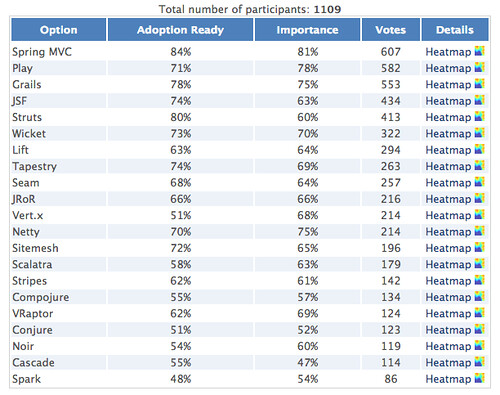
Secondly, I think InfoQ does good in showing how the frameworks ranked and showing their heatmaps. Below are their rankings from 1109 participants.

InfoQ's Top 20 Web Frameworks for the JVM

According to this research, the top 5 web frameworks for the JVM are Spring MVC, Play, Grails, JSF and Struts (I hope those surveyed meant Struts 2, not Struts 1).

In my research from last February (slide 21), I ranked them (with no particular weightings) as Grails, GWT, JRuby on Rails, Spring MVC and Vaadin. So I guess you could say I got 2 out of 5 right (Grails and Spring MVC). Not bad considering InfoQ didn't even consider GWT and Vaadin.

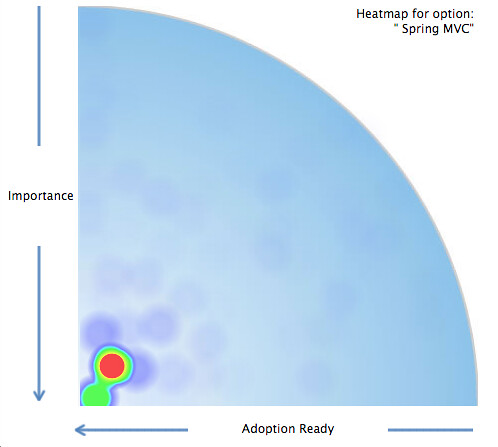
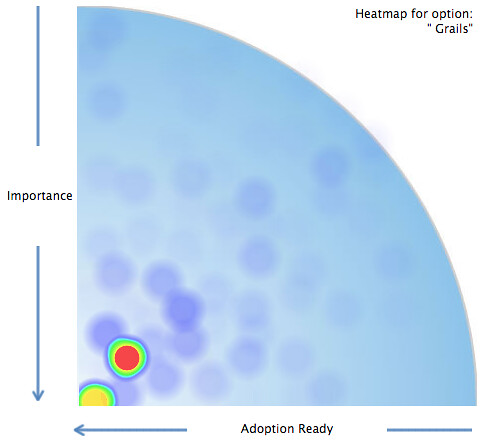
Another intriguing data point in this study is each frameworks' heatmap. For example, below are heatmaps for the top 4 frameworks.

Spring MVC Heatmap Grails Heatmap

Play Heatmap JSF Heatmap

Notice how Grails and Spring MVC are both hotter in the bottom right corner? It seems the community's overall opinions of these two frameworks are more aligned than JSF and Play, which a fair amount of folks rank as hyped and unimportant.

What I really like about this research is it's the community's opinions, visualized. It also confirms that some of my favorite frameworks are still on top. I don't know if JSF belongs as a top framework, however it seems a lot of folks do. I recently thought about removing it from AppFuse, but decided to keep it (at least for the next release). I hope InfoQ does more research projects like this, especially if they get their list of web frameworks right.

Posted in Java at Nov 06 2012, 12:04:28 PM MST 5 Comments

Upgrading to Play 2: Anorm and Testing

This time last year, I decided I wanted to learn Scala. I chose the Play Framework as my vehicle for learning and I added CoffeeScript and Jade to the mix. I packaged it all up, learned a bunch and presented it at Devoxx 2011.

In January, I added SecureSocial, JSON Services and worked a bit on the mobile client. I presented my findings at Jfokus shortly after. As part of my aforementioned post, I wrote:

Right before we left for Jfokus, I was able to get everything to work, but didn't spend as much time as I'd like working on the mobile client. If this talk gets accepted for Devoxx France, I plan on spending most of my time enhancing the mobile client.

I had some complications (a.k.a. too much vacation) with Devoxx France and wasn't able to attend. To make up for it, I submitted the talk to ÜberConf. It got accepted and I started working on my app a couple weeks ago. So far, I've spent about 8 hours upgrading it to Play 2 and I hope to start re-writing the mobile client later this week. I plan on using Cordova, jQTouch and releasing it in the App Store sometime this month.

Upgrading to Play 2
When I heard about Play 2, I thought it was a great thing. The developers were re-writing the framework to use Scala at the core and I was already using Scala in my app. Then I learned they were going to throw backwards compatibility out the window and I groaned. "Really? Another web framework (like Tapestry of old) screwing its users and making them learn everything again?!", I thought. "Maybe they should call it Run instead of Play, leaving the old framework that everyone loves intact."

However, after hearing about it at Devoxx and Jfokus, I figured I should at least try to migrate. I downloaded Play 2.0.1, created a new project and went to work.

The first thing I learned about upgrading from Play 1.x to Play 2.x is there's no such thing. It's like saying you upgraded from Struts 1 to Struts 2 or Tapestry 4 to Tapestry 5. It's a migration, with a whole new project.

Evolutions
I started by looking around to see if anyone had documented a similar migration. I found two very useful resources right off the bat:

From Jan's Blog, I learned to copy my evolutions from my Play 1.x project into conf/evolutions/default. I changed my application.conf to use PostgreSQL and wrote an EvolutionsTest.scala to verify creating the tables worked.

import org.specs2.mutable._

import play.api.db.DB
import play.api.Play.current

import anorm._

import play.api.test._
import play.api.test.Helpers._

class EvolutionsTest extends Specification {

  "Evolutions" should {
    "be applied without errors" in {
      evolutionFor("default")
      running(FakeApplication()) {
        DB.withConnection {
          implicit connection =>
            SQL("select count(1) from athlete").execute()
            SQL("select count(1) from workout").execute()
            SQL("select count(1) from comment").execute()
        }
      }
      success
    }
  }
}

Then I began looking for how to load seed data with Play 2.x. In Play 1.x, you could use a BootStrap job that would load sample data with YAML.

import play.jobs._
import play.Play

@OnApplicationStart
class BootStrap extends Job {

  override def doJob() {

    import models._
    import play.test._

    // Import initial data if the database is empty
    if (Athlete.count().single() == 0) {
      Yaml[List[Any]]("initial-data.yml").foreach {
        _ match {
          case a: Athlete => Athlete.create(a)
          case w: Workout => Workout.create(w)
          case c: Comment => Comment.create(c)
        }
      }
    }
  }
}

This is no longer a recommended practice in Play 2. Instead, they recommend you turn your YAML into code. 10 minutes later, I had a Global.scala that loaded seed data.

import models._
import play.api._
import play.api.Play.current

import anorm._

object Global extends GlobalSettings {

  override def onStart(app: Application) {
    InitialData.insert()
  }
}

/**
 * Initial set of data to be loaded
 */
object InitialData {

  def date(str: String) = new java.text.SimpleDateFormat("yyyy-MM-dd").parse(str)

  def insert() {

    if (Athlete.count() == 0) {

      Seq(
        Athlete(Id(1), "[email protected]", "beer", "Matt", "Raible"),
        Athlete(Id(2), "[email protected]", "whiskey", "Trish", "McGinity")
      ).foreach(Athlete.create)

      Seq(
        Workout(Id(1), "Chainsaw Trail",
          """
            A beautiful fall ride: cool breezes, awesome views and yellow leaves.

            Would do it again in a heartbeat.
          """, 7, 90, date("2011-10-13"), 1),
        Workout(Id(2), "Monarch Lake Trail",
          "Awesome morning ride through falling yellow leaves and cool fall breezes.",
          4, 90, date("2011-10-15"), 1),
        Workout(Id(3), "Creekside to Flume to Chainsaw",
          "Awesome morning ride through falling yellow leaves and cool fall breezes.",
          12, 150, date("2011-10-16"), 2)
      ).foreach(Workout.create)

      Seq(
        Comment(1, "Jim", "Nice day for it!"),
        Comment(2, "Joe", "Love that trail."),
        Comment(2, "Jack", "Where there any kittens there?")
      ).foreach(Comment.create)
    }
  }
}

Anorm's Missing Magic
Before starting with Play 2, I knew it had lost some of its magic. After all, the developers had mentioned they wanted to get ride of the magic and moving to Scala allowed them to do that. However, I didn't think I'd miss Magic[T] as much as I do. Like Martin Fowler, I like ORMs and having to use SQL again seems painful. It seems like a strange shift for Play to reduce type-safety on the backend, but increase it in its templates. Oh well, to each their own. I may eventually move to Squery, but I wanted to do a side-by-side comparison as part of my migration.

Using the aforementioned tutorial from James and Jan's blog posts, as well as Guillaume's Play 2.0/Anorm, I set about creating new model objects. I wrote a bunch of SQL, typed up some new finders and migrated my tests from ScalaTest to the new default, specs2. The Mosh Pit's Migrating a Play 1.2 website to Play 2.0 was a great help in migrating tests.

That's when I started having issues with Anorm and figuring out how its parser syntax works. After struggling for a few days, I finally found yabe-play20-scala. Since I'd used the yabe tutorial from Play 1.x, it was familiar and helped me get past my problems. Now, things aren't perfect (Workouts aren't ordered by their posted date), but everything compiles and tests pass.

To illustrate how little code was required for Anorm 1.x, checkout Workout.scala in Play 1.x vs. Play 2.x. The Play 1.x version is 66 lines; Play 2.x requires 193 lines. I don't know about you, but I kinda like a little magic in my frameworks to reduce the amount of code I have to maintain.

I was pleasantly surprised by specs2. First of all, it was an easy migration from ScalaTest. Secondly, Play's FakeApplication made it very easy to write unit tests. The line count on my UnitTests.scala in Play 1.x vs. Play 2.x is almost identical.

Summary
The first few hours of developing with Play 2 were frustrating, mostly because I felt like I had to learn everything over again. However, I was pleased to find good references on migrating from Play 1.x. Last night, I migrated all my Controllers, integrated Scalate and got most of my views rendering. I still have issues rendering validation errors, but I hope to figure that out soon. The last 2 hours have been much more fun and I feel like my Scala skills are coming along. I think if the Play Team could eliminate those first few hours of struggling (and provide almost instant joy like Play 1.x) they'd really be onto something.

As soon as I figure out how to validation and how to add a body class based on the URL, I'll write another post on the rest of my migration. A Play 2-compatible version of SecureSocial just came out this evening, so I may integrate that as well. In the meantime, I'll be working on the iPhone app and finishing up a Grails 2 application for James Ward and my Grails vs. Play Smackdown.

Posted in Java at Jun 05 2012, 08:55:40 PM MDT 7 Comments

Comparing Web Frameworks and HTML5 with Play Scala at Jfokus 2012

Riddenholm Church Stockholm seems a lot like Denver this time of year. Cold, snowy and beautiful. Trish and I arrived in Stockholm (Sweden) on Monday for the Jfokus conference and we're traveling to Madrid today for the Spring I/O conference. I was invited to Jfokus within minutes of delivering my HTML5 with Play Scala talk at Devoxx.

Both the Jfokus and Spring I/O Organizers were interested in my Comparing JVM Web Frameworks talk, so I updated it to reflect my latest thoughts. First of all, I mentioned that there's a lot of great frameworks out there and I think the reason people are so apprehensive to choose one is because they've chosen badly at one point. This might've been Struts back in the day (even thought it was one of the best frameworks at the time) or it might be because a vendor talked them into it. However, if you look at the modern JVM frameworks today, you should be able to see that they're all pretty awesome.

I mentioned how I think Web developers should know JavaScript and CSS. If you're a Java developer and you call yourself a web developer, you're letting your framework do too much of the work for you. I mentioned Rich Manalang's Modern Principles in Web Development, where he talks about his core web development principles.

  • Designing for mobile first (even if you’re not building a mobile app)
  • Build only single page apps
  • Create and use your own REST API
  • “Sex sells” applies to web apps

I've found these principles to be true in my own experience and suggested that if you want to be a web developer, the frameworks you might want to learn are not traditional JVM web frameworks, but rather client-side MVC frameworks. For those Java developers that don't want to be web developers, I suggest they strengthen their services development knowledge by reading Hot to GET a Cup of Coffee.

You can see my updated presentation below, on Slideshare or as a downloadable PDF. You can also watch the video.

I delivered my 2nd presentation on HTML5 with Play Scala, CoffeeScript and Jade on Wednesday morning. This talk is one of my favorites and I prepared for it over the last several weeks by adding JSON CRUD Services and SecureSocial to my HTML5 Fitness Tracking application. Right before we left for Jfokus, I was able to get everything to work, but didn't spend as much time as I'd like working on the mobile client. If this talk gets accepted for Devoxx France, I plan on spending most of my time enhancing the mobile client. After my latest experience developing, I can see how Rich's first principle (above) makes a lot of sense.

Below is my presentation for this talk. Of course, it's on Slideshare and downloadable as a PDF.

I also updated the Developing Play More demo video to show my latest efforts.

Delivering these talks at Jfokus was a lot of fun. Yes, it was a lot of work and stress to prepare them. However, I also learned a lot creating them and I hope the audience benefitted from that.

Jfokus 2012 The conference itself was incredible. I got to meet Peter Hilton and Helena Hjertén as I was registering. The speaker's dinner at F12 was off-the-hook good and I had the pleasure of finally meeting Rickard Öberg.

I also attended some fantastic presentations, including Peter Hilton's Play Framework 2.0, Bodil Stokke's CoffeeScript: JavaScript without the Fail, Pamela Fox's Client-side Storage and Heiko Seeberger's Scala in Action. I don't know if Heiko has published any slides, but I'm guessing not since most of his presentation was live coding.

I have lots of good memories from Jfokus. Many thanks to Mattias for inviting me!

Posted in Java at Feb 16 2012, 12:01:05 AM MST 5 Comments

Refreshing AppFuse's UI with Twitter Bootstrap

The last time AppFuse had an update done to its look and feel was in way back in 2006. I've done a lot of consulting since then, which has included a fair bit of page speed optimization, HTML5 development and integrating smarter CSS. It was way back in '05 when we first started looking at adding a CSS Framework to AppFuse. It was Mike Stenhouse's CSS Framework that provided the inspiration and my CSS Framework Design Contest that provided its current themes (puzzlewithstyle, andreas01 and simplicity).

Since then, a lot of CSS Frameworks have been invented, including Blueprint in 2007 and Compass in 2008. However, neither has taken the world by storm like Twitter Bootstrap. From Building Twitter Bootstrap:

A year-and-a-half ago, a small group of Twitter employees set out to improve our team’s internal analytical and administrative tools. After some early meetings around this one product, we set out with a higher ambition to create a toolkit for anyone to use within Twitter, and beyond. Thus, we set out to build a system that would help folks like us build new projects on top of it, and Bootstrap was conceived.
...
Today, it has grown to include dozens of components and has become the most popular project on GitHub with more than 13,000 watchers and 2,000 forks.

The fact that Bootstrap has become the most popular project on GitHub says a lot. For AppFuse.next, I'd like to integrate a lot of my learnings over the past few years, as well as support HTML5 and modern browsers as best we can. This means page speed optimizations, getting rid of Prototype and Scriptaculous in favor of jQuery, adding wro4j for resource optimization and integrating HTML5 Boilerplate. I've used Twitter Bootstrap for my Play More! app, as well as some recent client projects. Its excellent documentation has made it easy to use and I love the way you can simply add classes to elements to make them transform into something beautiful.

Last week, I spent a couple late nights integrating Twitter Bootstrap 2.0 into the Struts 2 and Spring MVC versions of AppFuse. The layout was pretty straightforward thanks to Scaffolding. Creating the Struts Menu Velocity template to produce dropdowns wasn't too difficult. I added class="table table-condensed" to the list screen tables, class="well form-horizontal" to forms and class="btn primary" to buttons.

I also added validation errors with the "help-inline" class. This is also where things got tricky with Struts and Spring MVC. For the form elements in Bootstrap, they recommend you use a "control-group" element that contains your label and a "controls" element. The control contains the input/select/textarea and also the error message if there is one. Here's a sample element waiting for data:

<div class="control-group">
    <label for="name" class="control-label">Name</label>
    <div class="controls">
        <input type="text" id="name" name="name">
    </div>
</div>

Below is what that element should look like to display a validation error:

<div class="control-group error">
    <label for="name" class="control-label">Name</label>
    <div class="controls">
        <input type="text" id="name" name="name" value="">
        <span class="help-inline">Please enter your name.</span>
    </div>
</div>

You can see this markup is pretty easy, you just need to add an "error" class to control-group and span to show the error message. With Struts 2, this was pretty easy thanks to its customizable templates for its tags. All I had to do was create a "template/css_xhtml" directory in src/main/webapp and modify checkbox.ftl, controlfooter.ftl, controlheader-core.ftl and controlheader.ftl to match Bootstrap's conventions.

Spring MVC was a bit trickier. Since its tags don't have the concept of writing an entire control (label and field), I had to do a bit of finagling to get things to work. In the current implementation, Struts 2 forms have a single line for a control-group and its control-label and controls.

<s:textfield key="user.firstName" required="true"/>

With Spring MVC, it's a bit more complex:

<spring:bind path="user.firstName">
<fieldset class="control-group${(not empty status.errorMessage) ? ' error' : ''}">
</spring:bind>
    <appfuse:label styleClass="control-label" key="user.firstName"/>
    <div class="controls">
        <form:input path="firstName" id="firstName" maxlength="50"/>
        <form:errors path="firstName" cssClass="help-inline"/>
    </div>
</fieldset>

You could probably overcome this verbosity with Tag Files.

Figuring out if a control-group needed an error class before the input tag was rendered was probably the hardest part of this exercise. This was mostly due to Bootstrap's great documentation and useful examples (viewed by inspecting the markup). Below are some screenshots of the old screens and new ones.

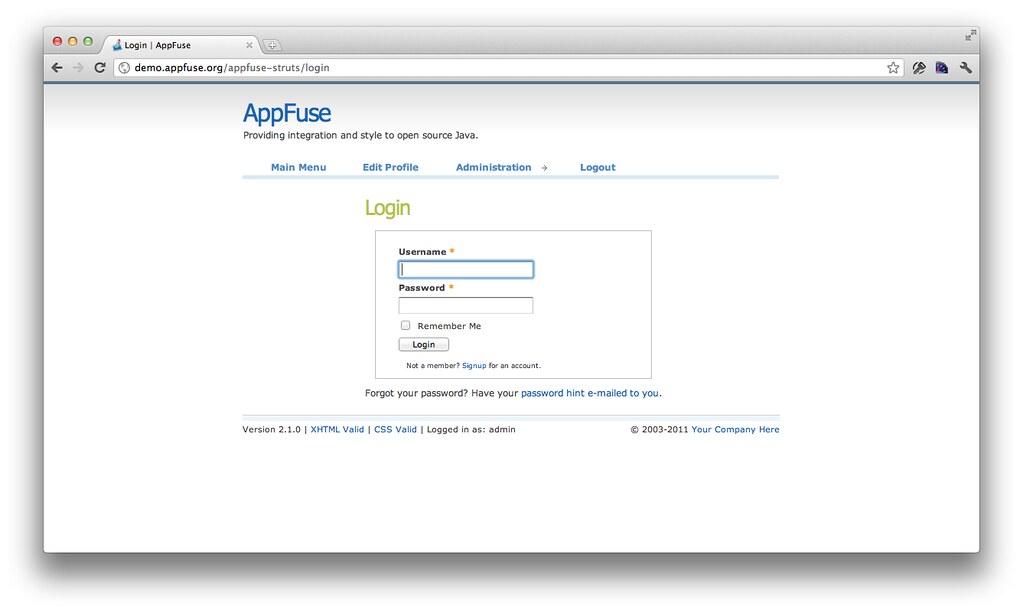
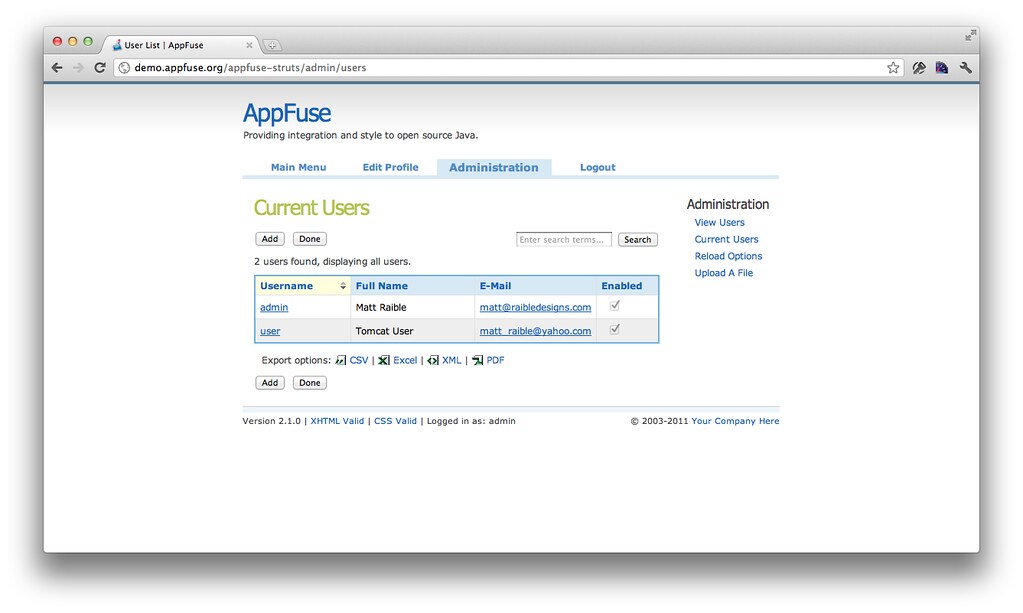
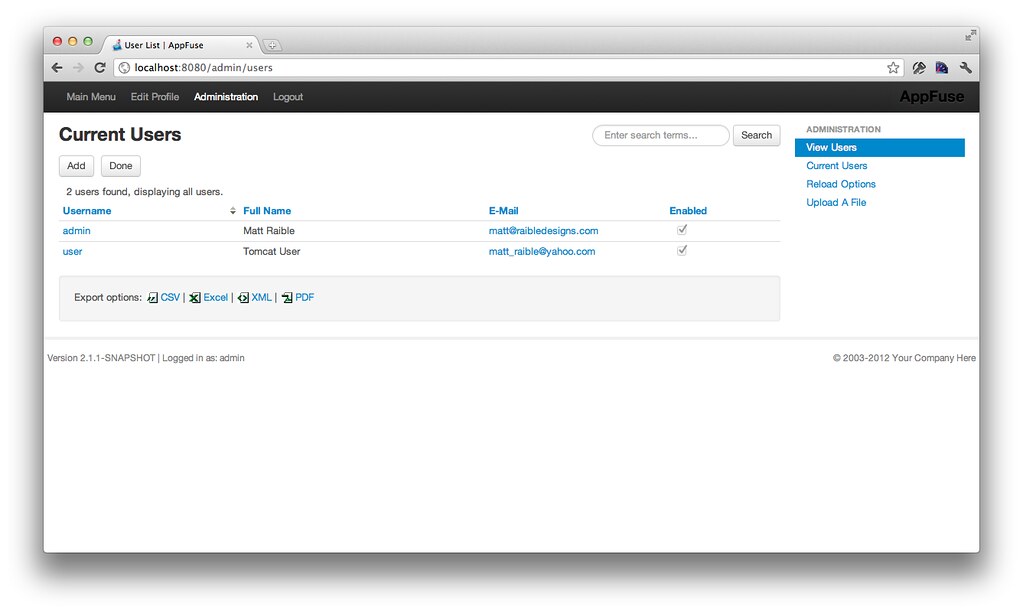
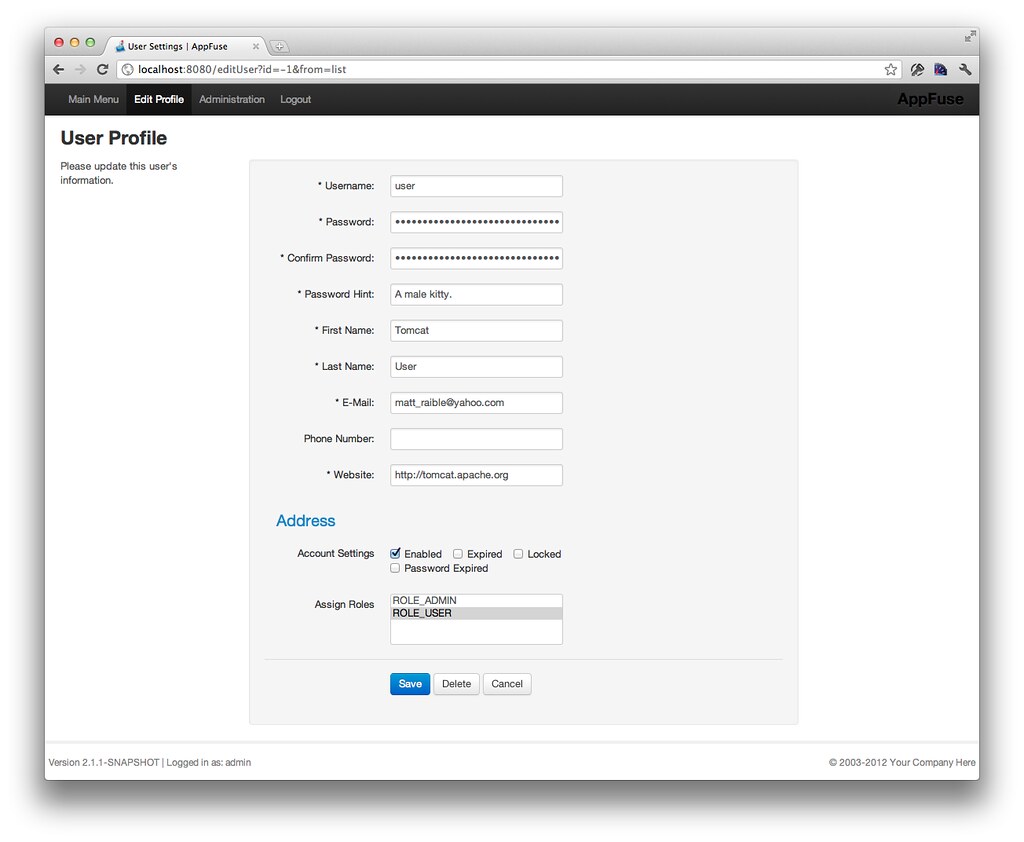
Old UI - Login Old UI - Users Old UI - Edit Profile

New UI - Login New UI - Users New UI - Edit Profile

Check out the full set on Flickr if you'd like a closer look.

Even though I like the look of the old UI, I can't help but think a lot of the themes are designed for blogs and content sites, not webapps. The old Wufoo forms were a lot better looking though. And if you're going to develop kick-ass webapps, you need to make them look good. Bootstrap goes a long way in doing this, but it certainly doesn't replace a good UX Designer. Bootstap simply helps you get into HTML5-land, start using CSS3 and it takes the pain out of making things work cross-browser. Its fluid layouts and responsive web design seems to work great for business applications, which I'm guessing AppFuse is used for the most.

I can't thank the Bootstrap developers enough for helping me make this all look good. With Bootstrap 2 dropping this week, I can see myself using this more and more on projects. In the near future, I'll be helping integrate Bootstrap into AppFuse's Tapestry 5 and JSF versions.

What do you think of this CSS change? Do you change your CSS and layout a fair bit when starting with AppFuse archetypes? What can we do to make AppFuse apps look better out-of-the-box?

Update: I updated AppFuse to the final Bootstrap 2.0 release. Also, Johannes Geppert wrote a Struts 2 Bootstrap Plugin. I hope to integrate this into AppFuse in the near future.

Posted in Java at Jan 31 2012, 05:12:17 PM MST 10 Comments

Upgrading AppFuse to Spring Security 3.1 and Spring 3.1

Before the holiday break, I spent some time upgrading AppFuse to use the latest releases of Spring and Spring Security. I started with Spring Security in early December and quickly discovered its 3.1 XSD required some changes. After changing to the 3.1 XSD in my security.xml, I had to change its <http> element to use security="none" instead of filters="none". With Spring Security 3.0.5, I had:

<http auto-config="true" lowercase-comparisons="false">
    <intercept-url pattern="/images/**" filters="none"/>
    <intercept-url pattern="/styles/**" filters="none"/>
    <intercept-url pattern="/scripts/**" filters="none"/>
After upgrading to 3.1, I had to change this to:
<http pattern="/images/**" security="none"/>
<http pattern="/styles/**" security="none"/>
<http pattern="/scripts/**" security="none"/>

<http auto-config="true">

The next thing I had to change was UserSecurityAdvice.java. Instead of using Collection<GrantedAuthority> for Authentication's getAuthority() method, I had to change it to use Collection<? extends GrantedAuthority>.

Authentication auth = ctx.getAuthentication();
Collection<? extends GrantedAuthority> roles = auth.getAuthorities();

Lastly, I discovered that SPRING_SECURITY_CONTEXT_KEY moved to HttpSessionSecurityContextRepository. Click here to see the changelog for this upgrade in AppFuse's FishEye.

You can read more about what's new in Spring Security 3.1 on InfoQ. I'm especially pumped to see http-only cookie support for Servlet 3.0. I discovered Spring Security didn't support this when Pen-Testing with Zed Attack Proxy.

Upgrading to Spring Framework 3.1
Compared to the Spring Security upgrade, upgrading to Spring 3.1 was a breeze. The first thing I discovered after changing my pom.xml's version was that Spring Security required some additional exclusions in order to get the latest Spring versions. Of course, this was communicated to me through the following cryptic error.

-------------------------------------------------------------------------------
Test set: org.appfuse.dao.LookupDaoTest
-------------------------------------------------------------------------------
Tests run: 1, Failures: 0, Errors: 1, Skipped: 0, Time elapsed: 0.004 sec <<< FAILURE!
testGetRoles(org.appfuse.dao.LookupDaoTest)  Time elapsed: 0.001 sec  <<< ERROR!
java.lang.NoSuchMethodError: org.springframework.context.support.GenericApplicationContext.getEnvironment()Lorg/springframework/core/env/ConfigurableEnvironment;
	at org.springframework.test.context.support.AbstractGenericContextLoader.loadContext(AbstractGenericContextLoader.java:97)
	at org.springframework.test.context.support.AbstractGenericContextLoader.loadContext(AbstractGenericContextLoader.java:1)
	at org.springframework.test.context.support.DelegatingSmartContextLoader.loadContext(DelegatingSmartContextLoader.java:228)
	at org.springframework.test.context.TestContext.loadApplicationContext(TestContext.java:124)
	at org.springframework.test.context.TestContext.getApplicationContext(TestContext.java:148)
	at org.springframework.test.context.support.DependencyInjectionTestExecutionListener.injectDependencies(DependencyInjectionTestExecutionListener.java:109)

Without these additional exclusions, Spring Security pulled in Spring 3.0.6. I had to exclude spring-expression, spring-context and spring-web from spring-security-taglibs to get the 3.1.0.RELEASE version of Spring.

<dependency>
    <groupId>org.springframework.security</groupId>
    <artifactId>spring-security-taglibs</artifactId>
    <version>${spring.security.version}</version>
    <exclusions>
        <exclusion>
            <groupId>org.springframework</groupId>
            <artifactId>spring-expression</artifactId>
        </exclusion>
        <exclusion>
            <groupId>org.springframework</groupId>
            <artifactId>spring-context</artifactId>
        </exclusion>
        <exclusion>
            <groupId>org.springframework</groupId>
            <artifactId>spring-web</artifactId>
        </exclusion>
    </exclusions>
</dependency>

I also had to exclude spring-context from spring-security-config and spring-context and spring-expression from spring-security-core. Isn't Maven wonderful?

<dependency>
    <groupId>org.springframework.security</groupId>
    <artifactId>spring-security-core</artifactId>
    <version>${spring.security.version}</version>
    <exclusions>
        <exclusion>
            <groupId>org.springframework</groupId>
            <artifactId>spring-expression</artifactId>
        </exclusion>
        <exclusion>
            <groupId>org.springframework</groupId>
            <artifactId>spring-context</artifactId>
        </exclusion>
    </exclusions>
</dependency>
<dependency>
    <groupId>org.springframework.security</groupId>
    <artifactId>spring-security-config</artifactId>
    <version>${spring.security.version}</version>
    <exclusions>
        <exclusion>
            <groupId>org.springframework</groupId>
            <artifactId>spring-context</artifactId>
        </exclusion>
    </exclusions>
</dependency>

After making these changes, I got a bit further, but ended up being blocked by a bug in Tapestry 5's Spring support. Basically, after upgrading to Spring 3.1, I started seeing the following error:

java.lang.RuntimeException: Service id 'environment' has already been defined by 
org.apache.tapestry5.services.TapestryModule.buildEnvironment(PerthreadManager) 

Luckily, I was able to easily fix this with advice I found on Tapestry's mailing list. Unfortunately, even though I submitted a fix on December 15th, it didn't make it into Tapestry's 5.3.1 release on December 21st. As soon as Tapestry 5.3.2 is released, I hope to get the AppFuse's build passing again (it's currently failing).

I hope this article helps you upgrade your AppFuse-started applications to the latest versions of Spring and Spring Security. Over the next few weeks, I'll be exploring many of Spring 3.1's new features and implementing them as I see fit. Right now, I'm thinking environments/profiles, Servlet 3 / Java 7 support and Hibernate 4 support. These seem to be the best new features to learn about for my talk in a few weeks.

Posted in Java at Jan 05 2012, 08:58:21 AM MST 7 Comments

Integrating OAuth with AppFuse and its REST API

One of the new features in AppFuse 2.1 is an appfuse-ws archetype. This archetype leverages Enunciate and CXF to create a project with a REST API and generated HTML documentation. Enunciate is a very useful tool, allowing you to develop web services with JAX-RS and JAX-WS annotations and have all types of client libraries generated. For me, it seems very useful for developing the backend of SOFEA (a.k.a. modern) applications.

Back in March, Ryan Heaton published a nice article on Securing Web Services in an Enunciate application. I decided to take his tutorial a step further and not only secure my web services, but also to integrate with OAuth 2. In this tutorial, I'll show you how to create a new application with AppFuse WS, secure it, add OAuth support, and then use a client app to authenticate and retrieve data.

Create a New AppFuse WS Project
To begin, I visited the Create AppFuse Archetypes page and created a new application using the "Web Services Only" option in the Web Framework dropdown. Below is the command I used to create the "appfuse-oauth" project.

mvn archetype:generate -B -DarchetypeGroupId=org.appfuse.archetypes \
-DarchetypeArtifactId=appfuse-ws-archetype -DarchetypeVersion=2.1.0 \
-DgroupId=org.appfuse.example -DartifactId=appfuse-oauth 

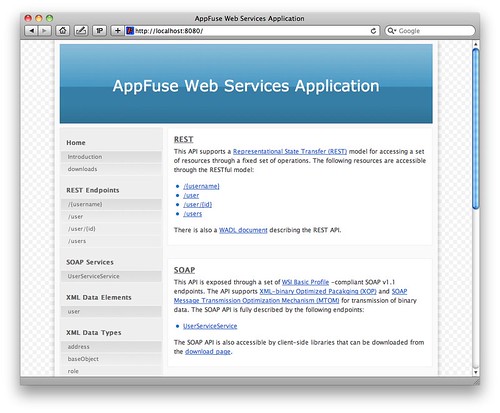
After doing this, I started the app using mvn jetty:run and confirmed it started OK. At this point, I was able to view the generated documentation for the application at http://localhost:8080. The screenshot below shows what the app looks like at this point.
AppFuse WS Homepage

NOTE: You might notice the REST endpoint of /{username}. This is a bug in AppFuse 2.1.0 and has been fixed in SVN. It does not affect this tutorial.

Integrate Spring Security and OAuth
I originally tried to integrate Spring Security with Enunciate's Securing Web Services Tutorial. However, it only secures endpoints and doesn't do enough filtering for OAuth support, so I ended up using a custom web.xml. I put this file in src/main/resources and loaded it in my enunciate.xml file. I also upgraded Spring Security and imported my security.xml file.

  <?xml version="1.0"?>
  <enunciate xmlns:xsi="http://www.w3.org/2001/XMLSchema-instance"
             xsi:noNamespaceSchemaLocation="http://enunciate.codehaus.org/schemas/enunciate-1.22.xsd">
      ...
      <webapp mergeWebXML="src/main/resources/web.xml"/>
      <modules>
      ...
          <spring-app disabled="false" springVersion="3.0.5.RELEASE">
              <springImport uri="classpath:/applicationContext-resources.xml"/>
              <springImport uri="classpath:/applicationContext-dao.xml"/>
              <springImport uri="classpath:/applicationContext-service.xml"/>
              <springImport uri="classpath:/applicationContext.xml"/>
              <springImport uri="classpath:/security.xml"/>
          </spring-app>
      </modules>
  </enunciate>

Then I created src/main/resources/web.xml with a filter for Spring Security and a DispatcherServlet for OAuth support.

<?xml version="1.0" encoding="UTF-8"?>
<web-app xmlns="http://java.sun.com/xml/ns/javaee"
         xmlns:xsi="http://www.w3.org/2001/XMLSchema-instance"
         xsi:schemaLocation="http://java.sun.com/xml/ns/javaee http://java.sun.com/xml/ns/javaee/web-app_3_0.xsd"
         version="3.0">

    <filter>
        <filter-name>securityFilter</filter-name>
        <filter-class>org.springframework.web.filter.DelegatingFilterProxy</filter-class>
        <init-param>
            <param-name>targetBeanName</param-name>
            <param-value>springSecurityFilterChain</param-value>
        </init-param>
    </filter>

    <filter-mapping>
        <filter-name>securityFilter</filter-name>
        <url-pattern>/*</url-pattern>
    </filter-mapping>

    <servlet>
        <servlet-name>appfuse-oauth</servlet-name>
        <servlet-class>org.springframework.web.servlet.DispatcherServlet</servlet-class>
        <load-on-startup>1</load-on-startup>
    </servlet>

    <servlet-mapping>
        <servlet-name>appfuse-oauth</servlet-name>
        <url-pattern>/oauth/*</url-pattern>
    </servlet-mapping>
</web-app>

Next, I created a src/main/resources/security.xml and used it to secure my API, specify a login page, supply the users and integrate OAuth (see the last 4 beans below).

<?xml version="1.0" encoding="UTF-8"?>
<beans:beans xmlns="http://www.springframework.org/schema/security"
             xmlns:xsi="http://www.w3.org/2001/XMLSchema-instance"
             xmlns:beans="http://www.springframework.org/schema/beans"
             xmlns:oauth="http://www.springframework.org/schema/security/oauth2"
             xsi:schemaLocation="http://www.springframework.org/schema/beans http://www.springframework.org/schema/beans/spring-beans.xsd
                           http://www.springframework.org/schema/security http://www.springframework.org/schema/security/spring-security.xsd
                           http://www.springframework.org/schema/security/oauth2 http://www.springframework.org/schema/security/spring-security-oauth2.xsd">

    <http auto-config="true">
        <intercept-url pattern="/api/**" access="ROLE_USER"/>
        <intercept-url pattern="/oauth/**" access="ROLE_USER"/>
        <intercept-url pattern="/**" access="IS_AUTHENTICATED_ANONYMOUSLY"/>
        <form-login login-page="/login.jsp" authentication-failure-url="/login.jsp?error=true"
                    login-processing-url="/j_security_check"/>
    </http>

    <authentication-manager>
        <authentication-provider>
            <user-service>
                <user name="admin" password="admin" authorities="ROLE_USER,ROLE_ADMIN"/>
                <user name="user" password="user" authorities="ROLE_USER"/>
            </user-service>
        </authentication-provider>
    </authentication-manager>

    <!--hook up the spring security filter chain-->
    <beans:alias name="springSecurityFilterChain" alias="securityFilter"/>

    <beans:bean id="tokenServices"
                class="org.springframework.security.oauth2.provider.token.InMemoryOAuth2ProviderTokenServices">
        <beans:property name="supportRefreshToken" value="true"/>
    </beans:bean>

    <oauth:provider client-details-service-ref="clientDetails" token-services-ref="tokenServices">
        <oauth:verification-code user-approval-page="/oauth/confirm_access"/>
    </oauth:provider>

    <oauth:client-details-service id="clientDetails">
        <!--<oauth:client clientId="my-trusted-client" authorizedGrantTypes="password,authorization_code,refresh_token"/>
        <oauth:client clientId="my-trusted-client-with-secret"
                      authorizedGrantTypes="password,authorization_code,refresh_token" secret="somesecret"/>
        <oauth:client clientId="my-less-trusted-client" authorizedGrantTypes="authorization_code"/>-->
        <oauth:client clientId="ajax-login" authorizedGrantTypes="authorization_code"/>
    </oauth:client-details-service>
</beans:beans>

I used the OAuth for Spring Security sample apps to figure this out. In this example, I used authorizedGrantTypes="authorization_code", but you can see from the commented <oauth:client> elements above that there's a few different options. You should also note that the clientId is hard-coded to "ajax-login", signifying I only want to allow a single application to authenticate.

At this point, I'd like to give a shoutout to Ryan Heaton for creating both Enunciate and Spring Security's OAuth support. Nice work Ryan!

At this point, I needed to do a number of additional tasks to finish integrating oauth. The first was to modify the Jetty Plugin's configuration to 1) run on port 9000, 2) load my custom files and 3) allow jetty:run to recognize Enunciate's generated files. Below is the final configuration in my pom.xml.

<plugin>
    <groupId>org.mortbay.jetty</groupId>
    <artifactId>maven-jetty-plugin</artifactId>
    <version>6.1.26</version>
    <configuration>
        <connectors>
            <connector implementation="org.mortbay.jetty.nio.SelectChannelConnector">
                <port>9000</port>
                <maxIdleTime>60000</maxIdleTime>
            </connector>
        </connectors>
        <webAppConfig>
            <baseResource implementation="org.mortbay.resource.ResourceCollection">
                <resourcesAsCSV>
                    ${basedir}/src/main/webapp,
                    ${project.build.directory}/${project.build.finalName}
                </resourcesAsCSV>
            </baseResource>
            <contextPath>/appfuse-oauth</contextPath>
        </webAppConfig>
        <webXml>${project.build.directory}/${project.build.finalName}/WEB-INF/web.xml</webXml>
    </configuration>
</plugin>

Next, I added the necessary OAuth dependencies for Spring Security to my pom.xml. Since the latest release is a milestone release, I had to add Spring's milestone repo too.

<repository>
    <id>spring-milestone</id>
    <url>http://s3.amazonaws.com/maven.springframework.org/milestone</url>
</repository>
...
<dependency>
    <groupId>org.springframework.security</groupId>
    <artifactId>spring-security-taglibs</artifactId>
    <version>${spring.version}</version>
    <exclusions>
        <exclusion>
            <groupId>org.springframework</groupId>
            <artifactId>spring-web</artifactId>
        </exclusion>
        <exclusion>
            <groupId>org.springframework</groupId>
            <artifactId>spring-support</artifactId>
        </exclusion>
    </exclusions>
</dependency>
<dependency>
    <groupId>org.springframework.security.oauth</groupId>
    <artifactId>spring-security-oauth</artifactId>
    <version>1.0.0.M3</version>
    <exclusions>
        <exclusion>
            <groupId>org.springframework</groupId>
            <artifactId>spring-beans</artifactId>
        </exclusion>
        <exclusion>
            <groupId>org.springframework</groupId>
            <artifactId>spring-context</artifactId>
        </exclusion>
        <exclusion>
            <groupId>org.springframework</groupId>
            <artifactId>spring-core</artifactId>
        </exclusion>
    </exclusions>
</dependency>
<dependency>
    <groupId>org.springframework</groupId>
    <artifactId>spring-webmvc</artifactId>
    <version>${spring.version}</version>
</dependency>
<dependency>
    <groupId>javax.servlet</groupId>
    <artifactId>servlet-api</artifactId>
    <version>2.5</version>
    <scope>provided</scope>
</dependency>
<dependency>
    <groupId>javax.servlet</groupId>
    <artifactId>jstl</artifactId>
    <version>1.1.2</version>
</dependency>
<dependency>
    <groupId>taglibs</groupId>
    <artifactId>standard</artifactId>
    <version>1.1.2</version>
</dependency>

Since I named my DispatcherServlet "appfuse-oauth" in web.xml, I created a src/main/webapp/WEB-INF/appfuse-oauth-servlet.xml to configure Spring MVC. I had to create the src/main/webapp/WEB-INF directory.

<?xml version="1.0" encoding="UTF-8"?>
<beans xmlns="http://www.springframework.org/schema/beans"
       xmlns:xsi="http://www.w3.org/2001/XMLSchema-instance"
       xmlns:context="http://www.springframework.org/schema/context"
       xmlns:mvc="http://www.springframework.org/schema/mvc"
       xsi:schemaLocation="http://www.springframework.org/schema/beans http://www.springframework.org/schema/beans/spring-beans-3.0.xsd
                http://www.springframework.org/schema/context http://www.springframework.org/schema/context/spring-context-3.0.xsd
                http://www.springframework.org/schema/mvc http://www.springframework.org/schema/mvc/spring-mvc-3.0.xsd">

    <!-- Scans the classpath of this application for @Components to deploy as beans -->
    <context:component-scan base-package="org.appfuse.examples.webapp"/>

    <!-- Configures the @Controller programming model -->
    <mvc:annotation-driven/>

    <!-- Resolves view names to protected .jsp resources within the /WEB-INF/views directory -->
    <bean class="org.springframework.web.servlet.view.InternalResourceViewResolver">
        <property name="viewClass" value="org.springframework.web.servlet.view.JstlView"/>
        <property name="prefix" value="/"/>
        <property name="suffix" value=".jsp"/>
    </bean>
</beans>

In order to show the OAuth confirmation page, I needed to create src/main/java/org/appfuse/examples/webapp/AccessConfirmationController.java and map it to /oauth/confirm_access. I copied this from one of the sample projects and modified to use Spring's annotations.

package org.appfuse.examples.webapp;

import org.springframework.beans.factory.annotation.Autowired;
import org.springframework.security.oauth2.provider.ClientAuthenticationToken;
import org.springframework.security.oauth2.provider.ClientDetails;
import org.springframework.security.oauth2.provider.ClientDetailsService;
import org.springframework.security.oauth2.provider.verification.ClientAuthenticationCache;
import org.springframework.security.oauth2.provider.verification.DefaultClientAuthenticationCache;
import org.springframework.stereotype.Controller;
import org.springframework.web.bind.annotation.RequestMapping;
import org.springframework.web.bind.annotation.RequestMethod;
import org.springframework.web.servlet.ModelAndView;

import javax.servlet.http.HttpServletRequest;
import javax.servlet.http.HttpServletResponse;
import java.util.TreeMap;

/**
 * Controller for retrieving the model for and displaying the confirmation page
 * for access to a protected resource.
 *
 * @author Ryan Heaton
 */
@Controller
@RequestMapping("/confirm_access")
public class AccessConfirmationController {

    private ClientAuthenticationCache authenticationCache = new DefaultClientAuthenticationCache();
    @Autowired
    private ClientDetailsService clientDetailsService;

    @RequestMapping(method = RequestMethod.GET)
    protected ModelAndView confirm(HttpServletRequest request, HttpServletResponse response) throws Exception {
        ClientAuthenticationToken clientAuth = authenticationCache.getAuthentication(request, response);
        if (clientAuth == null) {
            throw new IllegalStateException("No client authentication request to authorize.");
        }

        TreeMap<String, Object> model = new TreeMap<String, Object>();
        ClientDetails client = clientDetailsService.loadClientByClientId(clientAuth.getClientId());
        model.put("auth_request", clientAuth);
        model.put("client", client);

        return new ModelAndView("access_confirmation", model);
    }
}

This controller delegates to src/main/webapp/access_confirmation.jsp. I created this file and filled it with code to display Accept and Deny buttons.

<%@ page import="org.springframework.security.core.AuthenticationException" %>
<%@ page import="org.springframework.security.oauth2.common.exceptions.UnapprovedClientAuthenticationException" %>
<%@ page import="org.springframework.security.oauth2.provider.verification.BasicUserApprovalFilter" %>
<%@ page import="org.springframework.security.oauth2.provider.verification.VerificationCodeFilter" %>
<%@ page import="org.springframework.security.web.WebAttributes" %>
<%@ taglib prefix="authz" uri="http://www.springframework.org/security/tags" %>
<%@ taglib uri="http://java.sun.com/jsp/jstl/core" prefix="c" %>
<html>
<head>
    <title>Confirm Access</title>
    <link rel="stylesheet" type="text/css" media="all"
          href="http://demo.appfuse.org/appfuse-struts/styles/simplicity/theme.css"/>
    <style type="text/css">
        h1 {
            margin-left: -300px;
            margin-top: 50px
        }
    </style>
</head>

<body>

<h1>Confirm Access</h1>

<div id="content">

    <% if (session.getAttribute(WebAttributes.AUTHENTICATION_EXCEPTION) != null && 
                 !(session.getAttribute(WebAttributes.AUTHENTICATION_EXCEPTION) instanceof UnapprovedClientAuthenticationException)) { %>
    <div class="error">
        <h2>Woops!</h2>

        <p>Access could not be granted.
            (<%= ((AuthenticationException) session.getAttribute(WebAttributes.AUTHENTICATION_EXCEPTION)).getMessage() %>)</p>
    </div>
    <% } %>
    <c:remove scope="session" var="SPRING_SECURITY_LAST_EXCEPTION"/>

    <authz:authorize ifAnyGranted="ROLE_USER,ROLE_ADMIN">
        <h2>Please Confirm</h2>

        <p>You hereby authorize "<c:out value="${client.clientId}" escapeXml="true"/>" to access your protected resources.</p>

        <form id="confirmationForm" name="confirmationForm"
              action="<%=request.getContextPath() + VerificationCodeFilter.DEFAULT_PROCESSING_URL%>" method="POST">
            <input name="<%=BasicUserApprovalFilter.DEFAULT_APPROVAL_REQUEST_PARAMETER%>"
                   value="<%=BasicUserApprovalFilter.DEFAULT_APPROVAL_PARAMETER_VALUE%>" type="hidden"/>
            <label><input name="authorize" value="Authorize" type="submit"></label>
        </form>
        <form id="denialForm" name="denialForm"
              action="<%=request.getContextPath() + VerificationCodeFilter.DEFAULT_PROCESSING_URL%>" method="POST">
            <input name="<%=BasicUserApprovalFilter.DEFAULT_APPROVAL_REQUEST_PARAMETER%>"
                   value="not_<%=BasicUserApprovalFilter.DEFAULT_APPROVAL_PARAMETER_VALUE%>" type="hidden"/>
            <label><input name="deny" value="Deny" type="submit"></label>
        </form>
    </authz:authorize>
</div>
</body>
</html>

Finally, I needed to create src/main/webapp/login.jsp to allow users to login.

<%@ page language="java" pageEncoding="UTF-8" contentType="text/html;charset=utf-8" %>
<%@ taglib uri="http://java.sun.com/jsp/jstl/core" prefix="c" %>
<%@ taglib uri="http://java.sun.com/jsp/jstl/fmt" prefix="fmt" %>
<%@ taglib uri="http://java.sun.com/jsp/jstl/core" prefix="c" %>

<html>
<head>
    <title>Login</title>
    <link rel="stylesheet" type="text/css" media="all"
          href="http://demo.appfuse.org/appfuse-struts/styles/simplicity/theme.css"/>
    <style type="text/css">
        h1 {
            margin-left: -300px;
            margin-top: 50px
        }
    </style>
</head>
<body>
<h1>Login</h1>

<form method="post" id="loginForm" action="<c:url value='/j_security_check'/>">
    <fieldset style="padding-bottom: 0">
        <ul>
            <c:if test="${param.error != null}">
                <li class="error">
                    ${sessionScope.SPRING_SECURITY_LAST_EXCEPTION.message}
                </li>
            </c:if>
            <li>
                <label for="j_username" class="required desc">
                    Username <span class="req">*</span>
                </label>
                <input type="text" class="text medium" name="j_username"
                       id="j_username" tabindex="1"/>
            </li>

            <li>
                <label for="j_password" class="required desc">
                    Password <span class="req">*</span>
                </label>
                <input type="password" class="text medium" name="j_password"
                       id="j_password" tabindex="2"/>
            </li>
            <li>
                <input type="submit" class="button" name="login" value="Login"
                       tabindex="3"/>
            </li>
        </ul>
    </fieldset>
</form>
</body>
</html>

All the changes described in the above section are necessary to implement OAuth if you create a project with AppFuse WS 2.1. It may seem like a lot of code, but I was able to copy/paste and get it all working in an app in under 5 minutes. Hopefully you can do the same. I'm also considering adding it by default to the next version of AppFuse. Now let's look at integrating OAuth into a client to authenticate and retrieve data from this application.

Authenticate and Retrieve Data with Client
I originally thought my GWT OAuth application would provide a nice client. However, after 30 minutes of trying to get GWT 1.7.1 and the GWT Maven plugin (1.1) working with my 64-bit Java 6 JDK on OS X, I gave up. So I opted to use the Ajax Login application I've been using in my recent security tutorials.

In this example, I used OAuth2RestTemplate from Spring Security OAuth. While this works, and works well, I'd still like to get things working with GWT (or jQuery) to demonstrate how to do it from a pure client-side perspective.

To begin, I got the latest source of Ajax Login from GitHub (as of this morning) and made some changes. First of all, I added the Spring Security OAuth dependencies to pom.xml:

<repository>
    <id>spring-milestone</id>
    <url>http://s3.amazonaws.com/maven.springframework.org/milestone</url>
</repository>
...
<dependency>
    <groupId>org.springframework.security.oauth</groupId>
    <artifactId>spring-security-oauth</artifactId>
    <version>1.0.0.M3</version>
    <exclusions>
        <exclusion>
            <groupId>org.springframework</groupId>
            <artifactId>spring-beans</artifactId>
        </exclusion>
        <exclusion>
            <groupId>org.springframework</groupId>
            <artifactId>spring-context</artifactId>
        </exclusion>
        <exclusion>
            <groupId>org.springframework</groupId>
            <artifactId>spring-core</artifactId>
        </exclusion>
    </exclusions>
</dependency>

Then I modified src/main/webapp/WEB-INF/security.xml and added an OAuth Token Service and defined the location of the OAuth server.

<?xml version="1.0" encoding="UTF-8"?>
<beans:beans xmlns="http://www.springframework.org/schema/security"
             xmlns:xsi="http://www.w3.org/2001/XMLSchema-instance"
             xmlns:beans="http://www.springframework.org/schema/beans"
             xmlns:oauth="http://www.springframework.org/schema/security/oauth2"
             xsi:schemaLocation="http://www.springframework.org/schema/beans http://www.springframework.org/schema/beans/spring-beans-3.0.xsd
              http://www.springframework.org/schema/security http://www.springframework.org/schema/security/spring-security-3.0.xsd
              http://www.springframework.org/schema/security/oauth2 http://www.springframework.org/schema/security/spring-security-oauth2.xsd">

...
    <oauth:client token-services-ref="oauth2TokenServices"/>

    <beans:bean id="oauth2TokenServices"
                class="org.springframework.security.oauth2.consumer.token.InMemoryOAuth2ClientTokenServices"/>

    <oauth:resource id="appfuse" type="authorization_code" clientId="ajax-login"
                    accessTokenUri="http://localhost:9000/appfuse-oauth/oauth/authorize"
                    userAuthorizationUri="http://localhost:9000/appfuse-oauth/oauth/user/authorize"/>

Next, I created a Controller that uses OAuth2RestTemplate to make the request and get the data from the AppFuse OAuth application's API. I created src/main/java/org/appfuse/examples/webapp/oauth/UsersApiController.java and filled it with the following code:

package org.appfuse.examples.webapp.oauth;

import org.appfuse.model.User;
import org.springframework.beans.factory.annotation.Autowired;
import org.springframework.beans.factory.annotation.Qualifier;
import org.springframework.security.core.context.SecurityContextHolder;
import org.springframework.security.oauth2.common.exceptions.InvalidTokenException;
import org.springframework.security.oauth2.consumer.*;
import org.springframework.security.oauth2.consumer.token.OAuth2ClientTokenServices;
import org.springframework.stereotype.Controller;
import org.springframework.web.bind.annotation.RequestMapping;
import org.springframework.web.bind.annotation.RequestMethod;
import org.springframework.web.bind.annotation.ResponseBody;

import java.util.ArrayList;
import java.util.List;

@RequestMapping("/appfuse/users")
@Controller
public class UsersApiController {

    private OAuth2RestTemplate apiRestTemplate;
    @Autowired
    private OAuth2ClientTokenServices tokenServices;

    private static final String REMOTE_DATA_URL = "http://localhost:9000/appfuse-oauth/api/users";

    @Autowired
    public UsersApiController(OAuth2ProtectedResourceDetails resourceDetails) {
        this.apiRestTemplate = new OAuth2RestTemplate(resourceDetails);
    }

    @RequestMapping(method = RequestMethod.GET)
    @ResponseBody
    public List<User> getUsers() {
        try {
            List users = apiRestTemplate.getForObject(REMOTE_DATA_URL, List.class);
            return new ArrayList<User>(users);
        } catch (InvalidTokenException badToken) {
            //we've got a bad token, probably because it's expired.
            OAuth2ProtectedResourceDetails resource = apiRestTemplate.getResource();
            OAuth2SecurityContext context = OAuth2SecurityContextHolder.getContext();
            if (context != null) {
                // this one is kind of a hack for this application
                // the problem is that the sparklr photos page doesn't remove the 'code=' request parameter.
                ((OAuth2SecurityContextImpl) context).setVerificationCode(null);
            }
            //clear any stored access tokens...
            tokenServices.removeToken(SecurityContextHolder.getContext().getAuthentication(), resource);
            //go get a new access token...
            throw new OAuth2AccessTokenRequiredException(resource);
        }
    }
}

At this point, I thought everything would work and I spent quite some time banging my head against the wall when it didn't. As I was composing an email to the Enunciate users mailing list, I realized the issue. It appeared to be working, but from the server side, and the redirect back to the client was not happening. The Ajax Login app uses UrlRewriteFilter (for pretty URLs) to redirect from /app/* to /$1 and this redirect was losing the code parameter in the URL.

<rule>
    <from>/app/**</from>
    <to last="true" type="redirect">%{context-path}/$1</to>
</rule>

To fix this, I added use-query-string="true" to the root element in src/main/webapp/WEB-INF/urlrewrite.xml:

<urlrewrite default-match-type="wildcard" use-query-string="true">

After making all these changes, I ran mvn jetty:run on both apps and opened http://localhost:8080/appfuse/users in my browser. It all worked and a smile crept across my face. I've checked in the client changes into ajax-login on GitHub and the appfuse-oauth example into AppFuse Demos on Google Code. If you'd like to see this example in action, I'd encourage you to checkout both projects and let me know if you find any issues.


Posted in Java at Jul 05 2011, 10:56:48 AM MDT 4 Comments